Share via

How do I add weights to tasks on MS project?

Anonymous
2022-06-02T17:17:36+00:00

Hi, I need help with adding weights to tasks on the MS project.

For example, let's say I have a milestone that contains 9 tasks. However, only 3 of them are really critical and comprise 90% of the project. Yet, if the other 6 tasks are completed, MS project will show that most of that milestone is achieved. That is not correct. How can I add weights/show importance on tasks to get a more accurate estimation of a milestone's completion?

Please do not recommend the duration feature... As even trivial tasks may take long to complete.

Thank you!

Microsoft 365 and Office | Project | For business | Windows

Locked Question. This question was migrated from the Microsoft Support Community. You can vote on whether it's helpful, but you can't add comments or replies or follow the question.

0 comments No comments

7 answers

Sort by: Most helpful
  1. Anonymous
    2022-06-03T17:02:12+00:00

    John,

    Thank you so much for your response, but it still doesn't help me with what I want to do...

    However, perhaps you can help me with something else... I need to apply a formula to all subtasks that fall under one summary task. Here's an example.

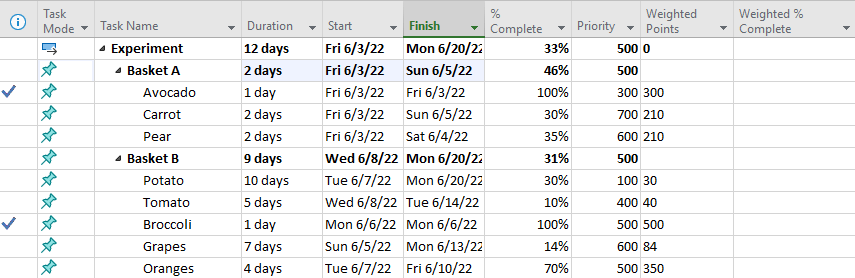
    Let's say I have a basket A and a basket B with different kinds of vegetables and fruits. My goal is to track the amount of time (measured in days) it takes for these fruits and vegetables to rot if left on the counter.*the duration is picked randomly, as an example. It's not supposed to reflect reality...

    Then I have a start date, finish date, and the % complete columns as provided by the MS project. The priority column, in this case, serves as the previously mentioned "importance factor". It shows how much I care about the spoiling of a specific vegetable and fruit. Let's say I really care about seeing how long it takes for the carrot, pear, and grapes to rot. Once those items rot, my experiment will be finished. Hence, they have the highest priority level. (700, 600, 600). I then took that priority level and multiplied it by the % completed and divided by 100, which is reflected in the column called "weighted points". The "weighted points" column depicts the relative importance of an item to the overall project completion.

    I would like the "weighted % complete" column to show the % complete in relation to the task's priority level. I would like the column to use this formula:

    [sum of weighted points under a specific summary line] divided by [sum of the priority under a specific summary line] times 100

    For example, for the Basket A, this formula would look like this:

    ((300 + 210 + 210)/1600) * 100 = 45%

    Therefore, the experiment is 45% complete (not 46% complete) with respect to Basket A.

    For Basket B, the formula would look like this:

    ((30 + 40 + 500 + 84 + 350) 2100)*100 = 32%

    Therefore, the experiment is 32% complete with respect to Basket B.

    As you can see, the duration here has nothing to do with the importance of the task, hence % complete does not show an accurate completion of the project. Potato takes 10 days to rot but its importance level is only 100.

    So, my question is: How can I insert a formula in the column "weighted % complete" that sums up all 'child tasks' under a summary line? I would like the MS Project to recognize that carrot is part of Basket A, not Basket B when doing the calculation.
    Was this answer helpful?

    10 people found this answer helpful.
    0 comments No comments
  2. Anonymous
    2022-06-02T19:02:07+00:00

    John,

    Your intuition is correct. I have a line like so:

    Major Task (Or what I call a "milestone". But I see how this term can be confusing.)

    1. Subtask1
    2. Subtask 2
    3. Subtask 3
    4. Etc...

    And yes, that's correct. But how do I indicate this importance factor in a way that MS Project understands it? I MS project to take that importance factor into account when showing % completion.

    Thank you!

    Was this answer helpful?

    3 people found this answer helpful.
    0 comments No comments
  3. Anonymous
    2022-06-02T18:47:05+00:00

    Muhammad,

    Thank you for your response. However, that still doesn't answer my question.

    Let's say I am making a device. To make a device, my tasks will consist of:

    1. Hardware tasks
    2. Software tasks
    3. Packaging tasks
    4. Testing tasks
    5. Sales and marketing tasks

    Obviously, not all of these tasks weigh equally. Even though packaging tasks may have a long duration, they are not as vital as hardware and software tasks. Without hardware and software, there would be no device, rendering packaging, testing, and sales tasks futile.

    How do I indicate this hierarchy on the MS project and make sure that the % complete takes into account the task's importance?

    Thank you!

    Was this answer helpful?

    3 people found this answer helpful.
    0 comments No comments
  4. John Project 49,705 Reputation points Volunteer Moderator
    2022-06-02T18:54:52+00:00

    Crystalightttt,

    The first sentence of your second paragraph leads me to believe you are referring to a summary line with 9 subtasks and calling it a milestone. Is that what you really have, or do you simply have 9 tasks that all must be completed in order to meet a milestone?

    Keep in mind, a milestone is a point in time. It has zero duration and is either not complete or complete, there is no partial complete for a milestone. If you want a separate metric to assign importance to the tasks leading up to a milestone, you can create a custom field (e.g. Number1) where you enter an "importance factor" and then roll this metric up to summary level but this factor will have no interaction with Project's scheduling calculation. Is that what you want?

    John

    Was this answer helpful?

    0 comments No comments
  5. Anonymous
    2022-06-02T18:16:49+00:00

    Dear Crystalightttt,

    First, my pleasure to assist you.

    As per your description, actually, by default the % completion of a task is calculated on the basis of duration of a task.

    However, here I found similar thread you may refer and see if it helps: Weight a task in MS project

    Your understanding and patience will be highly appreciated. I hope that you are keeping safe and well!

    Sincerely,

    Waqas Muhammad

    Was this answer helpful?

    0 comments No comments