Share via

PowerPoint "Design Ideas" Button Missing

Anonymous
2022-06-30T19:38:58+00:00

The "Design Ideas" button has been missing for me since today. It shows up on PowerPoint Web and it shows up on my Laptop, but it doesn't show up on my Desktop. All of them use the same account (subscription Microsoft 365 Apps for Enterprise) and I have Version 2206 (Build 15330.20196 Click-to-Run)

i tried all steps in the Troubleshoot design ideas in PowerPoint (microsoft.com) including uninstalling all office apps and reinstalling office and PowerPoint, but still the problem persists.

Any ideas?

Microsoft 365 and Office | PowerPoint | For business | Windows

Locked Question. This question was migrated from the Microsoft Support Community. You can vote on whether it's helpful, but you can't add comments or replies or follow the question.

0 comments No comments

24 answers

Sort by: Most helpful
  1. Anonymous
    2022-07-03T17:25:06+00:00

    Hi I have the same issue. The design ideas button is suddenly missing.

    Searching for "design ideas" yielded no results. I could add it to the ribbon as you suggested above, but the design ideas button is all grayed out and won't function.

    Image

    20+ people found this answer helpful.
    0 comments No comments
  2. Anonymous
    2022-07-04T18:44:14+00:00

    I too am missing "Design Ideas". I added it manually using the Custom Ribbons, but it appears greyed out and I cannot select it.

    20+ people found this answer helpful.
    0 comments No comments
  3. Anonymous
    2022-07-13T22:56:14+00:00

    I'm experiencing the same issue with the missing "design ideas" button. I'm signed into my Microsoft 365 Apps for enterprise subscription. I'm connected to the internet and have tried uninstalling and reinstalling my Office apps, as well as using the above suggested online repair tool through Programs in my Control Panel.

    My MS Surface is running the 2206 (build 15330-20230 click-to-run) version of the desktop app and the "design ideas" button is present and functioning. However, my desktop computer is running the 2206 (Build 15330.20246 Click-to-Run) version of the desktop app, and the "design ideas" button is missing.

    On my desktop computer...

    This is what the design tab looks like:

    In the customize ribbon section, this is what I see:
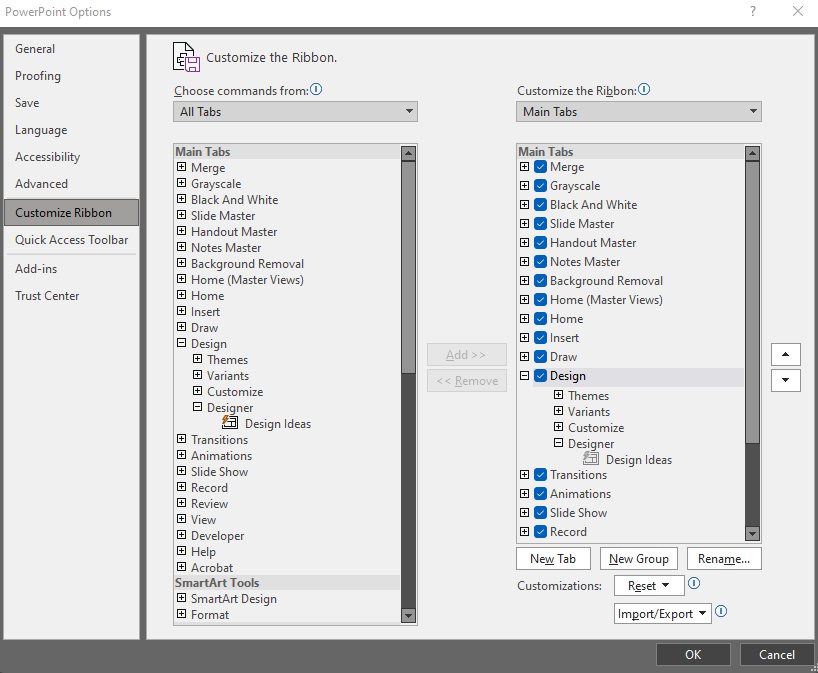
    In the General section of the Options area, there is no PowerPoint designer section for me to select "automatically show me design ideas"
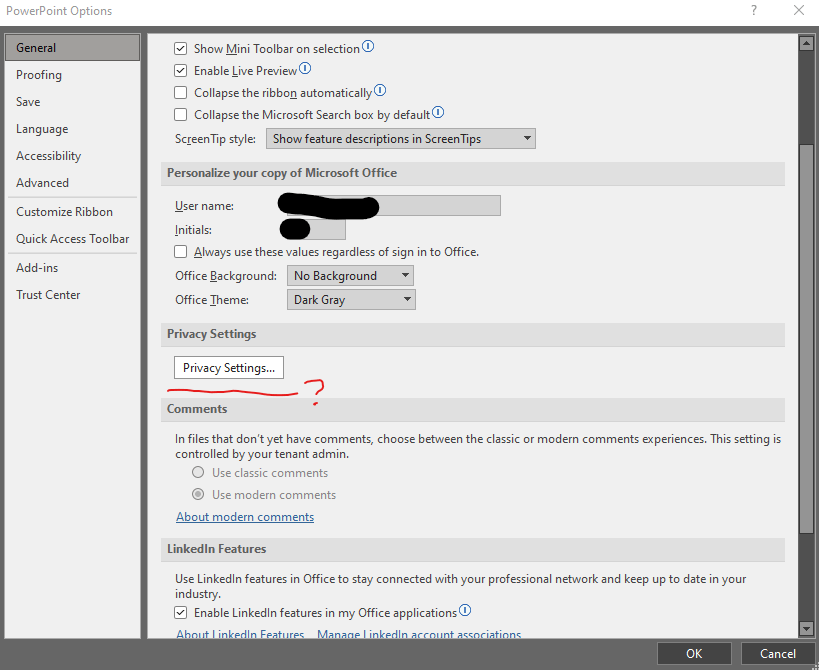
    I'm at a loss as to why I'm all of a sudden missing the "design ideas" feature. Please let me know what other actions I might take to fix this.

    9 people found this answer helpful.
    0 comments No comments
  4. Anonymous
    2022-09-23T11:31:36+00:00

    I have the same issue, on version 2208 (Build 15601.20148 Click-to-Run)

    The button does not appear, there is no longer an intelligent services choice under options, additionally, the "Design Ideas" option does NOT appear in the ribbon customization dialog, but I do have "Designer" - if i add it manually "Designer" is always greyed out.

    This is a windows 11 home machine, not joined to any domains.

    Edition Windows 11 Home

    Version 21H2

    Installed on ‎2021-‎12-‎16

    OS build 22000.978

    Experience Windows Feature Experience Pack 1000.22000.978.0

    Image

    Image

    Image

    Image

    Image

    7 people found this answer helpful.
    0 comments No comments
  5. Anonymous
    2022-07-01T01:22:10+00:00

    Dear Pamistel,

    Good day! Thank you for posting to Microsoft Community. We are happy to help you.

    Regarding the "Design Ideas" button missing, could you upload some related screenshots for our confirmation?

    I did a test with the Microsoft 365 Apps for enterprise application Version 2206 (Build 15330.20196 Click-to-Run) in our environment and I can't reproduce such an issue.

    I'd like you to check whether all users in your environment are experiencing such an issue and whether you can get the button back after you click on File>Options>Customize Ribbon>check whether the Design Ideas button is under Main Tabs and whether you can add the button under All Commands to a new group.

    Sincerely,

    Cliff | Microsoft Community Moderator

    ***Note: In the event that you're unable to reply to this thread, please ensure that your Email address is verified in the Community Website by clicking on Your Account Name > "My Profile" > "Edit Profile" > Add your Email Address > tick "Receive email notifications" checkbox > click on "Save".***

    6 people found this answer helpful.
    0 comments No comments