I'm experiencing the same issue with the missing "design ideas" button. I'm signed into my Microsoft 365 Apps for enterprise subscription. I'm connected to the internet and have tried uninstalling and reinstalling my Office apps, as well as using the above suggested online repair tool through Programs in my Control Panel.
My MS Surface is running the 2206 (build 15330-20230 click-to-run) version of the desktop app and the "design ideas" button is present and functioning. However, my desktop computer is running the 2206 (Build 15330.20246 Click-to-Run) version of the desktop app, and the "design ideas" button is missing.
On my desktop computer...
This is what the design tab looks like:

In the customize ribbon section, this is what I see:
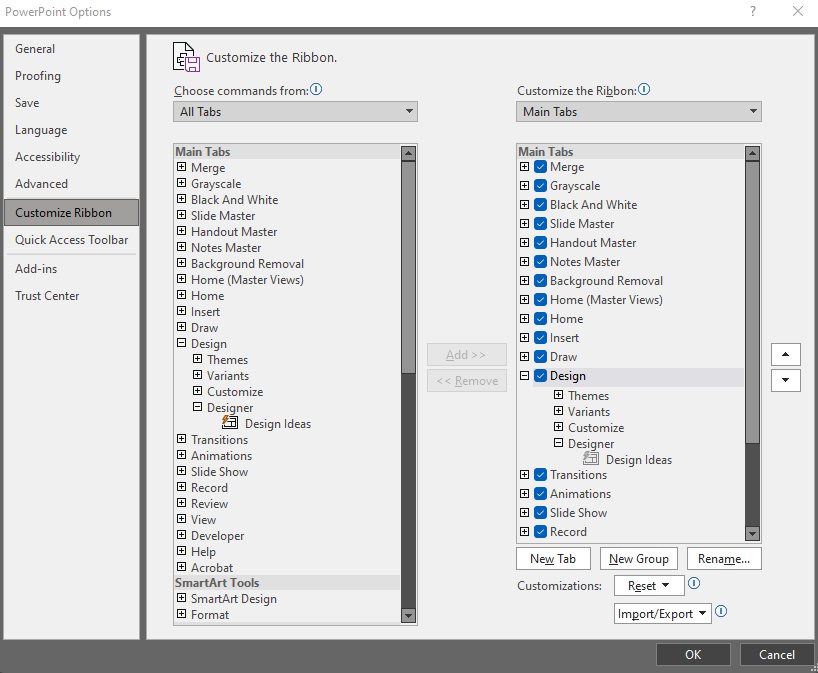
In the General section of the Options area, there is no PowerPoint designer section for me to select "automatically show me design ideas"
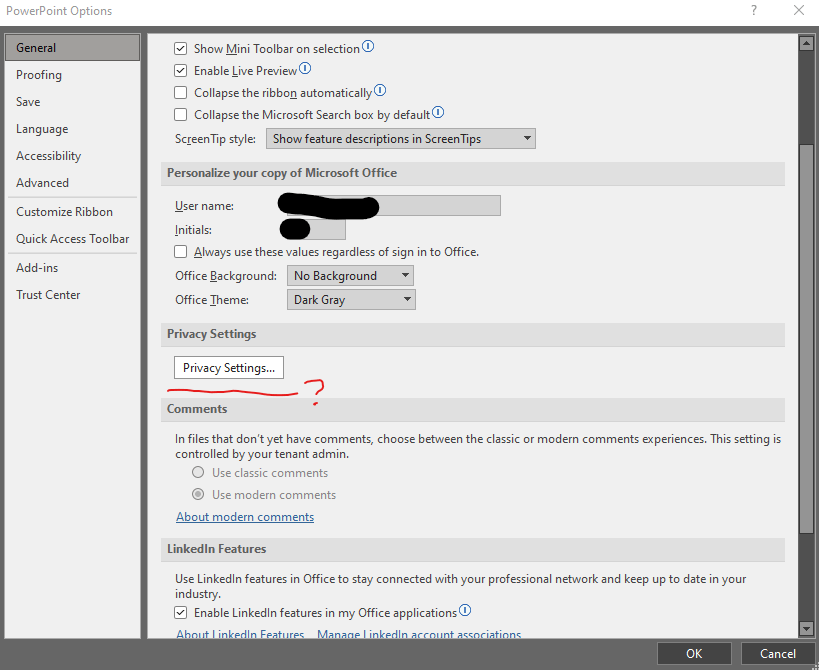
I'm at a loss as to why I'm all of a sudden missing the "design ideas" feature. Please let me know what other actions I might take to fix this.
' cx='32' cy='32' r='32' /%3E%3Ctext x='50%25' y='55%25' dominant-baseline='middle' text-anchor='middle' fill='%23FFF' %3EA%3C/text%3E%3C/svg%3E)
