Share via

Microsoft Project Save Issue

Anonymous
2022-11-02T15:58:57+00:00

MS Project is refusing to actually save the changes I make for status. If I try to simply make the changes then save and close, when I close it asks me if I would like to save the changes again, and promptly does nothing. When I try to 'save as' to force it to keep the changes, it simply updates the name of the old file with the new name and still dumps the changes.

The file isn't 'read only, there are no error messages popping up, it simply will not allow me to keep changes.

When I look at it in 'Apps and Features', this is how it presents:
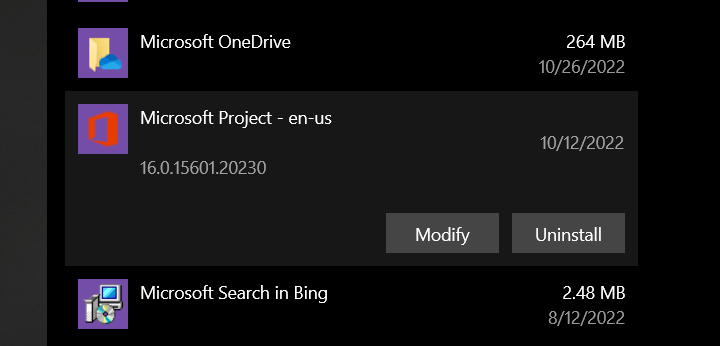
Has anyone else had this problem, and is there any fix?

Microsoft 365 and Office | Project | For business | Windows

Locked Question. This question was migrated from the Microsoft Support Community. You can vote on whether it's helpful, but you can't add comments or replies or follow the question.

0 comments No comments

8 answers

Sort by: Most helpful
  1. Anonymous
    2022-11-04T17:39:46+00:00

    I'm having the same problem. I was working on a document all day and was clicking 'Save' on a regular basis assuming my changes were being saved to disk (and subsequently copied to OneDrive). Trying to close Project at the end of the day I got a prompt to Save changes so I did but I got the same prompt again when I tried to exit. I checked the file date/time to make sure it had updated and because the date/time was current I assumed it was OK to close Project and ignore the 'Save' prompt.

    I think that was a mistake. When I opened the document none of my work had been saved. 8 hours work lost 😡

    This is happening to all my Project docs, it seems that I cant save changes to any of my docs. This problem isnt affecting any other applications that are saving documents to the same folder.

    I dont have any duplicate files or temporary files created by OneDrive that Dale mentioned.

    6 people found this answer helpful.
    0 comments No comments
  2. Anonymous
    2023-02-06T13:55:53+00:00

    I have a similar issue in that MS Project wont allow me to 'save as' following any changes.

    I can however, create a copy of the original file, re-name it, then make changes and 'save'

    but I still can't 'save as' the new file??

    hopefully this workaround might help until MS resolve the issue

    4 people found this answer helpful.
    0 comments No comments
  3. Anonymous
    2022-11-04T19:00:38+00:00

    Hey JP!

    So, yesterday my IT got back to me, and it turns out my issue is that I wasn't connected to the VPN, and therefore not connected to my network, so it was trying to save it to the OneDrive, but the save wasn't going through because it couldn't connect.

    Maybe that's something? I had figured that if it was a OneDrive issue, the company IT would be the best to fix it.

    3 people found this answer helpful.
    0 comments No comments
  4. Anonymous
    2023-02-01T23:12:10+00:00

    I have a very similar repeated "bug" in MS Project.

    When I try to "Save" or Save As" my working (open) **** MS Project file, after several hours work, I get blocked with the following error message (in pop-up box with red circle with white cross symbol inside): "The file "[xxx]" cannot be opened", even though the file is already open!

    I lose all my work from the last "save" if I close the open file - so no new work is saved, even in the *.BAK back-up file I have set up automatically in MS Project, because this file saves no more work than the original file.

    This error message and block still occurs if I try to "Save As" the file under a different name or in a different location or if I attempt to "Save As" another version of MS Project.

    If I close the file, I lose all the work done on the file from the time I have opened the file in the morning and try to safeguard the file several hours later.

    I have even set-up MS Project to automatically create a back-up file (*.BAK), but this only saves the work done up to the same time as the original file.

    So, a serious fault is apparent in MS Project that does not permit files to be saved after being worked on.

    The only way round I have to cut+paste all the tasks (rows) - can be several hundred lines/rows - into a new 'virgin' MS Project file, but this means I have to then re-set all my settings and formatting in this new file, wasting additional time each day (when I want to save new work on the same file).

    Any possible solutions would be very welcome!

    ____________________________________________________________________________________

    MS Project is refusing to actually save the changes I make for status. If I try to simply make the changes then save and close, when I close it asks me if I would like to save the changes again, and promptly does nothing. When I try to 'save as' to force it to keep the changes, it simply updates the name of the old file with the new name and still dumps the changes.

    The file isn't 'read only, there are no error messages popping up, it simply will not allow me to keep changes.

    When I look at it in 'Apps and Features', this is how it presents:

    Image

    Has anyone else had this problem, and is there any fix?

    2 people found this answer helpful.
    0 comments No comments
  5. Anonymous
    2022-11-08T12:47:23+00:00

    Hey Abaigael

    well today it all started working properly, no problem saving my document.

    Its definitely something to be aware of though. I was unlucky and lost a days work last week. If it happens I dont think there is a way of saving your work or even realising that your work is not being saved.

    John

    1 person found this answer helpful.
    0 comments No comments