Dear Sunny PA Wong
Good day! Thank you for posting in Microsoft Community. We are happy to help you.
Based on your description, it seems that you want to know when printing highest quality, if two images are same, which file size is better to choose.
Generally, the large file size can cause by multiple reasons, including fonts, videos or audio or images. If the image resolution
is same, we kindly suggest you choose the small file size, because large file size can occupy memory and cause some unexpected problem.
And if you want to make the image printing in PowerPoint have the highest quality, we suggest you can try following steps to make the print more advanced.
First, in PowerPoint, you can go to File>Options>Advanced>Image Size and Quality>select the Default resolutions as High fidelity.
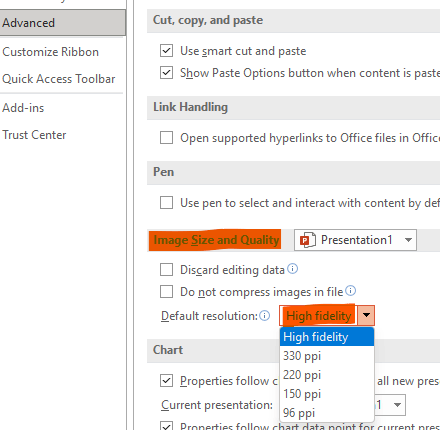
Then when print the image or file:
Go to File>Print>Settings>select High Quality under Full Pages Slides drop down menu
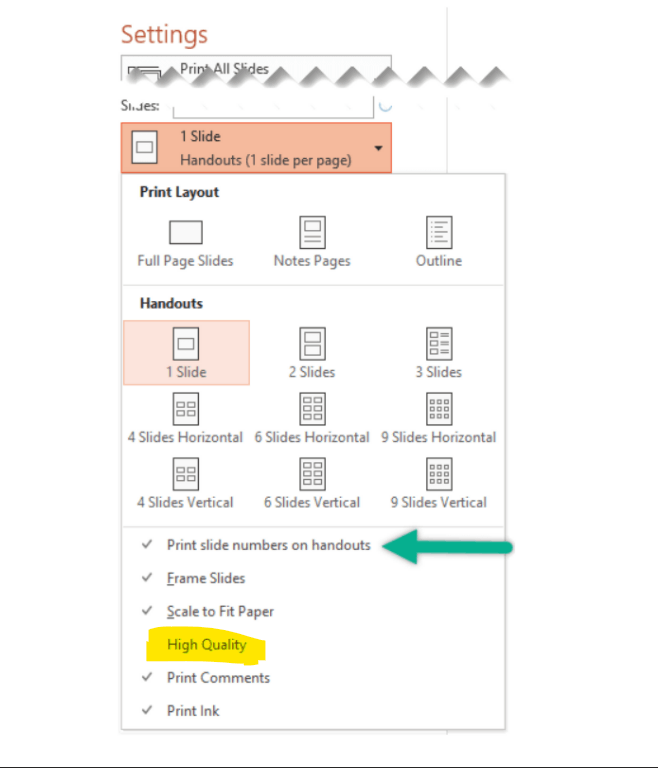
If the scenario above is not consistent with yours, you can also post back and point that.
Your understanding and patience will be highly appreciated. I hope that you are keeping safe and well!
Sincerely,
Stacey | Microsoft Community Moderator
' cx='32' cy='32' r='32' /%3E%3Ctext x='50%25' y='55%25' dominant-baseline='middle' text-anchor='middle' fill='%23FFF' %3EA%3C/text%3E%3C/svg%3E)

