Share via

PowerPoint Rehearse with Coach - Can't use presentation notes

Anonymous
2023-02-23T14:03:30+00:00

I am trying to practice a presentation using Rehearse with Coach, but there does not appear to be a way to turn on presenter view while using this feature. Please fix or indicate a way to turn on presenter view. It is pretty tough to rehearse without the notes you will be using along with a reminder of the next slide.

Microsoft 365 and Office | PowerPoint | For business | Windows

Locked Question. This question was migrated from the Microsoft Support Community. You can vote on whether it's helpful, but you can't add comments or replies or follow the question.

0 comments No comments

13 answers

Sort by: Most helpful
  1. Anonymous
    2023-02-23T15:42:50+00:00

    Feedback left, but that is a rather glaring oversight. How does one rehearse without the presenter view and notes that you will utilize while presenting?

    100+ people found this answer helpful.
    0 comments No comments
  2. Anonymous
    2023-05-02T21:44:42+00:00

    I totally agree with this. This feature is kind of useless if it can't be used in combination with my speaker notes.

    60+ people found this answer helpful.
    0 comments No comments
  3. Anonymous
    2023-06-04T16:17:41+00:00

    I am trying to practice a presentation using Rehearse with Coach, but there does not appear to be a way to turn on presenter view while using this feature. Please fix or indicate a way to turn on presenter view. It is pretty tough to rehearse without the notes you will be using along with a reminder of the next slide.

    totally agree. Very disappointing.

    30+ people found this answer helpful.
    0 comments No comments
  4. Anonymous
    2023-06-04T16:21:28+00:00

    Microsoft provides poor customer service and is a key reason why they are not as well liked as apple.

    We are on a microssoft board sharing a glaring issue with Microsoft software and they have trained their customer service to refer us to another location to make a note of this error.

    good customer service would be to thank the person as you did here and then submit the feedback for him.

    10+ people found this answer helpful.
    0 comments No comments
  5. Anonymous
    2023-02-23T14:59:01+00:00

    Dear respected Douglas M1,

    Good day! Thank you for posting to Microsoft Community. We are happy to help you.

    As per your description, yes, I'm sorry and I'm afraid to say that the Rehearse with Coach features don't work in presenter view.

    We feel your pain due to this limitation and we’re really feel sorry for it. Regarding to your concern, to make a future suggestion about improving PowerPoint, I request you, please send/provided feedback to related PowerPoint development team via Microsoft PowerPoint feedback portal (select Windows OS platform and click on Send feedback button), Submitting sends your suggestion to the PowerPoint programming team so that they can get notice about it.
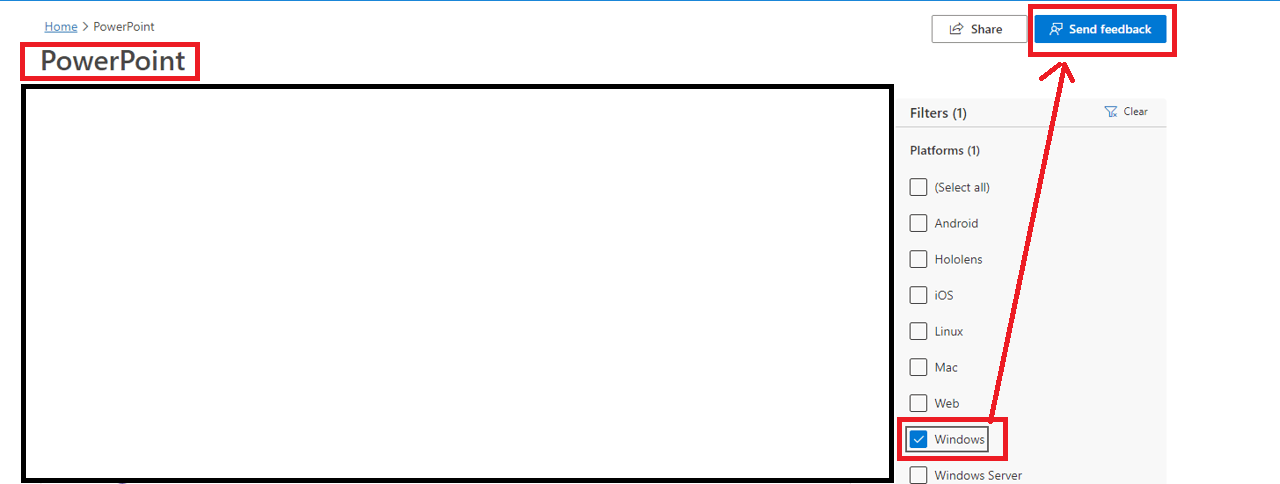
    We can expect this feature to be used in the future in PowerPoint app.

    Appreciate your patience and understanding and thank you for your time and cooperation.

    Sincerely,

    Waqas Muhammad

    10+ people found this answer helpful.
    0 comments No comments