Microsoft 365 and Office | Word | For business | Windows
A family of Microsoft word processing software products for creating web, email, and print documents.

This browser is no longer supported.
Upgrade to Microsoft Edge to take advantage of the latest features, security updates, and technical support.
' cx='32' cy='32' r='32' /%3E%3Ctext x='50%25' y='55%25' dominant-baseline='middle' text-anchor='middle' fill='%23FFF' %3EA%3C/text%3E%3C/svg%3E)
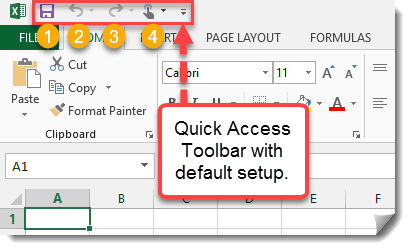
Hello, the Save, Redo & Undo buttons had moved from the top of the document to the Quick Access toolbar, which is currently at the bottom. How can I move (only) them back up - to their default locations? I have tried everything, but I can only move the entire Quick Access toolbar to the top, which I don't want to do - I only need the 3 buttons to move back to where they originally were. This happened out of the blue when I was editing someone's Word document and is only affecting Word's layout.
A family of Microsoft word processing software products for creating web, email, and print documents.
Locked Question. This question was migrated from the Microsoft Support Community. You can vote on whether it's helpful, but you can't add comments or replies or follow the question.
Answer accepted by question author

Things do change. I notice that after the latest update to Office 2021, the AutoSave button has also been moved to the QAT. Many users complained about having so many buttons on the title bar (the Search box is another annoyance, but it can be collapsed)--not really an issue if you run Word maximized and/or view it on a widescreen monitor, but you can never please everyone.

I was afraid that was the case. Microsoft just can't do anything right these days - their solutions always seems to bring more disappointment than satisfaction. They could've easily just let us pin the buttons wherever we wanted, but I guess giving everyone an option to customize the (overpriced) software to their liking is asking too much.
Up until Word 2007 you could put buttons anywhere on a page. Microsoft got huge complaints from corporate IT departments about the headaches this caused them. They scaled back on how easily users could make changes to the user interface. The QAT was the one concession to user customization. With Word 2010 they implemented allowing limited changes to the Ribbon tabs.
Modifying the Quick Access Toolbar (QAT) in Microsoft Word
For some time, the "New Experience" (now called Visual Refresh Preview) did park these icons in the Title Bar. That has changed, I'm not sure when.
Note that each of these functions has a built-in keyboard shortcut. (Ctrl+S, Ctrl+Z, Ctrl+Y)
The only time I use the Undo button is when I want to go back in the Undo stack using the dropdown and undo a number of actions. (Usually after running a macro that didn't quite work.)
If you want to get a message to Microsoft, this user-to-user support forum is not the place to do it. They do not see anything you post here. Instead, use the Feedback mechanisms.
Giving Feedback on Microsoft Word or other Microsoft Products
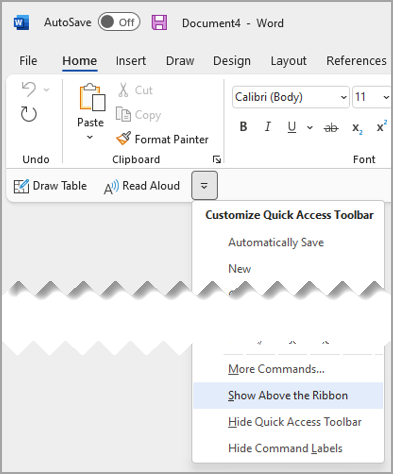
That wasn't the case in my situation. The save, redo and undo buttons would stay above the ribbon, no matter how I customized the QAT. It looked exactly like this example from Microsoft; only difference being that the undo and redo buttons were also next to the save button and not in a custom group. I have no idea what changed the position of them all. All I know is that I'm now being gaslighted by my IT department that I imagined it being like that, which is definitely not the case.
This answer has been deleted due to a violation of our Code of Conduct. The answer was manually reported or identified through automated detection before action was taken. Please refer to our Code of Conduct for more information.
Comments have been turned off. Learn more
Those buttons are on the QAT; they are only at the top when the QAT is above the Ribbon; when the QAT is below the Ribbon, that's where they are.