Share via

Power point Lop, randomize and background music.

Anonymous
2023-10-27T19:13:31+00:00

I want to loop a PowerPoint presentation, randomize slides with each consecutive loop, and play continuous background music on during the entire continuous presentation.

Microsoft 365 and Office | PowerPoint | For education | Windows

Locked Question. This question was migrated from the Microsoft Support Community. You can vote on whether it's helpful, but you can't add comments or replies or follow the question.

0 comments No comments

4 answers

Sort by: Most helpful
  1. Anonymous
    2023-11-01T12:41:26+00:00

    Hi respected Dr. Carla,

    Meanwhile, if you find our support/information helpful, you can also use the feedback tool below our response to submit your feedback for us (pictured below).

    Image

    If there are any issues related to Office applications in the future, feel free to repost to this community.

    We'll be here to help.

    Have a nice day and stay safe 😊

    Best wishes

    Waqas Muhammad

    Was this answer helpful?

    0 comments No comments
  2. Anonymous
    2023-10-31T16:22:58+00:00

    Hi respected Dr. Carla,

    Thanks for your valuable feedback and sharing updates with us and I really appreciate your effort and your precious time doing. 

    And I appreciate your kind words.

    I'm Sorry and I'm afraid, it may need VBA code actions to occur simultaneously.

    Besides, I would like to invite community members and MVPs in the forum to share their knowledge and insight on this topic.

    Your understanding and patience will be highly appreciated. I hope that you are keeping safe and well!

    Sincerely,

    Waqas Muhammad

    Was this answer helpful?

    0 comments No comments
  3. Anonymous
    2023-10-31T12:07:26+00:00

    I understand how to do each action individually, but I want all 3 actions to occur simultaneously. I want the presentation to play automatically with background music, loop when it reaches to end of the slides and randomize slides for the run of the loop.

    Was this answer helpful?

    0 comments No comments
  4. Anonymous
    2023-10-27T21:44:58+00:00

    Dear respected Dr. Carla,

    Good day! Thank you for posting to Microsoft Community. We are happy to help you.

    I’m sorry you’re having a problem but based on your description we can work together to resolve it.

    For the situation you encountered, we deeply understand the inconvenience caused and apologize for it.

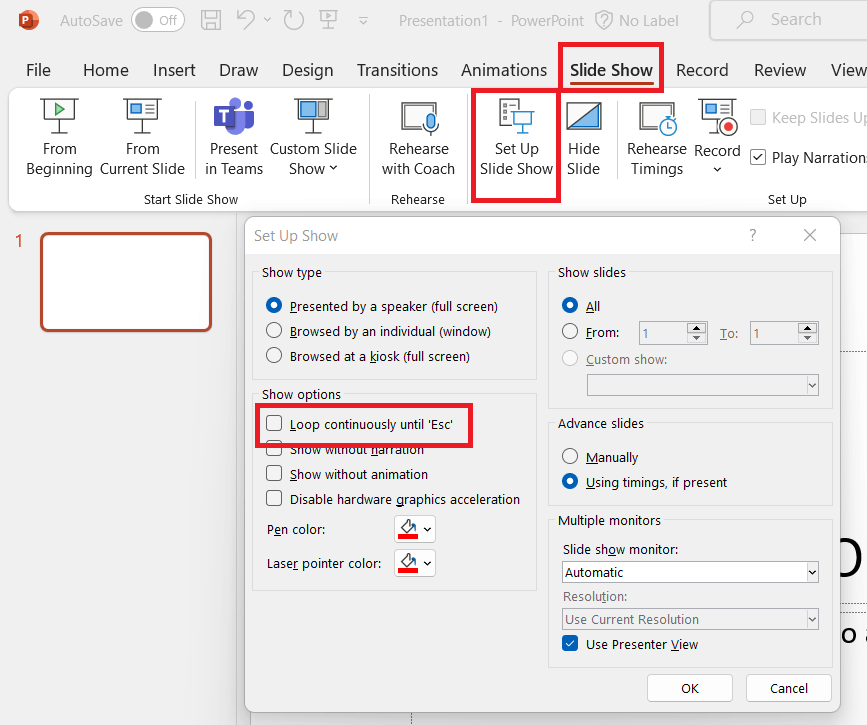
    As per your description, to loop a PowerPoint presentation, you select the option "Loop continuously until 'Esc'" under the

    "Set Up Show" dialog box.
    .

    To randomize slides with each consecutive loop, you may manually display them in random order using the “Slide Sorter” view. Or use VBA code do it (you need to actually run the macro).

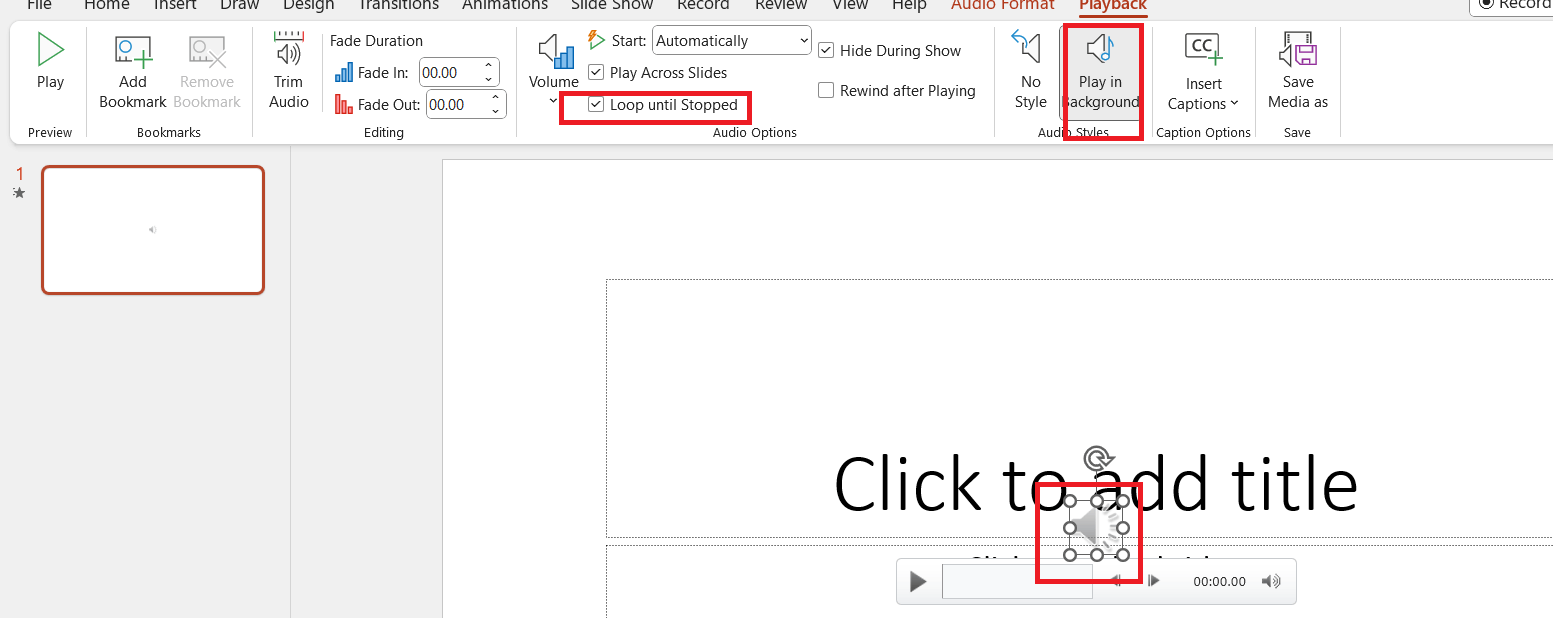
    To play continuous background music during your presentation, you may insert the audio file you want to use into your PowerPoint presentation. Click on the audio icon on your slide to select it.>Click on the "Playback" tab in the ribbon>Under "Audio Options", select "Play in Background".>Set the audio to "Loop until Stopped" under "Audio Options".
    .

    We appreciate your understanding that sometimes the initial suggestions may not resolve the problem very soon. However, we can work together to narrow down and resolve the situation.

    Appreciate your patience and understanding and thank you for your time and cooperation.

    Sincerely,

    Waqas Muhammad

    Was this answer helpful?

    0 comments No comments