Azure Key Vault
An Azure service that is used to manage and protect cryptographic keys and other secrets used by cloud apps and services.
This browser is no longer supported.
Upgrade to Microsoft Edge to take advantage of the latest features, security updates, and technical support.
' cx='32' cy='32' r='32' /%3E%3Ctext x='50%25' y='55%25' dominant-baseline='middle' text-anchor='middle' fill='%23FFF' %3EM%3C/text%3E%3C/svg%3E)
Hello!
I have a fast question: 2 years ago I associated a RSA-HSM key to my VM. Now I want switch to a new version, but i can't see any version. I can correctly choose my key vault and key, but no version apparead. Why?
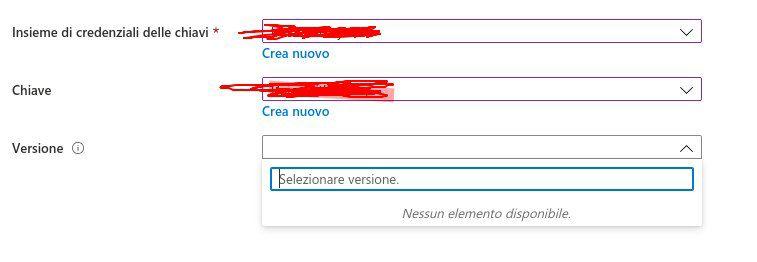
Thanks in advance
An Azure service that is used to manage and protect cryptographic keys and other secrets used by cloud apps and services.
An Azure service that provides hardware security module management.

@Momo
Thanks for your post!
-Can you confirm if your key has a "current version" within the key vault?

-When you say you associated a key to your VM how did you do that? Did you use ADE, SSE+CMK, etc.
-Within your screenshot are you trying to change keys within a disk encryption set? Or is this within the Key Vault or your VM?
Any additional details would greatly be appreciated.
Thank you for your time.
Hello James! Thanks for your support.


My key still has RSA-HSM (2048) like the old one (that in every case I can't see his version when I next to "Click to select a key").
Thanks!
Answer accepted by question author
@Momo
Thanks for the additional details and screenshots! I wasn't able to reproduce your issue as you can see in my screenshot below.
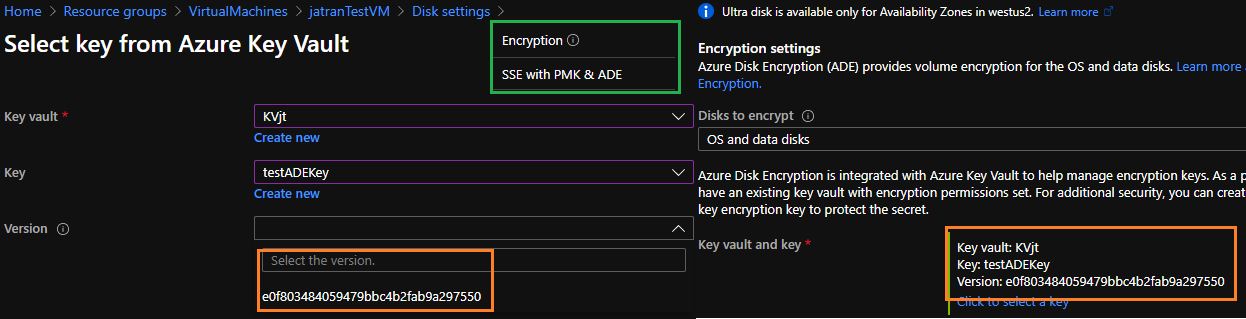
However, if you're trying to rotate your KEK, the recommended way to do so is by calling the ADE encryption script, using the same variables you used initially during encryption. For more info.
A backup is recommended prior to executing the ADE script.
For example - This was my initial script:
    $KVRGname = 'KeyVaultRG';
        $VMRGName = 'VirtualMachineRG';
        $vmName = 'jatranTestVM';
        $KeyVaultName = 'KVjt';
        $keyEncryptionKeyName = 'testADEKey';
        $KeyVault = Get-AzKeyVault -VaultName $KeyVaultName -ResourceGroupName $KVRGname;
        $diskEncryptionKeyVaultUrl = $KeyVault.VaultUri;
        $KeyVaultResourceId = $KeyVault.ResourceId;
        $keyEncryptionKeyUrl = (Get-AzKeyVaultKey -VaultName $KeyVaultName -Name $keyEncryptionKeyName).Key.kid;
        $sequenceVersion = [Guid]::NewGuid();

 Set-AzVMDiskEncryptionExtension -ResourceGroupName $VMRGname -VMName $vmName -DiskEncryptionKeyVaultUrl $diskEncryptionKeyVaultUrl -DiskEncryptionKeyVaultId $KeyVaultResourceId -KeyEncryptionKeyUrl $keyEncryptionKeyUrl -KeyEncryptionKeyVaultId $KeyVaultResourceId -VolumeType "All" –SequenceVersion $sequenceVersion;
If I were to rotate my keys, I would use the same script with the "sequence version" variable, just referencing a different key.
$KVRGname = 'KeyVaultRG';
$VMRGName = 'VirtualMachineRG';
$vmName = 'jatranTestVM';
$KeyVaultName = 'KVjt';
$keyEncryptionKeyName = 'testADEKey002';
If you have any other questions, please let me know.
Thank you again for your time and patience throughout this issue.
----------
If any reply/answer helped resolve your question, please remember to "mark as answer" so that others in the community facing similar issues can easily find the solution.
@Momo
I just wanted to check in and see if you had any other questions?
----------
If any reply/answer helped resolve your question, please remember to "mark as answer" so that others in the community facing similar issues can easily find the solution.
Hi James!
Sorry for being late. I really thank you for your help and availability :) (i saved the script in my own local repository!)
Problem solved with no actions. Yesterday I tried to choose the key and magically saw the associated version.
There was some issues for VM based in West Europe, I guess?
@Momo
Thank you for the update, I'm not aware of any issues regarding ADE with VMs based in West Europe. However, I'm glad you were able to resolve your issue!
Thank you for your time and patience throughout this issue!
----------
Please remember to "mark as answer" if any answer/reply helped, so that others in the community facing similar issues can easily find the solution.