Share via

cannot find Transform option for word art in powerpoint.

Anonymous
2023-10-16T23:40:28+00:00

wanted to insert curved text and looked for the Transform option under Shape Format -> Effects. There is none. This is in a M365 account (enterprise) on a macbook. I'm trying to attach a screenshot but this web interface keep saying it failed.

Microsoft 365 and Office | PowerPoint | For business | MacOS

Locked Question. This question was migrated from the Microsoft Support Community. You can vote on whether it's helpful, but you can't add comments or replies or follow the question.

0 comments No comments

Answer accepted by question author

  1. Anonymous
    2023-10-18T02:34:16+00:00

    Hi respected Jagmit Sandhu,

    Thanks for your valuable feedback and sharing updates with us and I really appreciate your effort and your precious time doing. 

    And I appreciate your kind words.

    As per your screenshot, you open the Format shape pane (side pane), based on my test, this is shape format pane there you can see shape effect.

    .

    Transform option is under Text Effect option:

    ![](https://learn-attachment.microsoft.com/api/attachments/4ba353c9-2e0d-4c67-bbf7-0ae95a298571?platform=QnA

  1. Anonymous
    2023-10-17T22:13:03+00:00

    If you look at my screenshot you can notice that the Transform option is not listed. Is there a way to add it ?

    3 people found this answer helpful.
    0 comments No comments
  2. Anonymous
    2023-10-19T01:19:33+00:00

    Hi respected Jagmit Sandhu,

    Thanks for your valuable feedback and I appreciate your kind words.

    If you find our suggestions helpful, you can also use the feedback tool below our reply to submit your feedback for us (pictured below), which will definitely help others in the community who are experiencing similar problems to find solutions to their problems more quickly.

    Image

    If there is any issue related with the Office applications in the future, please feel free to post back in this community.

    We will be here for help.

    Have a good day and stay safe 😊

    Best wishes

    Waqas Muhammad

    2 people found this answer helpful.
    0 comments No comments
  3. Anonymous
    2023-10-19T01:12:28+00:00

    ok, that worked ! thanks !

    0 comments No comments
  4. Anonymous
    2023-10-17T02:46:23+00:00

    Dear respected Jagmit Sandhu,

    Good day! Thank you for posting to Microsoft Community. We are happy to help you.

    I’m sorry you’re having a problem but based on your description we can work together to resolve it.

    For the situation you encountered, we deeply understand the inconvenience caused and apologize for it.

    As per your description, in PowerPoint for Mac, under "shape Format" you may expand the Text Effects button dropdown and then at the bottom of the list, there will be a Transform item (shown below):
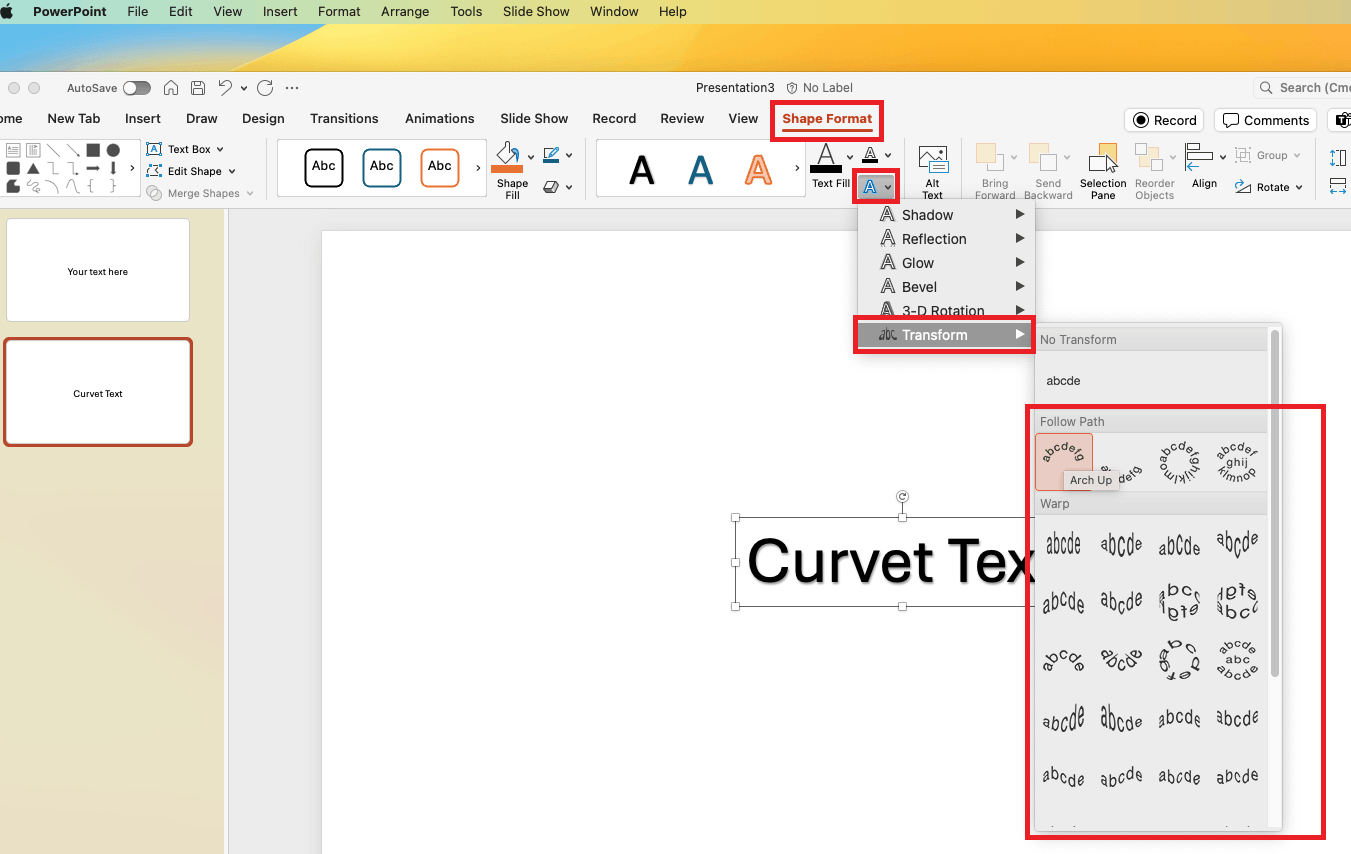
    .

    We appreciate your understanding that sometimes the initial suggestions may not resolve the problem very soon. However, we can work together to narrow down and resolve the situation.

    Appreciate your patience and understanding and thank you for your time and cooperation.

    Sincerely,

    Waqas Muhammad

    0 comments No comments