Developer technologies | .NET | .NET Multi-platform App UI
A Microsoft open-source framework for building native device applications spanning mobile, tablet, and desktop.
This browser is no longer supported.
Upgrade to Microsoft Edge to take advantage of the latest features, security updates, and technical support.
' cx='32' cy='32' r='32' /%3E%3Ctext x='50%25' y='55%25' dominant-baseline='middle' text-anchor='middle' fill='%23FFF' %3EC%3C/text%3E%3C/svg%3E)
Hi,
I am using VS 2022 and have a .NET MAUI project. The issue is that Live Preview doesn't seem to work. I watched the video here: https://www.youtube.com/watch?v=nEOvX3YKw_E
However, I get the error shown below and I don't have the debug menu at the top of the running title bar as shown in the other screenshot.

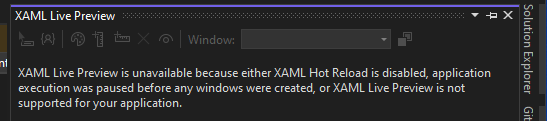
How do I get this to work?
Thanks,
Clint
A Microsoft open-source framework for building native device applications spanning mobile, tablet, and desktop.
A core feature of Visual Studio that allows developers to inspect, analyze, and troubleshoot code during execution.
' cx='32' cy='32' r='32' /%3E%3Ctext x='50%25' y='55%25' dominant-baseline='middle' text-anchor='middle' fill='%23FFF' %3EAX%3C/text%3E%3C/svg%3E)
Hello, you can wait for it to fix. If there is any update, I will inform you here.
' cx='32' cy='32' r='32' /%3E%3Ctext x='50%25' y='55%25' dominant-baseline='middle' text-anchor='middle' fill='%23FFF' %3EKJ%3C/text%3E%3C/svg%3E)
The same problem affects me as well.
I have upgraded to version 17.4.4, but I am still having the same problem. The XAML live preview works just perfectly with.net6, but not with.net7. I have enabled all the parameters and options. but no use.
' cx='32' cy='32' r='32' /%3E%3Ctext x='50%25' y='55%25' dominant-baseline='middle' text-anchor='middle' fill='%23FFF' %3EBJ%3C/text%3E%3C/svg%3E)
i am using the vs 2022 v 17.5.1 and i have the same problem..
' cx='32' cy='32' r='32' /%3E%3Ctext x='50%25' y='55%25' dominant-baseline='middle' text-anchor='middle' fill='%23FFF' %3EVL%3C/text%3E%3C/svg%3E)
Good evening to everyone, I'm having the problem with Visual studio enterprise Version 17.6.2. Anyone has solved it?
' cx='32' cy='32' r='32' /%3E%3Ctext x='50%25' y='55%25' dominant-baseline='middle' text-anchor='middle' fill='%23FFF' %3EL%3C/text%3E%3C/svg%3E)
Hello, I'm also having the same problem with Visual Studio 2022, was anyone able to resolve it?
Thanks for the reply! I upgraded to the latest VS2022 ( had 17.4.1 and updated to 17.4.3) but it still shows the same issues. Hot Reload is enabled as shown below. Screenshots taken when debugging MAUI app.
Thanks,
Clint
It may be a known issue.
Hi @CFos ,
Welcome to Microsoft Q&A!
Are you using the latest version of VS2022? Please update your VS2022 to the latest version through Visual Studio Installer.
Then, go to Debug > Options > XAML Hot Reload and make sure that the “Enable XAML Hot Reload” option is selected.
If it persists, I suppose it may be a known issue: https://developercommunity.visualstudio.com/t/NET-MAUI-Hot-ReloadXaml-Live-Preview-n/10198694?entry=problem&q=XAML+live+preview+not+working
You can also vote and add your comment in that ticket.
Sincerely,
Anna
If the answer is the right solution, please click "Accept Answer" and kindly upvote it. If you have extra questions about this answer, please click "Comment". Note: Please follow the steps in our [documentation][1] to enable e-mail notifications if you want to receive the related email notification for this thread.