Microsoft 365 and Office | Excel | For business | MacOS
A family of Microsoft spreadsheet software with tools for analyzing, charting, and communicating data

This browser is no longer supported.
Upgrade to Microsoft Edge to take advantage of the latest features, security updates, and technical support.
' cx='32' cy='32' r='32' /%3E%3Ctext x='50%25' y='55%25' dominant-baseline='middle' text-anchor='middle' fill='%23FFF' %3EA%3C/text%3E%3C/svg%3E)
How do I email a sheet or workbook directly from excel?
A family of Microsoft spreadsheet software with tools for analyzing, charting, and communicating data
Locked Question. This question was migrated from the Microsoft Support Community. You can vote on whether it's helpful, but you can't add comments or replies or follow the question.
Dear respected Edward Wellman,
Good day! Thank you for posting to Microsoft Community. We are happy to help you.
As per your description, if you only want to email a single sheet from Excel, Right-click the sheet tab of the sheet you want to email>choose Move or Copy from the contextual menu>From the To book: menu select **(new book)>**Tick the Create a copy box>click OK.
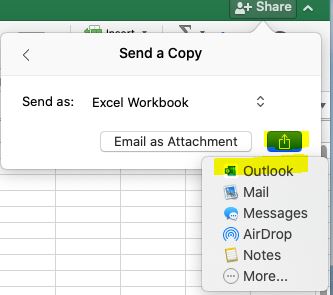
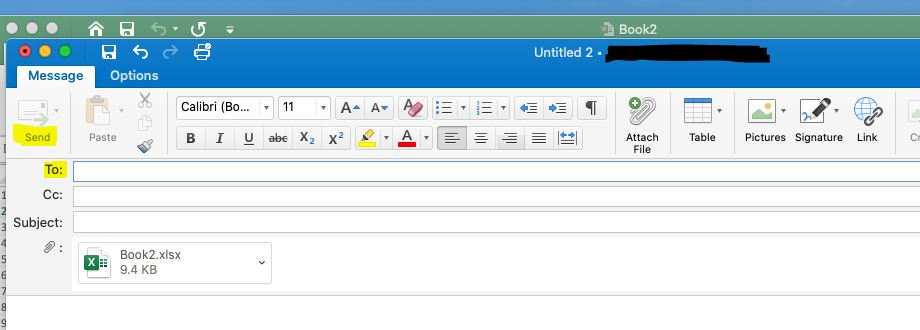
In the new workbook you should be able to use **File> Share>**then click Send a Copy>And then please choose one app, such as Outlook as following image.
Please understand that our initial reply may not always immediately resolve the issue. However, with your help and more detailed information, we can work together to find a solution.
Appreciate your patience and understanding and thank you for your time and cooperation.
Sincerely,
Waqas Muhammad

Hi Edward,
To send a copy of the entire workbook, use Share > Send a Copy > Email with Outlook
Perhaps faster and easier is to use the Menu Bar and choose File > Share > Send Workbook.
All these methods presume that Microsoft Outlook is set as the default email client on your Mac. If you use some other email client you need to open an email and manually attach the file you wish to send.
To send a copy of an individual worksheet, follow Waqas' suggestion to right-click on the sheet tab and generate a new workbook as a copy of that worksheet, then follow the above steps to send just that one worksheet by email.