Share via

Can't insert online videos to powerpoint

Anonymous
2024-01-11T09:04:39+00:00

Hi, I am trying to insert an online video into powerpoint (within microsoft office 365 version 2312). When I try to paste the URL, nothing happens, it won't paste. I do not get an error message. I can paste videos that are saved to my device. I did have a message pop up earlier asking for something to change, block or allow something but I cannot remember what it was and I fear I have changed something to stop this feature working, I don't know how to change it back or how to find out what changed. Any ideas please?

Microsoft 365 and Office | PowerPoint | For business | Windows

Locked Question. This question was migrated from the Microsoft Support Community. You can vote on whether it's helpful, but you can't add comments or replies or follow the question.

0 comments No comments

38 answers

Sort by: Most helpful
  1. Steve Rindsberg 99,161 Reputation points MVP Volunteer Moderator
    2024-01-18T16:49:09+00:00

    Thanks to everyone who sent feedback to Microsoft about this "Can't insert video" issue.

    The problem got in front of the right people and a fix is in the works.

    It'll probably roll out gradually, first to a small group of users, then to larger groups and finally to all users that are accepting updates. If you're having this problem, keep checking for updates; with luck, it'll be fixed for you soon.

    2 people found this answer helpful.
    0 comments No comments
  2. Steve Rindsberg 99,161 Reputation points MVP Volunteer Moderator
    2024-01-12T16:07:17+00:00

    Since you have a business version of Office, your IT folks may have disabled your ability to insert videos from the internet. If you have access to a Help Desk or the like, I'd give them a shout.

    1 person found this answer helpful.
    0 comments No comments
  3. Anonymous
    2024-01-12T07:26:55+00:00

    Thanks, this is correct, but it only happens when I’m trying to insert an online video. Something is obviously blocking the permission or access but I don’t know what to try to change it.

    1 person found this answer helpful.
    0 comments No comments
  4. Anonymous
    2024-01-12T07:24:27+00:00

    Thanks Steve, the problem I have is that the ‘paste’ doesn’t work. It doesn’t matter what I am trying to paste, it won’t let me drop anything into that dialogue box. It only happens when I am trying to insert online videos. Anything saved on my device inserts fine. Thanks for your help.

    1 person found this answer helpful.
    0 comments No comments
  5. Steve Rindsberg 99,161 Reputation points MVP Volunteer Moderator
    2024-01-11T17:27:35+00:00

    Sophia has mentioned that inserting a YouTube video works. To do this, you need to get a specific EMBED link from YouTube.

    But you can't simply copy the URL of a video you're watching in the browser and paste it into PowerPoint.

    To get an EMBED code, right-click the video you're watching in YouTube and choose COPY EMBED CODE
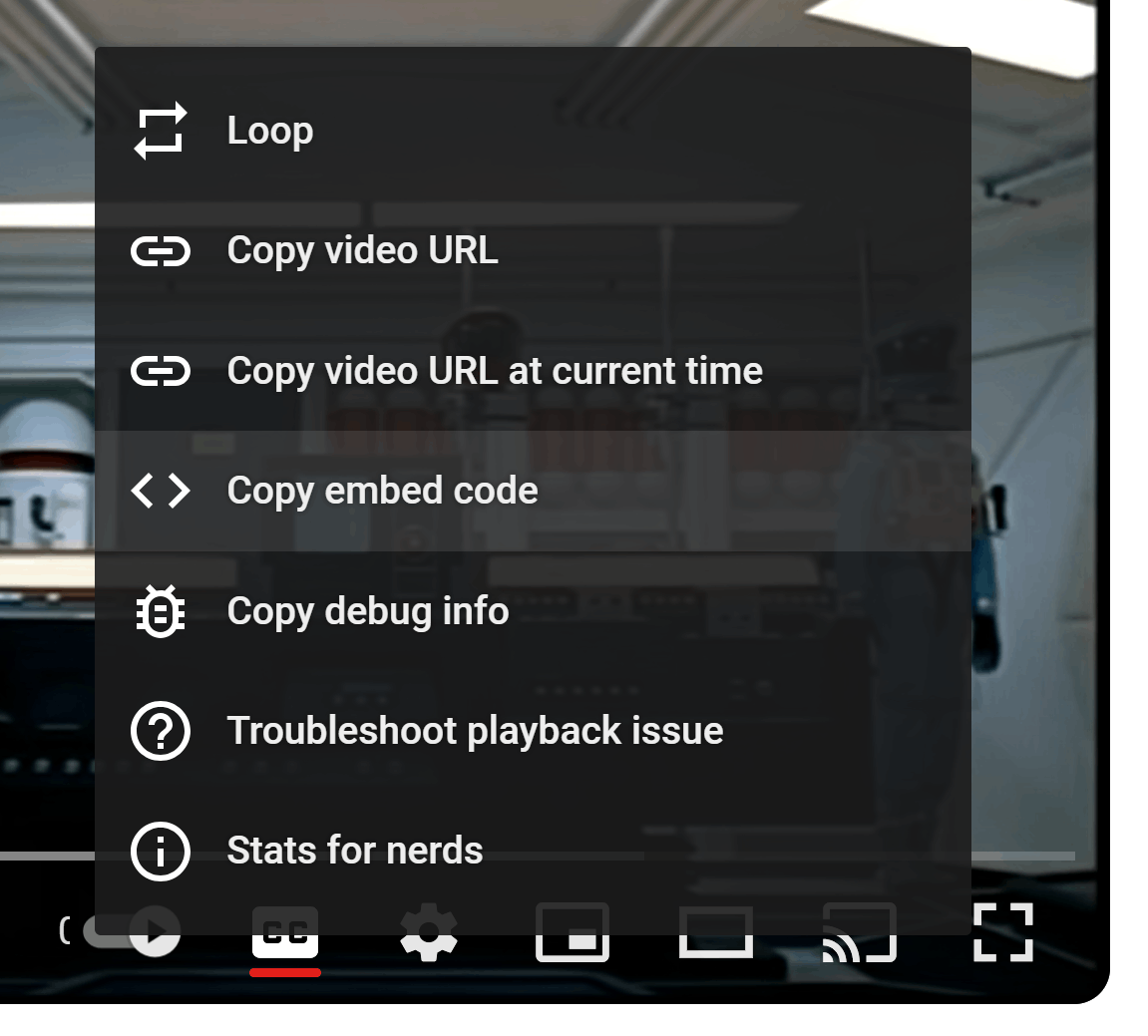
    Then in PowerPoint, choose Insert | Video | Online Video then paste the video code into the dialog box that appears.

    The dialog box also lists the different sites you can embed videos from (YouTube, Slideshare, Vimeo and others)

    1 person found this answer helpful.
    0 comments No comments