Microsoft 365 and Office | Word | Other | Windows
A family of Microsoft word processing software products for creating web, email, and print documents.

This browser is no longer supported.
Upgrade to Microsoft Edge to take advantage of the latest features, security updates, and technical support.
' cx='32' cy='32' r='32' /%3E%3Ctext x='50%25' y='55%25' dominant-baseline='middle' text-anchor='middle' fill='%23FFF' %3EA%3C/text%3E%3C/svg%3E)
HNY folks!
I want to extract data from a column in an Excel worksheet into a column in a Word doc so that I can update the Word table from the Excel worksheet. When I copy/paste/special and choose link and MS Excel Object, then I get the copied data pasted into one cell of the table only. Please see attached image. (I get the same result if I select the cells in the table where I the linked data to be.)
I suppose I could do this multiple time for each cell, but my "real" data has 73 rows, so I'm hoping there is a proper way of doing this that I am missing.
Thank you everyone for your assistance.
A family of Microsoft word processing software products for creating web, email, and print documents.
Locked Question. This question was migrated from the Microsoft Support Community. You can vote on whether it's helpful, but you can't add comments or replies or follow the question.

You could try pasting the data into Word as a freestanding column (a separate table). The select that column and insert it in the existing table by selecting the column of end-of-row markers and pasting.
Alternatively, you can convert the existing table to text, insert the Excel data as paragraph text (or as a table and convert to text). Use Replace to replace the paragraph break at the end of each line in the first group with tab and paragraph mark. Then use Alt+click to select the second set of data as a column and drag it up to the right of the existing column. Then select the whole and convert to a table, separating at tabs.
' cx='32' cy='32' r='32' /%3E%3Ctext x='50%25' y='55%25' dominant-baseline='middle' text-anchor='middle' fill='%23FFF' %3ET5%3C/text%3E%3C/svg%3E)
HNY folks!
I want to extract data from a column in an Excel worksheet into a column in a Word doc so that I can update the Word table from the Excel worksheet. When I copy/paste/special and choose link and MS Excel Object, then I get the copied data pasted into one cell of the table only. Please see attached image. (I get the same result if I select the cells in the table where I the linked data to be.)
I suppose I could do this multiple time for each cell, but my "real" data has 73 rows, so I'm hoping there is a proper way of doing this that I am missing.Thank you everyone for your assistance.
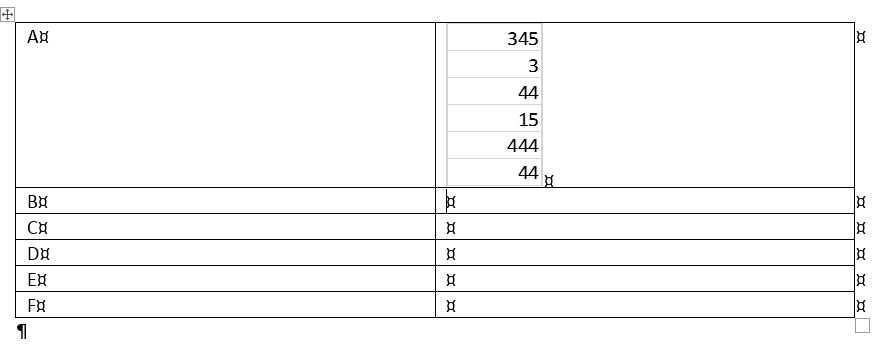
I've just tested this and as far as I can see with the current software it can't be done.
Thank you...it cannot be done? Sounds like a simple objective, no? To link, say, 20 cells in Excel to 20 cells in Word?
Thanks for giving it a go.
Allan
Hello! agfkl
Thank you for posting in Microsoft Community
I understand that you are having trouble copying/pasting in your Word application. Allow me to ask:
To copy/paste/special data from Excel into a Word table, you can follow these steps:
This should paste the data into the cell and create a link to the original Excel worksheet. If you want to update the data in the Word table, you can double-click the cell to open the linked Excel worksheet and make changes there. When you save and close the Excel worksheet, the changes should be reflected in the Word table.
We will also leave the thread open for Volunteer Moderatos to join in and share their opinion/suggestion to help you with your concern.
Thank you,
Vince
Microsoft Community Moderator
Thank you Vince. You are correct...the pasted data goes into one call in the table, which is exactly what I do not want!! If I am copying, say, 20 cells in the Excel worksheet, then I want these to go into 20 cells in the Word table.
(One of the below replies says that it cannot be done!
Allan