Microsoft 365 and Office | OneDrive | For home | Windows
A Microsoft file hosting and synchronization service.

This browser is no longer supported.
Upgrade to Microsoft Edge to take advantage of the latest features, security updates, and technical support.
' cx='32' cy='32' r='32' /%3E%3Ctext x='50%25' y='55%25' dominant-baseline='middle' text-anchor='middle' fill='%23FFF' %3EA%3C/text%3E%3C/svg%3E)
I just purchased Microsoft 365 and wanted it to store a backup of my documents, desktop, music, and photos.
After allowing several days for it to upload all of these files, I then see that the hard drive where I stored all of these things was now completely empty.
I DID NOT want onedrive to remove these files from my computer and am very upset that it did this.
I am now trying to restore these files back to this hard drive, but now it will probably take several days to redownload and in the meantime I will not have access to these files offline. In the meantime I am very frightened that if I merely try to move them from the onedrive and there is ANY kind of error that those files will be gone forever.
Onedrive needs to NEVER remove files from an offline location without making it EXPLICITLY CLEAR what it is doing. I believe there was a sync checkbox that I marked which I THOUGHT would SYNC the files to the cloud onedrive, not MOVE them to the cloud onedrive and remove them from my computer.
This is MAJOR problem in that microsoft does not seem to understand what the definition of the word SYNC means.
To do what I want, have these files stay on my computer and have them backed up online, what is the correct way to do this since Microsoft's definition of SYNC appears to be different from mine and the dictionary's definition.
A Microsoft file hosting and synchronization service.
Locked Question. This question was migrated from the Microsoft Support Community. You can vote on whether it's helpful, but you can't add comments or replies or follow the question.
Update: I discovered what Microsoft did.
I had my documents, desktop, music etc. folders on my e: drive. When I went to sync to onedrive - WITHOUT ASKING OR INFORMING ME - Microsoft moved all of these folders to the c: drive inside a Onedrive folder it created. I now have to unlink my onedrive folder and then move it to the e: drive and then start the whole upload process over again.
THIS IS NOT HOW THIS SHOULD GO. When files will be moved, Microsoft needs to ask first or at least inform the user of what they are doing.
I completely agree with Jeremy. Not only do I agree, but it is very apparent that there are those at Microsoft who don't understand the difference between Back up and Move. Moving a file does not back it up, copying a file does. Understanding this terminology is critical in this context.
The OneDrive icon in Windows 11 File Explorer should have a tool tip that says "Move your files to the cloud", not "Back up your files to the cloud".
OneDrive offers a false sense of security to its users, and for that reason alone should not be entirely trusted. Why would Microsoft even want to be held potentially liable for possibly deleting or corrupting a users files? Because they can't be held liable, as the user signs their rights away in the terms and conditions of use.
Absolutely fantastic way of saying it and, I'm sorry, because the same darn exact thing happened to me!
I am a retired attorney -- i LOST EVERYTHING. I AM SO OUTRAGED AT MICROSOFT. This is unacceptable in this day and age, and I will make sure it never happens again -- trust me! They have stolen a small part of my life and its precious time.....
Yes, I came across those articles and I just finished changing my onedrive onto my e: Drive. Thank-you for linking them to try and help.
My c: drive is a smaller solid state so I try to reserve it for gaming and other things that need the faster access; my e: drive is a 1 TB hard disk where I keep my documents, photos, and other things I do not need as quickly. When all of a sudden I saw that my TB hard disk was completely empty I worried that my files had completely disappeared into the cloud. If Windows was going to move my documents, photos, music etc. folders it definitely should have asked first, then I would have had the chance to understand and preemptively move my onedrive folder to the e: drive.
I don't see any way to send this feedback, but if any Microsoft rep could pass it along I would appreciate it.

How do I get the files back to my pc? and where do I alter the direction to sync, but not remove them from my PC?
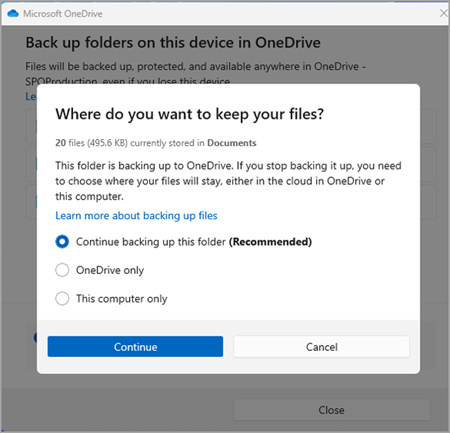
If you don't want to use OneDrive then turn off the backup at Manage Backup in the OneDrive settings.
See the video and article here: https://support.microsoft.com/en-us/office/back-up-your-folders-with-onedrive-d61a7930-a6fb-4b95-b28a-6552e77c3057
To stop backing up a folder, select the toggle for the folder to turn it off. A confirmation dialog will appear presenting some options: