Microsoft 365 and Office | PowerPoint | For home | Windows
A family of Microsoft presentation graphics products that offer tools for creating presentations and adding graphic effects like multimedia objects and special effects with text.

This browser is no longer supported.
Upgrade to Microsoft Edge to take advantage of the latest features, security updates, and technical support.
' cx='32' cy='32' r='32' /%3E%3Ctext x='50%25' y='55%25' dominant-baseline='middle' text-anchor='middle' fill='%23FFF' %3EA%3C/text%3E%3C/svg%3E)
Split from this thread.
How do I change default font in Powerpoint when I just click on <<new>> then<<Blank presentation>>?
.. and no, I don't mean creating another of my own templates.
I can edit the normal.dotx and sheet.xltx .. but is there an installed presentation.potx
A family of Microsoft presentation graphics products that offer tools for creating presentations and adding graphic effects like multimedia objects and special effects with text.
Locked Question. This question was migrated from the Microsoft Support Community. You can vote on whether it's helpful, but you can't add comments or replies or follow the question.
Answer accepted by question author

As Steve has pointed out, PowerPoint does not have an equivalent to Normal.dotm. But you can give it one using the following steps:
To create a new file, you can also use File>New and choose the Default Theme icon, which will be at the left end of the top row of templates/themes.
Answer accepted by question author

As far as I know, the only option in PowerPoint is to create a custom template and make use of it.
PowerPoint has no equivalent to the "global" Normal.dotm template in Word.
' cx='32' cy='32' r='32' /%3E%3Ctext x='50%25' y='55%25' dominant-baseline='middle' text-anchor='middle' fill='%23FFF' %3ESR%3C/text%3E%3C/svg%3E)
You can create your own template and set that as the default template that PPT will use when you create a new file.
OR
You can open any given presentation and set the default font for that presentation alone.
Other than that, I don't think there's any way to do what you're after.
The default template that PPT uses, absent any instructions to the contrary, is built into PPT itself, and not a separate file as you have in Word or Excel.
Thank you .. but that is NOT the answer to teh question I asked.
I know how to change the font in an open presentation Master slides.
I know how to save that open presentation as a POTX
What I asked was about the usual slide that opens when I just click <<New blank presentation>>
or <<New>> then <<Blank Presentation>>
i.e. NOT my personal PPTX or POTX
Hello, RocketRodAus.
Welcome to Microsoft Community!
You can use these steps to change the default font in PowerPoint:

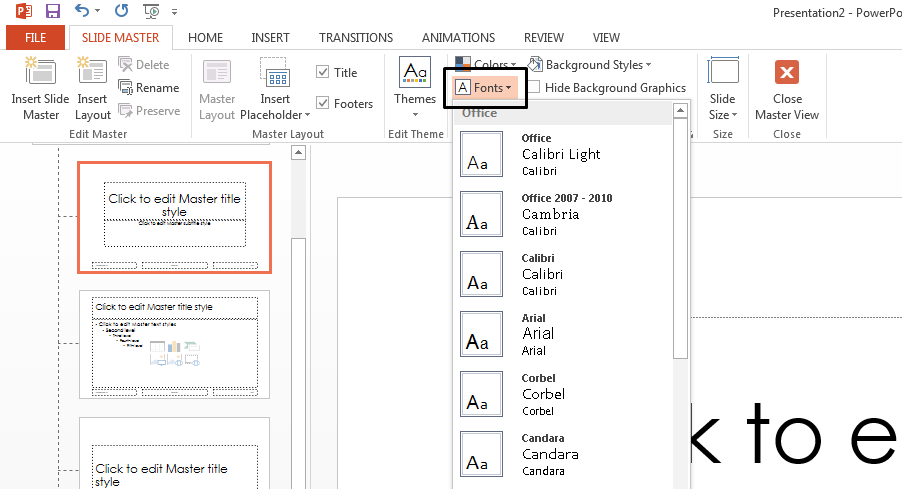 **Note:**Any changes you make in Slide Master view affect all the slides that use the master.
For more info you can refer to the official link:
Change the default font in PowerPoint - Microsoft Support
Best Regards,
Airy.C - MSFT | Microsoft Community Support Specialist