Microsoft 365 and Office | Loop | Other
A collaborative workspace app in Microsoft 365 designed to help teams co-create, stay organized, and work together in real time across apps and devices.

This browser is no longer supported.
Upgrade to Microsoft Edge to take advantage of the latest features, security updates, and technical support.
' cx='32' cy='32' r='32' /%3E%3Ctext x='50%25' y='55%25' dominant-baseline='middle' text-anchor='middle' fill='%23FFF' %3EA%3C/text%3E%3C/svg%3E)
Dear Community,
I’m currently researching how I can backup/export MS Loop Workspaces, but haven’t found a solution yet.
Individual Loop Components, if they are created for example in MS Teams Chats, are stored as .loop files in a user’s OneDrive and can be backed up. However, MS Loop Workspaces seem to be stored in SharePoint Embedded, and there seems to be no option to backup/export from SharePoint Embedded, either as an individual user or admin.
Has anyone found a solution? I would like to make more use of Loop Workspaces, but without option to back them up, I can’t trust the application yet.
More info from Microsoft on the container types/storage in SharePoint Embedded:
https://learn.microsoft.com/en-us/microsoft-365/loop/loop-compliance-summary?view=o365-worldwide
A collaborative workspace app in Microsoft 365 designed to help teams co-create, stay organized, and work together in real time across apps and devices.
Locked Question. This question was migrated from the Microsoft Support Community. You can vote on whether it's helpful, but you can't add comments or replies or follow the question.
I would like to see loop be able to be created within SharePoint, and stored there instead of being stored on a user's space. This would prevent loss in changes in job roles or leaving the company. Everything else about loop is exactly what we need!
Thank you for your feedback Arquel! It would be great if you could forward my suggestion to the development team and I will also post it via the Help button.
I was also talking to Microsoft Support in the meantime, and they told me that it's possible to run a Content Search in the Admin Compliance center, and filter by file type .loop. That allowed to get me an extract of all the Loop pages in the Loop Workspaces.
I agree with this Alicia.
When this feature would be available I want to make Loop our standard application within the company for a lot of work documents.
Lets hope it will be possible in the future.
Kind regards
Wim
Hello all,
I had the same problem - I had some notes in one MS Loop workspace (linked to a MS 365 account that would soon be deactivated) that I wanted to move to a new MS 365 account / MS Loop).
While I have not yet found (as of September 2024) a way to easily export something like a ".loopwksp" file storing an entire Loop Workspace (pretty much like OneNote where one can export an entire Notebook), I did notice an easy way to print/save to PDF entire pages, which can be satisfactory enough, at least to backup the info stored in Loop - especially since it is done in a different format that does not require the Loop **** to be read.
Simply go to the top-right corner of your Loop page, next to the Share button, and click on the 3 dots.
Click on "Print & PDF export"
Save it as PSF on your computer (or print it).
And you have a record of that page.
Not ideal if you have many pages, or if you wanted to import the Workspace into another MS Loop account - but still, something that could be useful to some.
Cheers,
Dan
Hello Jakyss,
Thank you for posting here in Microsoft Community.
To set your expectations that Microsoft Loop is still in on it's infancy state where you may have less feature that expected or issues, I assure you that our engineering team are continuously working on improving the Microsoft Loop.
With your concern, as per checking, since Loop's workspace are being stored on the SharePoint Embedded. On this post Announcing SharePoint Embedded Public Preview where you can connect it with Microsoft 365 Backup – Microsoft Adoption. To know more, you may check on this article: Set up Microsoft 365 Backup (Preview) - Microsoft Syntex | Microsoft Learn.
We always suggest sending feedback on this, as our engineers values your feedback specially as it contributes on improving the Loop's functionality.
In the bottom right corner, select Help> Give feedback.
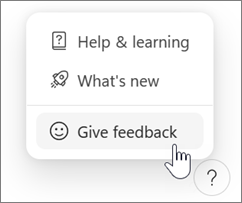
On Android or iOS, tap your profile picture at the top left to find Help and feedback.
Regards,
Arquel C.
Microsoft Moderator