Share via

How Can I re-enable Organizational Chart Add-in for PowerPoint for Microsoft 365 Apps for enterprise?

Anonymous
2024-04-17T19:54:24+00:00

The last time was able to edit the chart on the PowerPoint file using Organizational Chart add-in was on March 29th, 2024. As of this morning lost the ability to edit it and now get the error saying that the add-in is missing. Upon checking the add-ins for PowerPoint I did not find the Organizational Chart add-in in there. Uon checking version of office its the Microsoft Corporation version 16.0.17328.20282. Is there a way to re-enable the add-in? Due to been a newer office the option to add the add-in via installation option is not available. Please help.

Thank you,

Jonathan

Microsoft 365 and Office | PowerPoint | For business | Windows

Locked Question. This question was migrated from the Microsoft Support Community. You can vote on whether it's helpful, but you can't add comments or replies or follow the question.

0 comments No comments

5 answers

Sort by: Most helpful
  1. Anonymous
    2024-06-19T21:26:29+00:00

    If you can retrieve the orgchart.exe file from a version of powerpoint where the org chart editor was working and overwrite the file in the new version while powerpoint is closed then it will be working again when you reopen powerpoint.

    Be warned however, it is important to recreate the file with another tool of some sort because there is no guarantee that this workaround will work on the next powerpoint update. At least with it working again you will be able to copy/paste text information you have in the chart and move it to a tool like SmartArt in Powerpoint or create it in Visio.

    https://support.microsoft.com/en-us/office/create-an-organization-chart-in-office-by-using-smartart-9b51f667-11b7-4971-a757-a08a36684ee6

    OrgChart.exe is located in C:\Program Files\Microsoft Office\root\Office16

    Was this answer helpful?

    1 person found this answer helpful.
    0 comments No comments
  2. Anonymous
    2024-04-22T19:27:23+00:00

    Mia, I asked this same question and oddly was told by Zenobia to post the question to the excel group forum which is odd as this is not in excel.

    After a March 2024 windows update the org chart add-in in powerpoint no longer works.

    This is the error:

    This screen grab is from the MS update release notes for #2403 on March 27:

    Please advise what MS's workaround is since they are the ones whom without notice removed it with that update.

    Thank you

    Christina

    Was this answer helpful?

    1 person found this answer helpful.
    0 comments No comments
  3. Anonymous
    2024-04-18T04:24:14+00:00

    Dear respected Jonathan,

    We went through your post carefully and may I know if you are referring to the Organizational Chart SmartArt in PowerPoint? Below are the results from the latest version of PowerPoint, kindly check if my tests are correct to your concern. And please let me know if you are using a previous version of PowerPoint like 2016/2013.
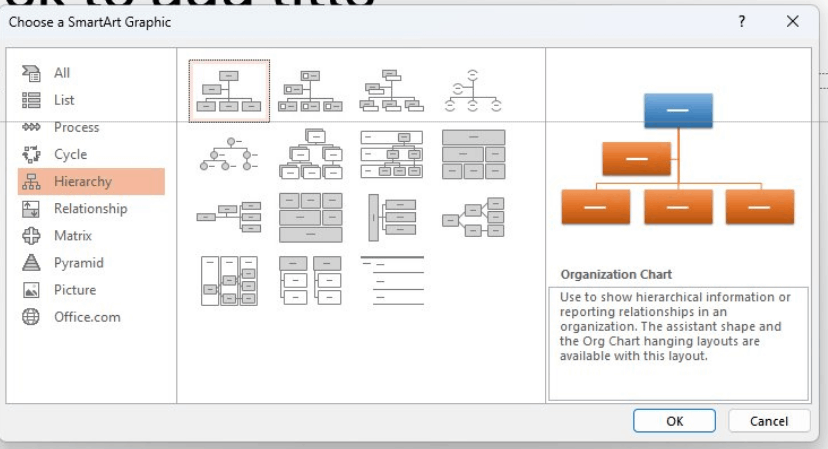
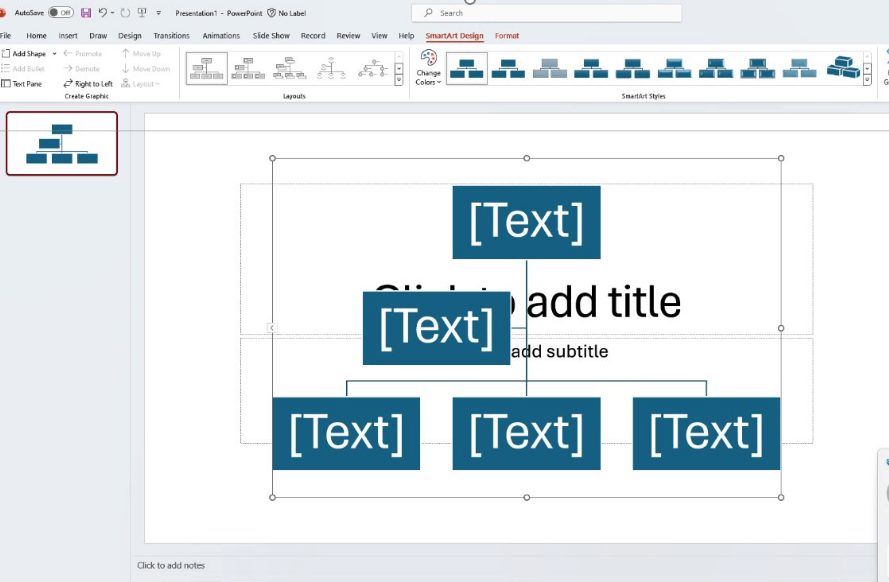
    If so, it seems like I can add and edit it normally. To troubleshoot the scenario on your side, please share us the following information as needed.

    1. The full screenshot of the product version information.

    See: About Office: What version of Office am I using? - Microsoft Support

    1. The screenshot of the complete error message.
    2. If the same issue will happen when you create a new file and add it?
    3. If the issue is only happening on a specific file, you can share with me in our private message:

    Appreciate your understanding that sometimes the initial reply may not resolve the situation very soon. However, we can work together to narrow down and resolve the situation. Please kindly post back and provide the more information, then we can focus on your specific scenario and provide specific suggestions.

    We'll be here for you to wait for your updates. I appreciate your time and effort on checking these above and thank you for your patience and cooperation. I hope that you are keeping safe and well!

    Sincerely,

    Mia | Microsoft Community Moderator

    Was this answer helpful?

    1 person found this answer helpful.
    0 comments No comments
  4. Anonymous
    2024-06-03T19:58:12+00:00

    Is there a work around for this?

    Was this answer helpful?

    0 comments No comments
  5. Anonymous
    2024-05-06T21:49:21+00:00

    This is causing some real issues surely you must have a workaround.

    Was this answer helpful?

    0 comments No comments