Microsoft 365 and Office | Install, redeem, activate | For business | Other
Processes in Microsoft 365 for setting up Office apps, redeeming product keys, and activating licenses.

This browser is no longer supported.
Upgrade to Microsoft Edge to take advantage of the latest features, security updates, and technical support.
' cx='32' cy='32' r='32' /%3E%3Ctext x='50%25' y='55%25' dominant-baseline='middle' text-anchor='middle' fill='%23FFF' %3EA%3C/text%3E%3C/svg%3E)
We currently have 2 Webhook integrations that create cards in Teams channels. Considering Microsoft's extremely quick timeline to deprecate Webhook connectors, we were hoping to get some support in converting these as there doesn't seem to be much in terms of documentation available on this.
Webhook 1:
The first webhook sends the payload in the following format:
{
"@context": "https://schema.org/extensions",
"@type": "MessageCard",
"themeColor": "0072C6",
"title": "Title text....",
"text": "Body test...",
"potentialAction": []
}
And we are getting the following error with the default "Post to ... when a webhook request is received" flow:
Action 'Send_each_adaptive_card' failed: The execution of template action 'Send_each_adaptive_card' failed: the result of the evaluation of 'foreach' expression '@triggerOutputs()?['body']?['attachments']' is of type 'Null'. The result must be a valid array.
We have tried several changes within the workflow to correctly parse the MessageCard object and also read it in as an Array, but nothing has been successful.
Webhook 2:
The second webhook uses Python to send the payload as a ConnectorCard:
myTeamsMessage = pymsteams.connectorcard(teams_url)

myTeamsMessage.text(current_password)

myTeamsMessage.send()
This was very simple, as we are just passing a string as the message text. I was able to successfully convert this to be accepted by the flow. This was the resulting code:
myTeamsMessage = pymsteams.connectorcard(teams_url)
    fullMessageJson = {
        "type": "message",
        "attachments": [
            {
                "contentType": "application/vnd.microsoft.card.adaptive",
                "content": {
                    "$schema": "http://adaptivecards.io/schemas/adaptive-card.json",
                    "type": "AdaptiveCard",
                    "version": "1.0",
                    "body": [
                        {
                            "type": "TextBlock",
                            "text": current_password
                        }
                    ]
                }
            }
        ]
    }
    myTeamsMessage.payload = fullMessageJson
    myTeamsMessage.send()
Since we were able to figure out the second webhook, Webhook 1 is really what we need some help on, since we cannot change the payload that is being sent from the ticketing API we rely on.
Is there a way to edit the flow so that it can accept the MessageCard type, or do we need to convert that to the array of AdaptiveCard types before sending the request to the workflow?
Processes in Microsoft 365 for setting up Office apps, redeeming product keys, and activating licenses.
Locked Question. This question was migrated from the Microsoft Support Community. You can vote on whether it's helpful, but you can't add comments or replies or follow the question.
Answer accepted by question author
Hey Mitch,
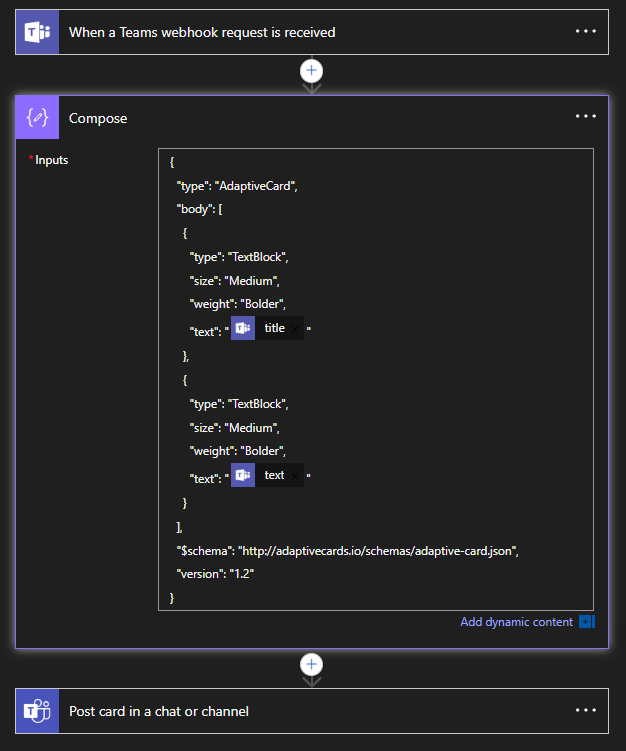
What you can do is add a compose step immediately after the webhook received trigger, and perform the transformation into what you want there, e.g.
Teams workflow example (image upload failed here)
I got that working from the guidance here - https://github.com/prometheus/alertmanager/issues/3920#issuecomment-2219950227
Atlassian came out with an updated integration on 8/24 to work with Microsoft's changes. I created a new workflow for my Teams channel by using the attached instructions and it worked perfectly when I put in the new web hook into my Jira Automation.
That and having a Premium subscription to Teams in order to execute the steps.
Dear Mitch Hein,
Thanks for posting back.
We've done a quick test and can reproduce a similar situation on our side. Please click on search and then choose to "Post your question" as a workaround as shown below:
Best Regards,
Rhoda
It won't allow me to start a topic, the button is greyed out:
Dear Mitch Hein,
Per your description, the issue happens when you try to convert Teams Webhooks to Power Automate Workflow.
We'd love to help you, considering that we mainly focus on general and build-in queries in Microsoft 365 and Office, we're afraid we may have limited resource for Power Automate flow.
At the same time, for Power Automate flow related queries, we have a dedicated channel Microsoft Power Automate Community, for you to be assisted properly, we sincerely recommend you go to that community and post a new thread. Members and engineers over there are proficient in the knowledge of flow customization queries. They will focus on the specific situation on your side and provide specific suggestions for you.
The reason we ask you to post a new thread is that in Microsoft Community we have limited resources and very little knowledge about Power Automate and in Microsoft Power Automate Community, you will get the most qualified pool of respondents, and other partners who read the forums regularly can either share their knowledge or learn from your interaction.
Thanks for your understanding and cooperation! We hope you stay safe and healthy always.
Sincerely,
Rhoda | Microsoft Community Moderator