Hi QuachM125,
Good day! Thanks for reaching out in the Microsoft Community. We are happy to assist you.
From your description, it seems that you are using a PowerPoint template with an "polyline" object in a PowerPoint template, which is labeled in Bulgarian, and you're wondering what this object is in the English version and it's a special add-on or not.
The object you are wondwering to is the Freeform shape tool in the English version of PowerPoint, which is used to draw polylines. Following the steps below we can easily draw a polyline:
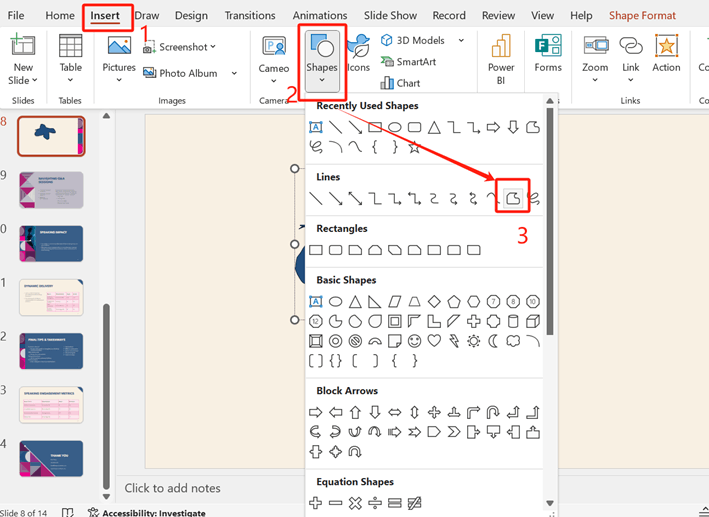
- Open PowerPoint Application, select file then go to theInsert tab in the PowerPoint menu.
- Click onShapes and underLines you selectFreeform shape option in the list.
- To draw the polyline, simply click to add points on your slide where you want the line to bend. PowerPoint will automatically connect those points with straight lines.
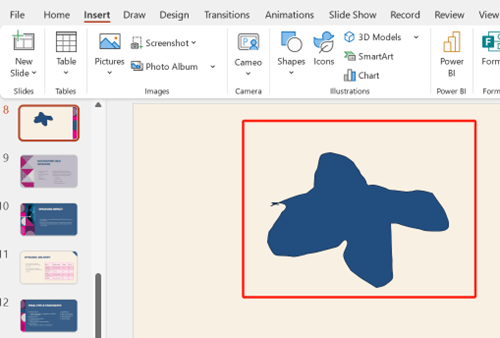
- Once you're done, click back on the starting point to close the shape if needed.
For more information click Draw or edit a freeform shape.
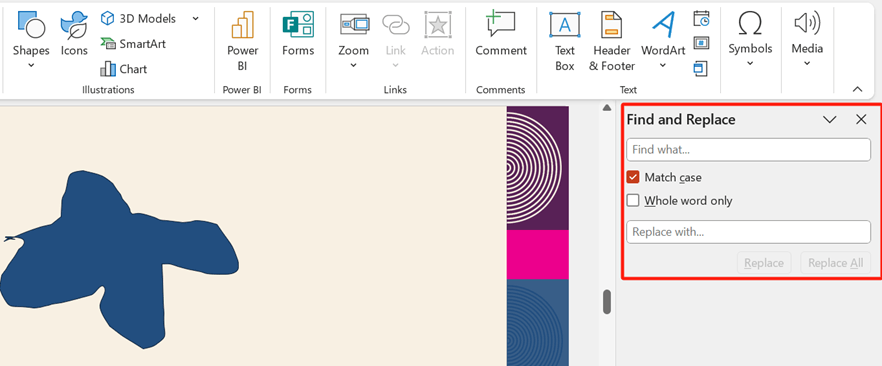
This tool is available in the regular version of PowerPoint and does not require any special add-ons. If you are still unable to find it on Insert tab>Shape, you can try searching for "Freeform" in the PowerPoint Find and Replace interface.
If the scenario above is not consistent with yours, you can also post back and point that.
We appreciate your understanding and patience. If you need more help or have more questions, don't hesitate to ask. I hope you stay safe and healthy!
Best regards,
Sophia
' cx='32' cy='32' r='32' /%3E%3Ctext x='50%25' y='55%25' dominant-baseline='middle' text-anchor='middle' fill='%23FFF' %3EA%3C/text%3E%3C/svg%3E)
