Microsoft 365 and Office | Install, redeem, activate | For business | Other
Processes in Microsoft 365 for setting up Office apps, redeeming product keys, and activating licenses.

This browser is no longer supported.
Upgrade to Microsoft Edge to take advantage of the latest features, security updates, and technical support.
' cx='32' cy='32' r='32' /%3E%3Ctext x='50%25' y='55%25' dominant-baseline='middle' text-anchor='middle' fill='%23FFF' %3EA%3C/text%3E%3C/svg%3E)
How to set up a Teams meeting in Outlook
Processes in Microsoft 365 for setting up Office apps, redeeming product keys, and activating licenses.
Locked Question. This question was migrated from the Microsoft Support Community. You can vote on whether it's helpful, but you can't add comments or replies or follow the question.
Thank you. This did not work either. The solution is I am no longer using Outlook.
Thank you,
Cam
Same issue. I have two gmail accounts and calendars that are synced through Outlook (New). Neither of these calendars appear in Teams. And, I cannot create an event in Outlook, as a Teams meeting, because the Teams Meeting option does not appear in the
Please advise,
Cam
Thanks. No matter what I do, the "Teams Meeting" option does not appear.
The Teams Meeting Add-in is enabled, but the option does not show.
I have uninstalled and reinstalled my full 365 suite and Teams. No impact.
How do I get it to show??
Thanks ...
Hi,
This issue was that the Teams add-in for Outlook was dis-abled. I've sorted it now thanks,
Bernie
Hello Bernard Zakary,
Good day. Thank you for posting to Microsoft Community. We are happy to help you.
For detailed steps on how to set up a Teams meeting in Outlook on the web, desktop or mobile kindly follow the steps in the attached document Schedule a Microsoft Teams meeting from Outlook - Microsoft Support [a41b-1ea1-420-367f].
For new Outlook desktop and web:
To schedule a Teams meeting on the Outlook desktop app:
 .
. .
.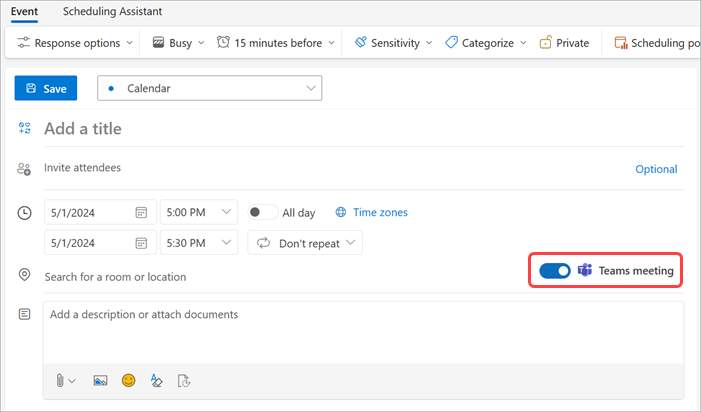 5. From the Calendardropdown menu, select the account you want to schedule a Teams meeting with.
6. Add meeting details and invite attendees.
7. Select Send
5. From the Calendardropdown menu, select the account you want to schedule a Teams meeting with.
6. Add meeting details and invite attendees.
7. Select Send  .
.
**Note:**The Teams meeting join details are added to the meeting invite automatically after selecting Send. Selecting Save as draft will create a draft on your calendar without the Teams meeting join details.
For classic Outlook:
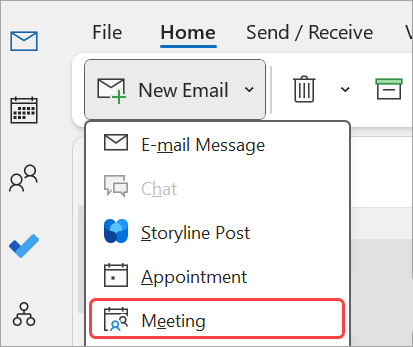 4. In the Meetingtab, select the dropdown arrow next to Teams Meeting.
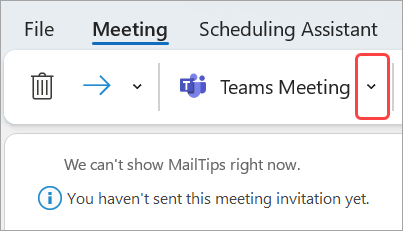 5. SelectSchedule meeting.
- Teams meeting join info will appear below the details.
We are looking forward to your reply. I appreciate your cooperation.
Sincerely,
Simbarashe | Microsoft Community Moderator