I'm trying to upgrade my unlicensed (not really, I'll explain later) Windows 10 Pro to a licensed Windows 11 Pro. My system is, generally speaking, around 14 years old. I started with Windows XP on a clean install 14 years ago, and since then, I have upgraded my OS a few times. I have also migrated the C: drive, OS files, and other data from one hard drive to another, and another, and so on. Now, I have a 4TB SSD. I had an OS license until several years ago, when I upgraded my motherboard, CPU, and RAM. Windows required me to re-enter my license key, but I couldn't find it, which resulted in an unlicensed OS. I recently purchased a Windows 11 Pro key and upgraded the main components a few weeks ago. In trying to resolve the Windows Health Check error stating that my system does not support Secure Boot, I've attempted to use the CMD mbr2gpt command multiple times to no avail. The validate command runs successfully. I have activated the key in this same system, in case it somehow fixes the mbr2gpt error. My motherboard (ASUS TUF GAMING B650E-PLUS WIFI) does, in fact, support Secure Boot. When I try to update my BIOS settings by disabling the "Launch CSM" setting, it prevents Windows from loading to the Windows splashscreen. And so, I have to enable it again and make sure that the sub-setting "Boot Control Device" to at least "UEFI and Legacy OPROM". Windows won't boot if I set it to "UEFI only". The System Reserve has 100MB, the C: drive has nearly 1 TB, the Recovery Partition has 1.1 TB of space, and an unallocated section with 1.6 TB. The C: drive has around 112 GB of free space, more than enough for mbr2gpt to create the EFI System Partition.
What am I missing here? What do I need to do to convert the Disk 2 to GPT?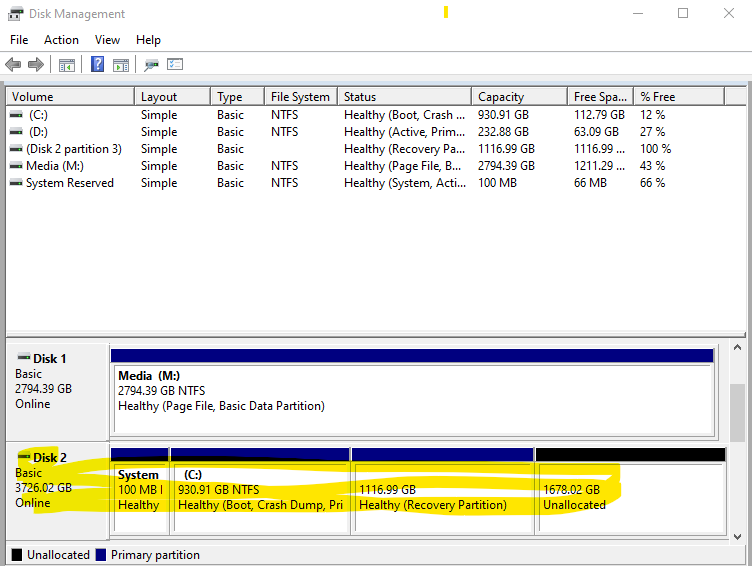

' cx='32' cy='32' r='32' /%3E%3Ctext x='50%25' y='55%25' dominant-baseline='middle' text-anchor='middle' fill='%23FFF' %3ESP%3C/text%3E%3C/svg%3E)

' cx='32' cy='32' r='32' /%3E%3Ctext x='50%25' y='55%25' dominant-baseline='middle' text-anchor='middle' fill='%23FFF' %3EVZ%3C/text%3E%3C/svg%3E)
' cx='32' cy='32' r='32' /%3E%3Ctext x='50%25' y='55%25' dominant-baseline='middle' text-anchor='middle' fill='%23FFF' %3EJB%3C/text%3E%3C/svg%3E)