Hello, thank you for reaching out to Microsoft Q&A.
Please note that, if you delete the Windows Hello Fingerprint .DAT file from the WinDatabase folder, Windows will automatically recreate the file when the Biometric service restarts (this is by default). However, your previous fingerprint data (records) will be removed, allowing you to set up a new Fingerprint again.
If you encounter any errors while setting up Windows Hello Fingerprint again, please let me know. In the meantime, make sure you have followed the steps below.
- Press Windows + R keys , type services.msc and press Enter.
- Find Windows Biometrics Service in the list, right-click and stop the service.

Next, navigate to the following location on your C: drive -
This PC > Local Disk ) C:) > Windows > System32 > WinBioDatabase
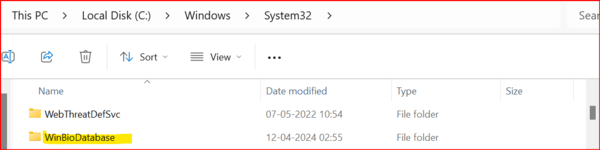
(This is where your fingerprint data is stored)
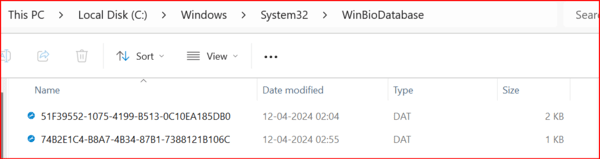
Inside the folder, you will find several .DAT files.
- Right-click the first .DAT file > Open with > Notepad. (To delete the entire file, press Ctrl + A to select everything, then click Delete.)
Now click File > Save As > Save File to Desktop. (Be sure to select "Save file type as - All Files" from the drop-down menu.
 A notepad file with empty data and the same name will appear on your desktop.
• Do the same for all files inside the folder.
Now go to your desktop folder >> You will have deleted Notepad content files with the same name >> Just cut those files from desktop and go to the same location and paste them.
Go to This PC > Local Disk (C:) > Windows > System32 > WinBioDatabase, right click and paste.
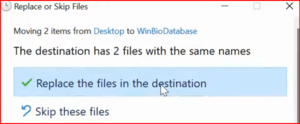
Select "Replace files in the destination".
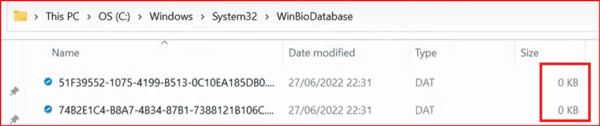
After replacing the fingerprint, go to the Services window, right-click the Windows Biometrics service, and select "Start Service." Now set up your fingerprint again in the sign-in options.
I hope this information helps. If you have any questions, please let me know and I'll be happy to help you.
' cx='32' cy='32' r='32' /%3E%3Ctext x='50%25' y='55%25' dominant-baseline='middle' text-anchor='middle' fill='%23FFF' %3EB%3C/text%3E%3C/svg%3E)

