Share via

windows firewall, BFE not starting, error codes 5:access denied and 1068:The dependency service or group failed to start

kingkia 20 Reputation points
2025-09-28T04:09:17.01+00:00

Lately, my HP laptop has been experiencing blue screens fairly often (roughly once every two weeks), with errors such as DPC_WATCHDOG_VIOLATION and CRITICAL_PROCESS_DIED.

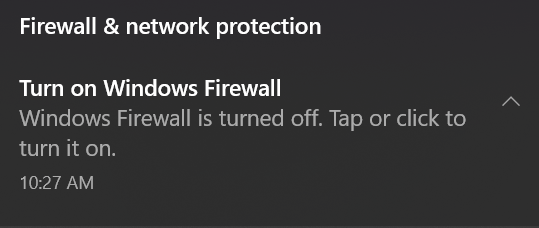
A few days ago, while working in an Excel file, my computer encountered a PAGE_FAULT_IN_NONPAGED_AREA blue screen, and my Wi-Fi stopped working. After extensive troubleshooting, I deleted the Excel file, and the issue was resolved. However, ever since then, I have been receiving almost daily notifications asking me to turn on my firewall, which I have ignored.
User's image

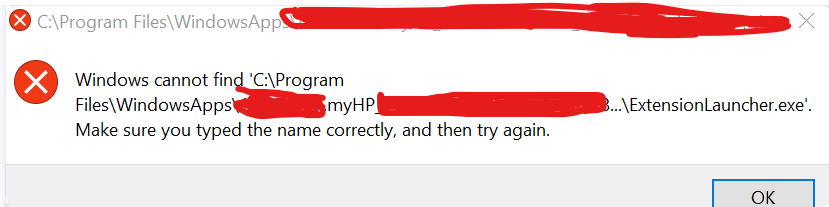
Last night, when I turned on my laptop, my taskbar items didn’t load immediately. Even after they appeared, I received an error saying that Windows couldn’t find something.
Screenshot 2025-09-28 120700

Additionally, when I tried to watch a movie, both the Movies & TV app and the Media Player app gave the same type of error, and only Windows Media Player worked.

This morning, I tried several methods to fix my firewall. I followed a tutorial which instructed me to:

Press Windows key + R, type regedit, and press Enter.

Navigate to HKEY_LOCAL_MACHINE\SYSTEM\CurrentControlSet\Services\BFE.

Right-click on the BFE entry and select Permissions.

Click Add and type Everyone, then click OK.

Select the Everyone entry and mark Full Control under permissions.

Restart the PC.

However, this did not resolve the issue. I also ran DISM and SFC scans, and all system files were intact.

I then tried running netsh advfirewall set allprofiles state on in the command prompt, but received the following error:

"An error occurred while attempting to contact the Windows Defender Firewall service. Make sure that the service is running and try your request again."

I also went to services.msc and attempted to start BFE and Windows Defender Firewall, but got these errors:

Error 5: Access Denied

Error 1068: The dependency service or group failed to start

I am not sure what the underlying problem is. I am using a Chinese antivirus (Tencent). Could this be causing the issue?

Windows for home | Windows 10 | Security and privacy
0 comments No comments

Answer accepted by question author

  1. Ramesh 176.1K Reputation points Volunteer Moderator
    2025-09-28T05:07:45.2666667+00:00

    Please share your Farbar scan logs for analysis.

    • Download Farbar Recovery Scan Tool 64-bit FRST64.exe
    • If the OS language is not English, rename FRST64.exe to FRST64English.exe.
    • Run the program. Don't check or uncheck any options. Click "Scan".
    • Add the two logs, FRST.txt and Addition.txt, to a zip archive.
    • Share the zip file on OneDrive or GoFile.io, and post the link here.

    Note: If Microsoft Edge or Chrome mislabels the Farbar Scanner executable as PUA/malware, choose to keep it by tapping … in the bottom bar, choosing Keep, and then choosing Keep anyway in the dialog that appears. See this screenshot. It's a safe tool used in most antimalware forums.


    1 person found this answer helpful.

2 additional answers

Sort by: Most helpful
  1. Ramesh 176.1K Reputation points Volunteer Moderator
    2025-10-02T12:41:39.7+00:00

    Please try the accepted answer in the following thread exactly as instructed.

    https://learn.microsoft.com/en-us/answers/questions/4088904/windows-firewall-0x800706d9?forum=windows-windows_11-performance&referrer=answers

    That should fix the Firewall and BFE services.

    1 person found this answer helpful.

  2. Ramesh 176.1K Reputation points Volunteer Moderator
    2025-10-02T12:19:10.66+00:00

    Please run the fixlist below.

    • Download fixlist.txt
    • Save Fixlist.txt to the same folder as FRST64.exe.
    • Close all programs.
    • Launch the Farbar Scanner tool and click "Fix".
    • Restart Windows when prompted.
    • Upload the output log file (FixLog.txt) to your OneDrive.

    NOTE: The fixlist.txt script was written specifically for this user and for use on that particular machine. It is not recommended to run it on another machine, and don't run the same fixlist.txt more than once.


    The fixlist clears your browser's cache and cookies.


    1 person found this answer helpful.

Your answer

Answers can be marked as 'Accepted' by the question author and 'Recommended' by moderators, which helps users know the answer solved the author's problem.

