Share via

My Outlook account has been hacked and I need help.

Roderick Irawan 30 Reputation points
2025-07-23T05:29:15.0566667+00:00

Hello,

Around last week I got a "unusual login activity" notification on my authenticator and then I change my password. For example, let say this new password is FirstPass.

Yesterday, I got the same "unusual login activity" notification and also a new email from Microsoft account team saying New app(s) connected to your Microsoft account and the app is Thunderbird. Which I didn't do. I also received multiple microsoft authenticator asking me to approve 5 digits login codes (which I Deny)

Then I got annoyed denying these notification so I once again change my password. (Example newest password: NewestPass)

In this process, I carefuly look at the code and make sure I Approve the correct code from my Authenticator.

Then I opened my email and I found that there's a draft message with subject "FirstPass - Roderick Irawan, I have hacked you and stolen your data and photos." The draft email saying they have monitored me for a long time and threaten to expose me unless I transfered them some bitcoins.
I also got multiple password reset request from from other account connected with my email in the inbox (opened) and some successful password reset.

At this point I'm sure my account is hacked.

Everytime I delete that draft, a new draft with the same subject will appear within 3 seconds.

The hacker also set a rule to forward all incoming and outgoing emails to be forwarded to a certain hotmail account.
Deleting, modifying, or adding new rule will reset the rule to only do that 1 rule.

Last night, I manage to remove that rule by following this https://learn.microsoft.com/en-us/answers/questions/4620278/how-do-i-stop-a-hacker-from-changing-the-rules-in?forum=outlook_com-all&referrer=answers
It was a success, and I can set up a new rule to auto delete that Draft containing my old password.

Unfortunately today I woke up and find that rule is back (only this time the email target is different) and my auto delete rule is gone.

The draft keep displaying my old password.

I have a feeling the hacker have installed microsoft authenticator on their end, so they no longer need the new password to login to my account and gained access to my account freely.

Now I even failed to login via my authenticator,User's image
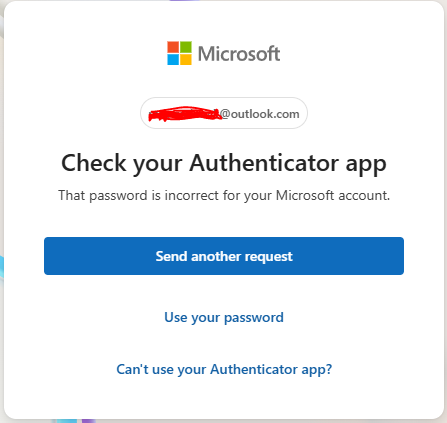
so I just use password and recovery code sent to my other email as my login method.

I looked up on how to check how many authenticator is connected to my account but I couldn't find any helpful solution. I found some mentioning Microsoft Entra, but this looks like something that a company use to manage multiple accounts.

At this moment I also can't access "security tab" in my account since everytime I put my password, it just responded with "Too many requests"

Outlook | Web | Outlook.com | Account management, security, and privacy

Answer accepted by question author
  1. Bal Singh 80 Reputation points
    2025-07-26T09:07:49.5566667+00:00

    Hi,

    I also found a similar issue and may have a solution to "Name - I have hacked you and stolen your data and photos." email.

    Firstly, change password immediately - then log into your Microsoft account and remove all rules. I found 4 rules associated with my account forwarding emails and stopping others from notifying this was happening.

    https://learn.microsoft.com/en-us/answers/questions/4620278/how-do-i-stop-a-hacker-from-changing-the-rules-in?forum=outlook_com-all&referrer=answers

    https://outlook.live.com/mail/0/options/mail/rules

    Secondly, remove any permissions (such as connection to Thunderbird) and stop any forwarding and IMAP.

    https://outlook.live.com/mail/0/options/mail/forwarding

    Thirdly, set up two factor authentication if you have not already done so.

    https://support.microsoft.com/en-gb/account-billing/how-to-use-two-step-verification-with-your-microsoft-account-c7910146-672f-01e9-50a0-93b4585e7eb4

    Forthly, sign out of all devices, this usually takes 24 hours.

    https://support.microsoft.com/en-gb/account-billing/how-to-sign-out-of-your-microsoft-account-everywhere-58da4a74-a719-43a6-9dd0-74a7e613229f

    Finally, watch for any account reset emails within 24 hours and try to immediately delete any associated accounts or change passwords, they targeted accounts that would have registered addresses or card information for me such as amazon and deliveroo.

    Before this the draft message of "Name - I have hacked you and stolen your data and photos." would continue to appear in my folder. This no longer appears.

    Hope this helps someone!

    1 person found this answer helpful.

5 additional answers

Sort by: Most helpful
  1. Ana Magaz 0 Reputation points
    2025-10-01T09:19:38.8066667+00:00

    El pasado viernes, mi cuenta de outlook fue pirateada. La he restaurado pero han desaparecido todos los correos que tenía en el buzón.
    ¿Como puedo recuperar esos correos que me han desaparecido?

    0 comments No comments

  2. Virginia M 40,490 Reputation points Independent Advisor
    2025-08-07T08:54:21.7833333+00:00

    Hi, if you can access the account I would turn on 2 factor authentication & change the password via another device. Then scan your pc for malware.

    If you can’t then is there any error message when trying to access your Mondo account?

    If the hacker had access then I suspect they’ll withdraw the money.

    0 comments No comments

  3. Rach Harrison 0 Reputation points
    2025-08-07T08:48:58.0266667+00:00

    I’m having the same problem but they have changed some of my other passwords such as Amazon and tried to log onto my Monzo now having problems with getting access to Monzo which has money in I’ve changed my Hotmail password but they are still managing to get certain emails and read them I’ve tried ringing customer service and nothing so don’t know what to do or where to go next

    0 comments No comments

  4. Virginia M 40,490 Reputation points Independent Advisor
    2025-07-23T09:34:08.6866667+00:00

    Hello, I’m Virginia, a fellow user like yourself.

    Sorry to hear you’re experiencing problems.

    Please note we’re not Microsoft but fellow users like yourself & have no access to accounts.

    There’s an excellent tutorial here by Diane Poremsky who is an MVP so the information is 100% reliable on what your options are:

    https://answers.microsoft.com/en-us/outlook_com/forum/all/recovering-microsoft-accounts/38e19a63-ec0c-498c-b187-b633f9e67d57

    Also try recovering your account here:

    https://support.microsoft.com/account-billing/how-to-recover-a-hacked-or-compromised-microsoft-account-24ca907d-bcdf-a44b-4656-47f0cd89c245

    Please be aware that as the email address has been changed to that of the hacker &/or 2fa/mfa has been enabled then usually there’s nothing which can be done.

    Did you save the backup codes shown during 2fa set up? If yes then you can also use one to access your account..

    Recovery methods should be listed under security but in any case I don’t think two separate Authenticator apps can be added as a recovery method.

    I’d recommend scanning the PC for malware & change passwords via a non compromised device & not signing in to any accounts on the hacked PC until it is clean..

    Try running these programs:

    MS Safety scanner: https://learn.microsoft.com/microsoft-365/security/intelligence/safety-scanner-download?view=o365-worldwide

    MBAM free: https://www.malwarebytes.com/mwb-download/ ensure scan for rootkits is enabled.

    If these find one or more infections but do not fully remove them it will be wise to register with a malware removal site to receive dedicated malware removal instructions, an expert will remain with you throughout the process until confirmation that your PC is 100% clean.

    Malwarebytes virus/malware removal forum:

    https://forums.malwarebytes.com/forum/7-windows-malware-removal-help-support/

    Note: The above is a non-Microsoft website. The page appears to be providing accurate, safe information. Watch out for ads on the site that may advertise products frequently classified as a PUP (Potentially Unwanted Products).

    Please do not download any repair tool which may be offered by this site other than the ones I mention/recommend.

    Thoroughly research any product which is mentioned here before you decide to download and install it.

    0 comments No comments

Your answer

Answers can be marked as 'Accepted' by the question author and 'Recommended' by moderators, which helps users know the answer solved the author's problem.