I recently installed the Windows 11 version 25h2 on my laptop, and my Bluetooth stopped working. In fact, the Bluetooth setting disappeared entirely. I tried everything I found online, but it didn't help. I was eventually able to get my Bluetooth to work again by reinstalling the current version of Windows. Below are the steps:
Steps to reinstall Windows
- In the Settings app
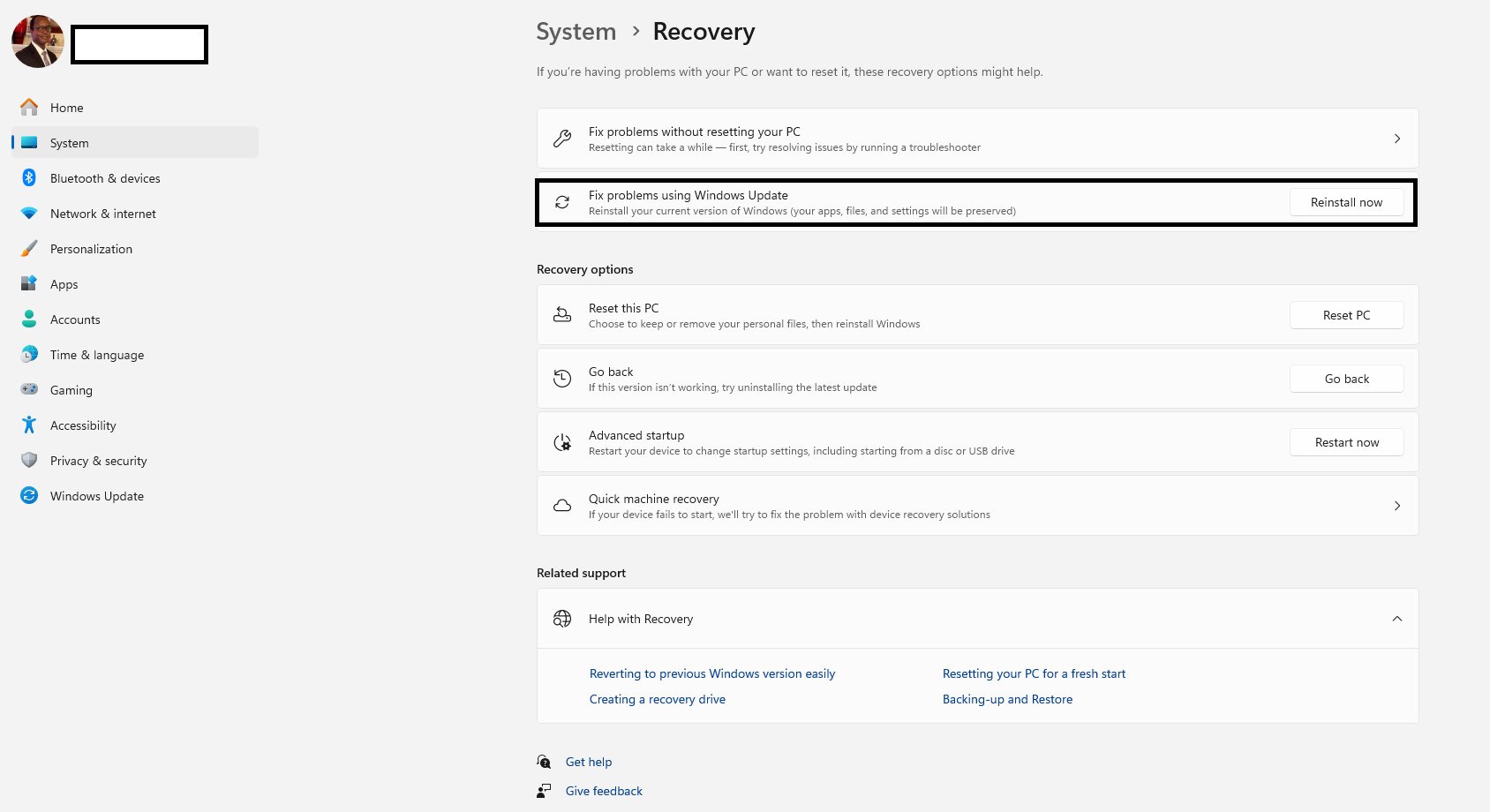
 on your Windows device, select System > Recovery
- Under Fix problems using Windows Update, select Reinstall now
- In the Fix problems using Windows Update window, choose if you want to allow the PC to automatically restart 15 minutes after the installation completes
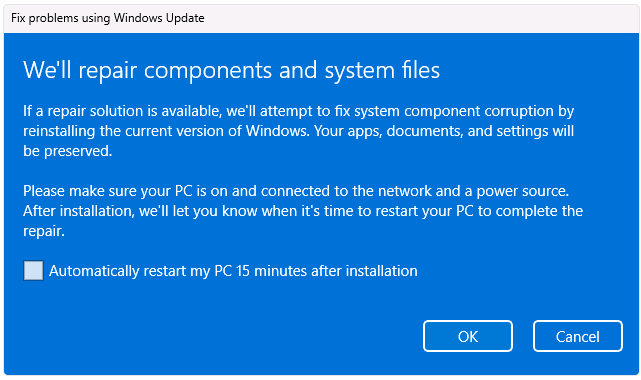
- Select OK when you’re ready to start the installation
- The reinstall will take you to the Windows Update page in Settings. It will start downloading a repair version of the last operating system update that was successfully installed on your PC. Once the download is complete, the repair version of the update installs
- Once the reinstall is complete, restart your PC if you didn’t choose to allow it to restart automatically
After restarting, I checked and confirmed that my Bluetooth settings are functioning properly. I also tested all my Bluetooth devices to ensure they are working properly. Please give a thumbs up to let me know if this information is helpful.
Disclaimer: I am not a Microsoft Staff member; this is a personal attempt at troubleshooting, and I'm not certifying that it will work for everyone.
' cx='32' cy='32' r='32' /%3E%3Ctext x='50%25' y='55%25' dominant-baseline='middle' text-anchor='middle' fill='%23FFF' %3ET%3C/text%3E%3C/svg%3E)

' cx='32' cy='32' r='32' /%3E%3Ctext x='50%25' y='55%25' dominant-baseline='middle' text-anchor='middle' fill='%23FFF' %3ED%3C/text%3E%3C/svg%3E)
' cx='32' cy='32' r='32' /%3E%3Ctext x='50%25' y='55%25' dominant-baseline='middle' text-anchor='middle' fill='%23FFF' %3EA%3C/text%3E%3C/svg%3E)
' cx='32' cy='32' r='32' /%3E%3Ctext x='50%25' y='55%25' dominant-baseline='middle' text-anchor='middle' fill='%23FFF' %3EJQ%3C/text%3E%3C/svg%3E)
' cx='32' cy='32' r='32' /%3E%3Ctext x='50%25' y='55%25' dominant-baseline='middle' text-anchor='middle' fill='%23FFF' %3EEH%3C/text%3E%3C/svg%3E)
' cx='32' cy='32' r='32' /%3E%3Ctext x='50%25' y='55%25' dominant-baseline='middle' text-anchor='middle' fill='%23FFF' %3EJS%3C/text%3E%3C/svg%3E)
' cx='32' cy='32' r='32' /%3E%3Ctext x='50%25' y='55%25' dominant-baseline='middle' text-anchor='middle' fill='%23FFF' %3ESK%3C/text%3E%3C/svg%3E)
' cx='32' cy='32' r='32' /%3E%3Ctext x='50%25' y='55%25' dominant-baseline='middle' text-anchor='middle' fill='%23FFF' %3EAD%3C/text%3E%3C/svg%3E)
' cx='32' cy='32' r='32' /%3E%3Ctext x='50%25' y='55%25' dominant-baseline='middle' text-anchor='middle' fill='%23FFF' %3EJT%3C/text%3E%3C/svg%3E)
' cx='32' cy='32' r='32' /%3E%3Ctext x='50%25' y='55%25' dominant-baseline='middle' text-anchor='middle' fill='%23FFF' %3EJC%3C/text%3E%3C/svg%3E)
' cx='32' cy='32' r='32' /%3E%3Ctext x='50%25' y='55%25' dominant-baseline='middle' text-anchor='middle' fill='%23FFF' %3ERD%3C/text%3E%3C/svg%3E)
' cx='32' cy='32' r='32' /%3E%3Ctext x='50%25' y='55%25' dominant-baseline='middle' text-anchor='middle' fill='%23FFF' %3ELH%3C/text%3E%3C/svg%3E)