Exchange | Exchange Server | Management
The administration and maintenance of Microsoft Exchange Server to ensure secure, reliable, and efficient email and collaboration services across an organization.
This browser is no longer supported.
Upgrade to Microsoft Edge to take advantage of the latest features, security updates, and technical support.
' cx='32' cy='32' r='32' /%3E%3Ctext x='50%25' y='55%25' dominant-baseline='middle' text-anchor='middle' fill='%23FFF' %3EGA%3C/text%3E%3C/svg%3E)
Hi
We have an on-premise Exchange server. The users are running Office 365 and up to a few days ago, Outlook was working fine and the users were connecting to their local Exchange mailboxes.
Now they are disconnected from their mailboxes and are getting a prompt to enter an account to reconnect to it. However, their domain account never gets accepted.
In the past if we created a new Outlook profile it would automatically find the Exchange mailbox and connect. However, now they get the prompt to enter the account to use autodiscover.xml.
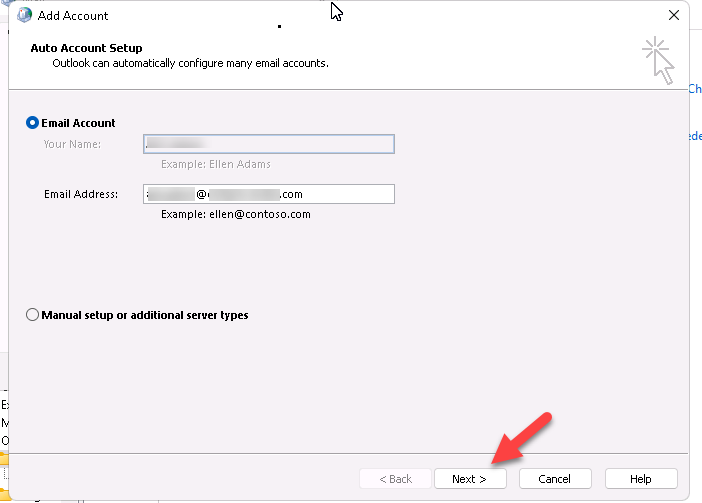
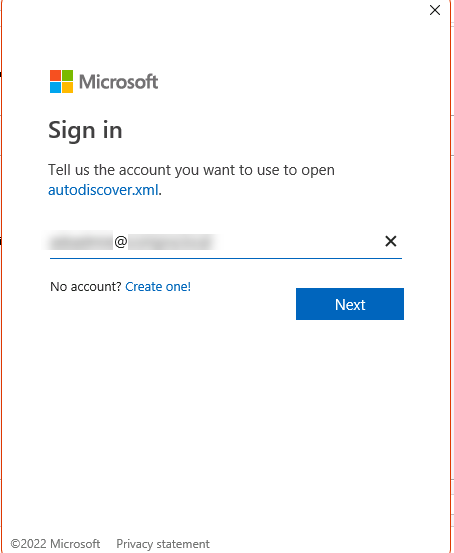
Before this occurred, we did not change anything on the Exchange server or in the local Windows DNS Manager.
We have tried a number of troubleshooting steps but none have been successful.
We have even added to the registry path "HKEY_CURRENT_USER\Software\Microsoft\Office\16.0\Outlook\AutoDiscover" the DWORD (32-bit)Value with the name ExcludeExplicitO365EndPoint and gave it the value 1.
What could be causing this behaviour?
Regards,
The administration and maintenance of Microsoft Exchange Server to ensure secure, reliable, and efficient email and collaboration services across an organization.
' cx='32' cy='32' r='32' /%3E%3Ctext x='50%25' y='55%25' dominant-baseline='middle' text-anchor='middle' fill='%23FFF' %3EAL%3C/text%3E%3C/svg%3E)
Hi @GIC-AUA ,
I want to know if you create a new profile with only one on-premises mailbox, will this issue persist?
If yes, please use ExRCA to check if it can connect to Exchange server successfully.
If Autodiscover is working and pointing to the correct server, You should be able to stop Outlook from checking Office 365 settings by setting both registry keys.
HKEY_CURRENT_USER\SOFTWARE\Microsoft\office\16.0\outlook\autodiscover
DWORD: ExcludeExplicitO365Endpoint
Value = 1

HKEY_CURRENT_USER\SOFTWARE\Policies\Microsoft\office\16.0\outlook\autodiscover
DWORD: ExcludeExplicitO365Endpoint
Value = 1
Please restart the Outlook2016 client after you modify the registry and recreate the profile to see if it can works.
Hello Aholic Liang-MSFT
Thanks for your assistance.
All mailboxes are on-premises and we are not able to create new profiles because it seems as if there i a problem with the autodiscover.
I tried the ExRCA and it does not connect to the Exchange server using autodicover.
I tried setting both registry keys and it made no difference.
Regards,
Hi,
I tried the ExRCA and it does not connect to the Exchange server using autodicover.
If possible, please provide a complete screenshot about it for our better research. (In order to avoid the disclosure of your privacy, please remember to hide your personal information).
Hi AholicLiang-MSFT
When I run the Microsoft Remote Connectivity Analyzer, I enter the information as follows:
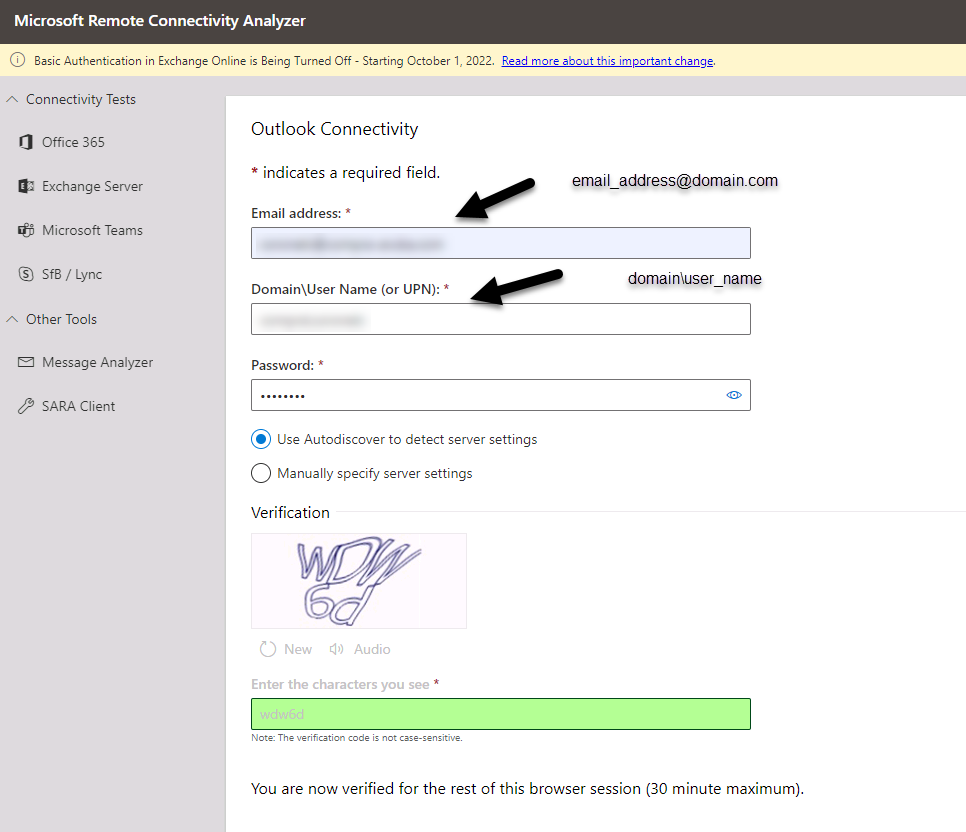
The results are as follows:
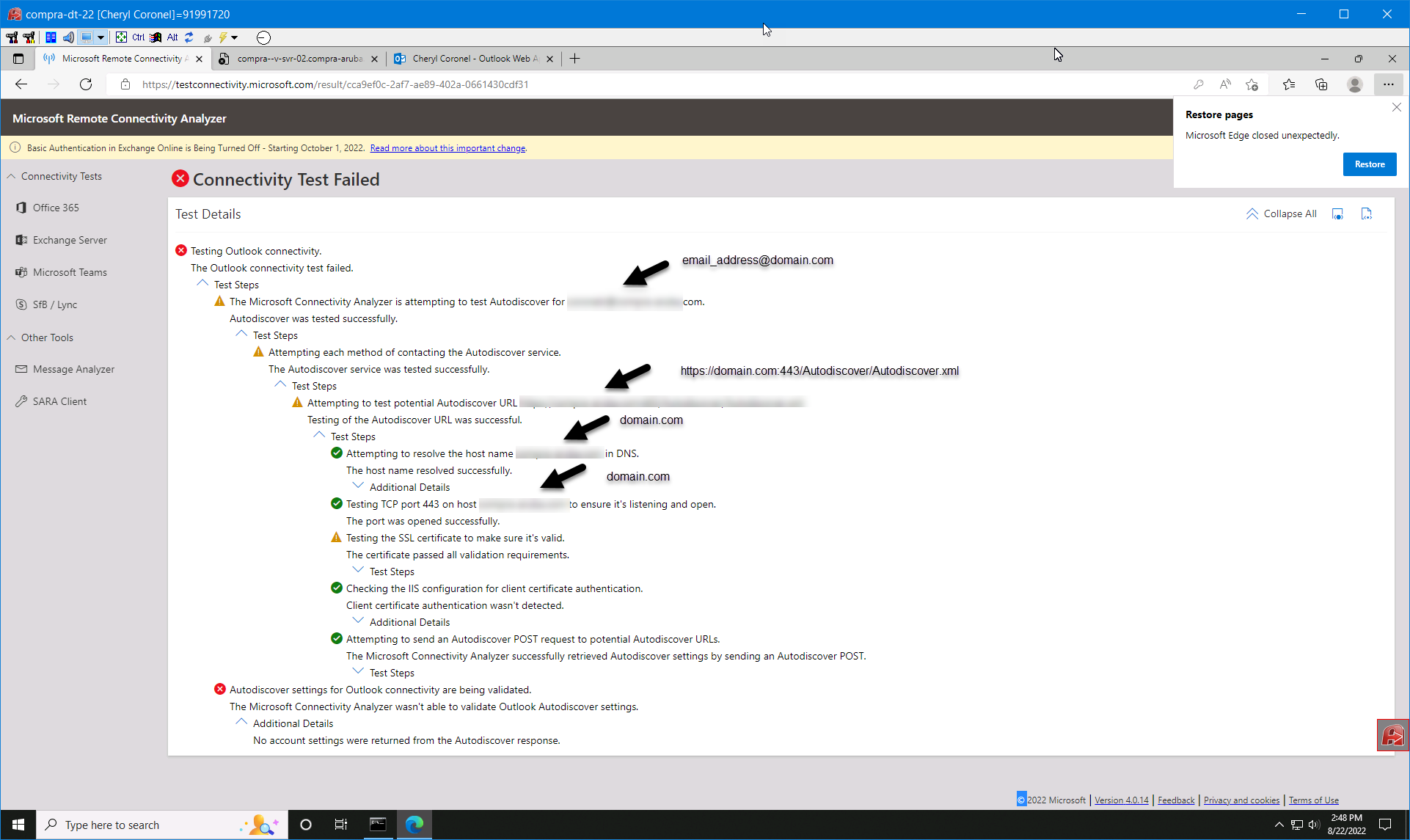
I notice in the results, the host is returned as domain.com but I think it should be <mail_server_computer_name>.domain_name.local.
On the internal network Outlook Web App works with domain.local but not domain.com and we need to specify the computer name of the mail server.
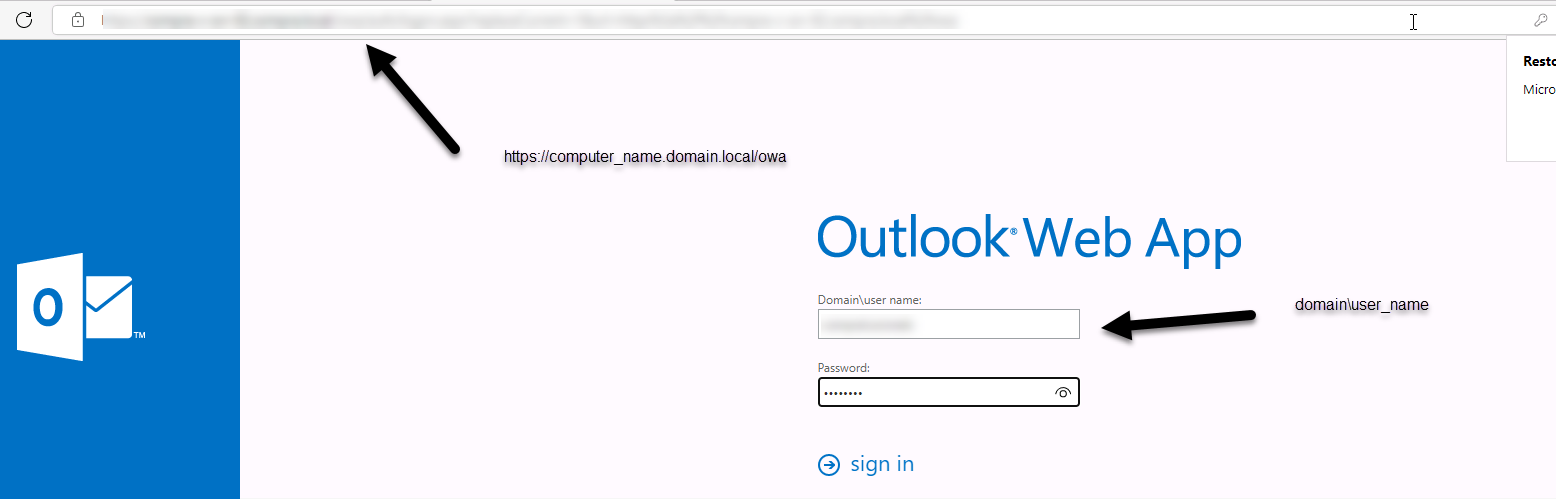
I hope the information provided sheds some light on what could be causing the problem.
Regards,
Hi @GIC-AUA ,
Thanks for your detailed information.
Do you have any websites running with the root domain(domain.com)?
If so , the website will take over the request of search for the Autodiscover URL.
Please following steps below to add the value ExcludeHttpsRootDomain will force Outlook to skip domain.com and go direct to Autodiscover.domain.com, and then see if it works:
1.open regedit.exe on the client computer and locate
HKEY_CURRENT_USER\Software\Microsoft\Office\16.0\Outlook\AutoDiscover
2.add a DWORD value named ExcludeHttpsRootDomain and set its value data to 1
3.restart Outlook and check if you are able to configure the profile
If the answer is helpful, please click "Accept Answer" and kindly upvote it. If you have extra questions about this answer, please click "Comment".
Note: Please follow the steps in our documentation to enable e-mail notifications if you want to receive the related email notification for this thread.
Hi AholicLiang-MSFT
Yes. There is an external website hosted with domain.com.
On the client computer, I added the DWORD ExcludeHttpsRootDomain and set its value to 1.
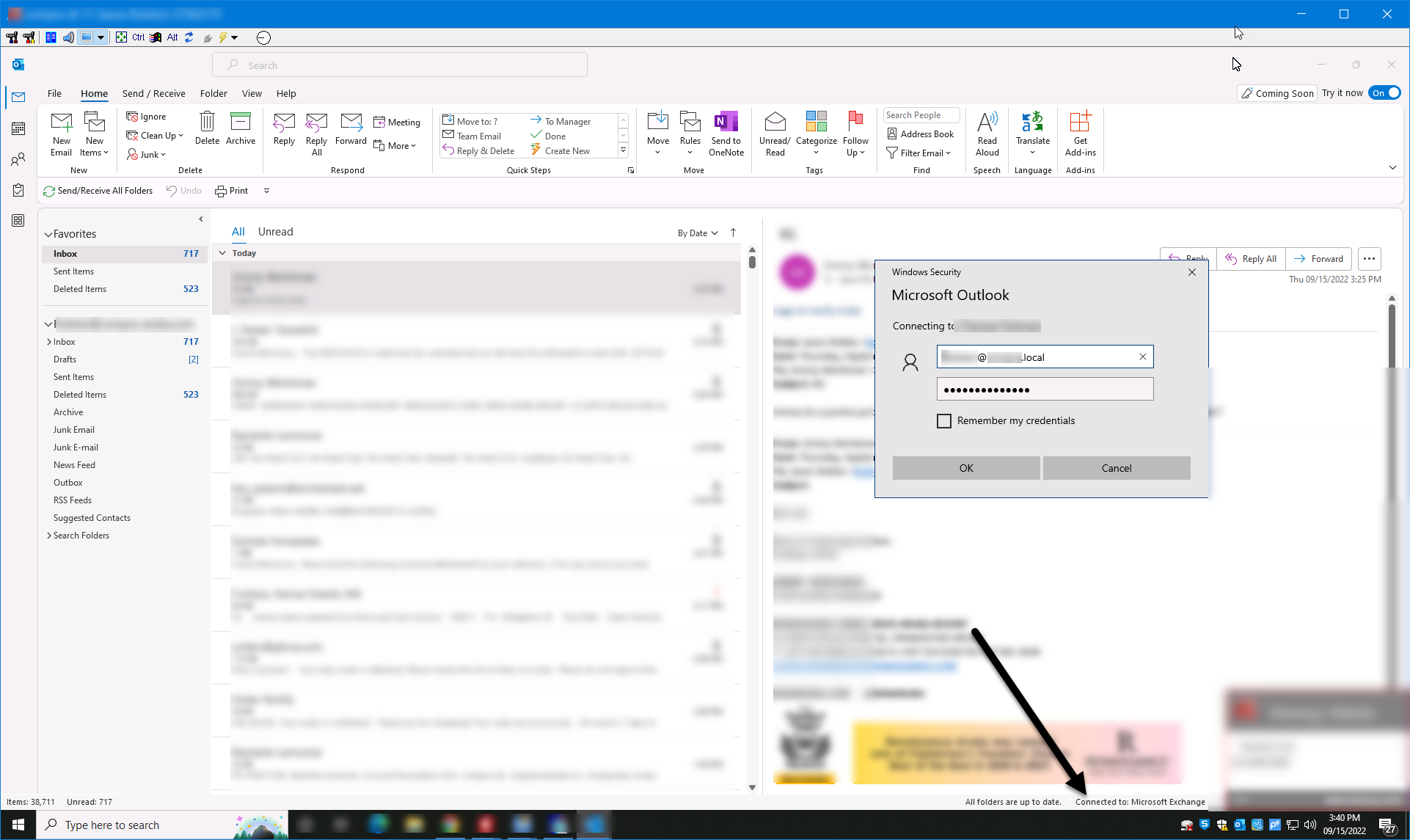
When I try to create the Outlook profile, I get the following pop-up:
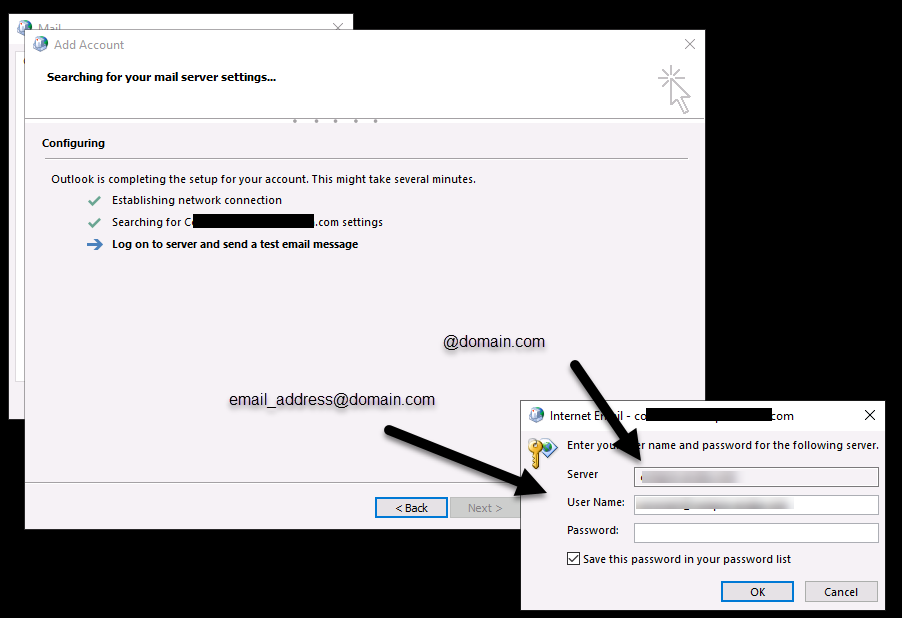
In the server field it has the external domain and in the username it the the email address.
I restarted the client computer just to see if it was necessary after changing the registry, but it made no difference.
Regards,
Hi,
Please have a check that the Autodiscover CNAME record is set up in DNS to point to the mail.contoso.com.
Autodiscover service in Exchange Server | Microsoft Learn
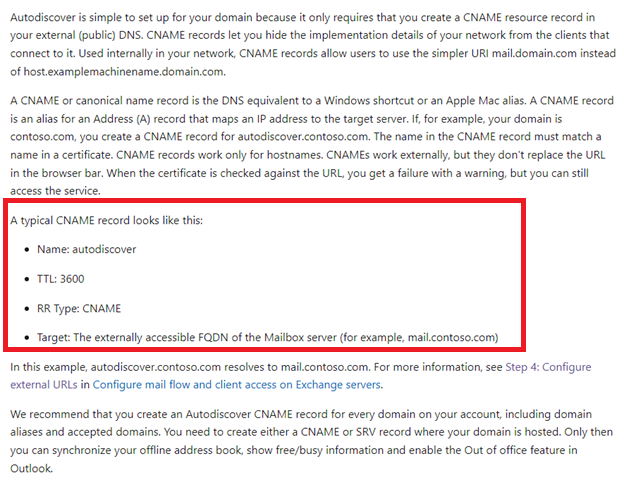
According to Autodiscover process , add the value ExcludeHttpsRootDomain will force Outlook to skip domain.com and go direct to Autodiscover.domain.com .However , you won't receive any useful information from “autodiscover.domain.com/autodiscover/autodiscover.xml” if you do not set Autodiscover record in DNS.
Hi AholicLiang-MSFT
I reviewed the link to the document you sent Autodiscover service in Exchange Server | Microsoft Learn (https://learn.microsoft.com/en-us/Exchange/architecture/client-access/autodiscover?view=exchserver-2019#autodiscover-in-dns).
It is a bit confusing because there is a section that states the following:
*
> Autodiscover is simple to set up for your domain because it only requires that you create a CNAME resource record in your external (public) DNS. CNAME records let you hide the implementation details of your network from the clients that connect to it. Used internally in your network, CNAME records allow users to use the simpler URI mail.domain.com instead of host.examplemachinename.domain.com.
*
It asks us to create a CNAME record in our external (public) DNS but the problem we have is that the Outlook has connectivity issues with the local Exchange server so why would it need to contact the external DNS and not the local DNS.
In our local DNS we have an A record for the Exchange server as follows:
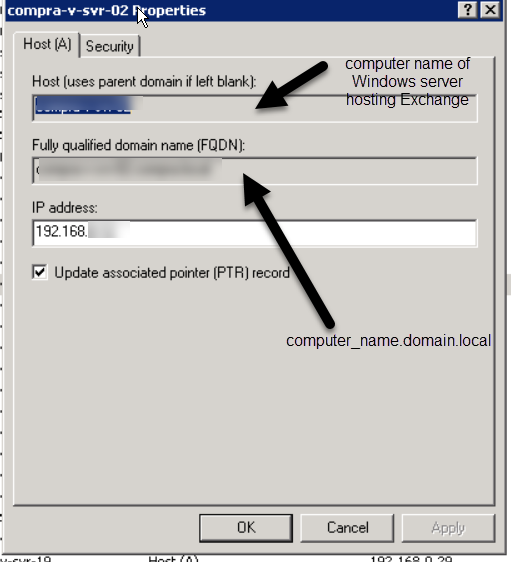
We have a CNAME record as follows:
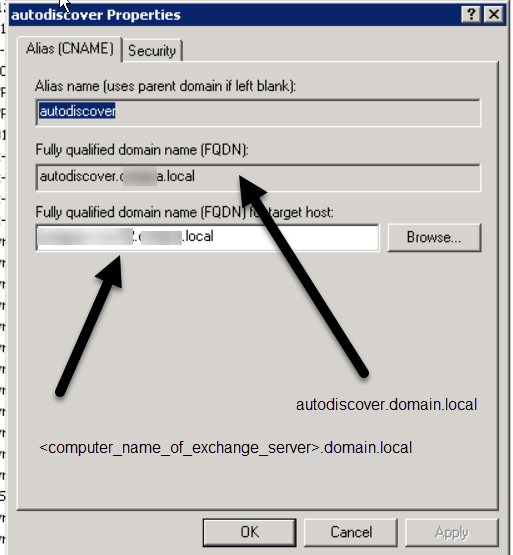
I'm really confused as to why I need to worry abut the public DNS. The local domain is domain.local. When the A and CNAME records were created, it automatically used domain.local and not the domain.com external domain.
Regards,
Hi,
I think the main reason for the issue is that your email address doesn't correspond to the FQDN of Autodiscover.
Please change the FQDN of Autodiscover like Autodiscover.domain.com to see if it changes.
Hi @GIC-AUA ,
It has been a few days and I am checking in to see how things are going on with this issue.
Does this issue have any updates?
Hi AholicLiang-MSFT
I'm not able to change the FQDN of autodiscover because it is greyed out. I'm only able to change the FQDN for the target host, It can be changed to <computer_name_of_exchange_server>.domain.com but iy makes no difference.
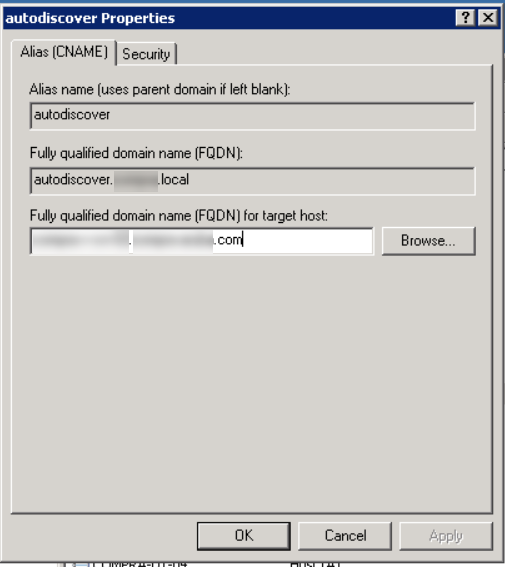
Regards,
Hi,
I am sorry to come back late. Could you please re-confirm the following questions:
(Notes: Please only select “Use Autodiscover” , and don’t forget to hide your personal information! )
Hi,
Just checking in to follow up with this thread. If you have any questions or need further help on this issue, please feel free to post back.
Part 1 of 2
Hi
I'm still having issues and now it is much worse.
Part 2 of 2
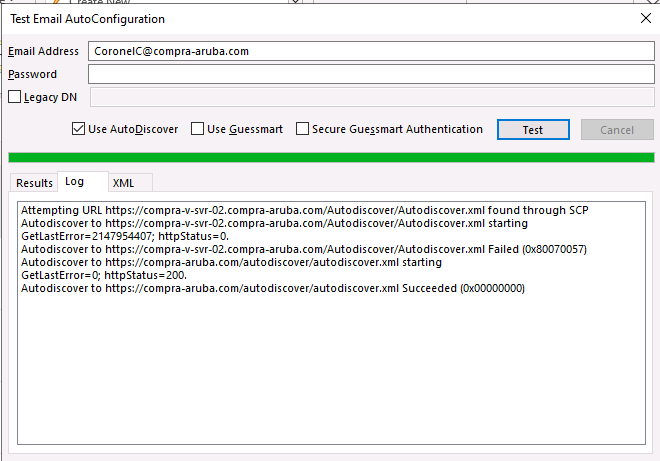
The on-premises exchange server is xxx-v-svr-02.domain.local but in the tool it shows xxx-v-svr-02.domain.com.
On the last line it has https://domain.com/autodiscover/autodiscover.xml Succeeded. However when we ping domain.com it is pointing to the external mail server.
The setup has always been as follows: On-premises Exchange forwards emails though a Smart Host on the external hosting company (domain.com). A utility on the Exchange server uses POP3 to retrieve the emails from the mailboxes on the external email server at the hosting company and forwards them to the corresponding Exchange mailboxes. This worked fine for years but something change recently.
Somehow the autodiscover on the local network is ignoring the on-premises Exchange server and going out to the External hosting company.
Regards,
Hi
I'm still having issues. Did you see my last post?
Regards,
' cx='32' cy='32' r='32' /%3E%3Ctext x='50%25' y='55%25' dominant-baseline='middle' text-anchor='middle' fill='%23FFF' %3ESE%3C/text%3E%3C/svg%3E)
Did you ever solve this, I get this from time to time, also with a .local domain (although I do have a mydomain.co.uk entry in the local DNS server for the internal ip-address to try to stop it going out into the big bad world.
I am just starting the process of migrating to Office365 in the cloud, and I fear all the hacks and slashing I've done over the last 15 years or so to registries and AD policies are going to make for a real bad time though :(
' cx='32' cy='32' r='32' /%3E%3Ctext x='50%25' y='55%25' dominant-baseline='middle' text-anchor='middle' fill='%23FFF' %3EPW%3C/text%3E%3C/svg%3E)
Are there any news related to the problem?
I have the exact same setup and therefore the same problem.
' cx='32' cy='32' r='32' /%3E%3Ctext x='50%25' y='55%25' dominant-baseline='middle' text-anchor='middle' fill='%23FFF' %3EJO%3C/text%3E%3C/svg%3E)
I also started having this exact issue on 10/18/2023
' cx='32' cy='32' r='32' /%3E%3Ctext x='50%25' y='55%25' dominant-baseline='middle' text-anchor='middle' fill='%23FFF' %3EHH%3C/text%3E%3C/svg%3E)
Same issue here. OUTLOOK365 is a nightmare.
MS seems to have BAKED in ther own servers, and to hell with the rest of the world.
Outlook 2013 we were able to enter all the neccessary details about our hosted exchange (NOT MICROSOFT SERVERS) and it worked flawlessly.
Now with this new flavour, it's a joke. Outlook INSISTS on connecting to thier own servers. Even if we do get it to work, it sticks for less than 24 hours, the then somwhow, "AUTOMATICALLY" it switchs back over to 0ffice365.microsoft.com GARBAGE.
We don't use MS Servers, never have, never will. Get over it and fix this issue.
HUGE WASTE OF TIME WITH THIS PRODUCT.
' cx='32' cy='32' r='32' /%3E%3Ctext x='50%25' y='55%25' dominant-baseline='middle' text-anchor='middle' fill='%23FFF' %3EDG%3C/text%3E%3C/svg%3E)
all the suggestions here are wrong to fix the problem. you should not have to edit a clients computer registery on every single machine to login to exchange server to on premise, that would be ridiculous on a large scale setup with exchange. It is an autodiscover error with DNS error to go with, I have had the same issue with my exchange server for months, i can login perfectly by Microsoft Exchange Active Sync - that works fine on all my clients with exchange server but not connecting via the Microsoft Exchange method, it always defaults to office 365, that is wrong. It needs to connect to your own domain setup with on premise exchange server. I assume it is DNS, Autodiscover and port 443. I have tried a number of fixes but how to just connect to on premise exchange server domain without the need to custom microsoft exchange server active sync connection. Ps. my mobile logging in perfectly fine on my iphone 14 pro max to exchange server, it is only relevant to exchange server problem and windows desktop client client in outlook client where DNS and autodiscover is not working correctly, how to fix this, please?
Exchange is a rhino on heat. I get a problem where i can connect only on my local LAN IP connectivity. soon as i switch my IP to my public IP address of my router it does not connect and tries to connect to office 365 online, clearly it is a DNS issue of some sought, mail flow, autodiscover works fine on my mobile and iphone even mac clients. when it comes to windows 10, 11, it just does not connect from a public IP and tries to connect to microsoft 365 online exchange, it needs to default to microsoft exchange on premise, regardless of LAN or WAN IP address. Any ideas?
Exchange is a rhino on heat. I get a problem where i can connect only on my local LAN IP connectivity. soon as i switch my IP to my public IP address of my router it does not connect and tries to connect to office 365 online, clearly it is a DNS issue of some sought, mail flow, autodiscover works fine on my mobile and iphone even mac clients. when it comes to windows 10, 11, it just does not connect from a public IP and tries to connect to microsoft 365 online exchange, it needs to default to microsoft exchange on premise, regardless of LAN or WAN IP address. Any ideas?
My exchange works perfect on my mobiles, apple, samsung, OWA, macs, etc, except when i connect from a public IP anywhere then microsoft exchange does not work but i can connect using Microsoft Exchange Active Sync Client for outlook and that goes to my microsoft exchange on premise server. How to make exchange connect from anyIP with out being on the same LAN? 192.168.50.40 my windows desktop client public IP from ISP when on laptop, it fails to connect to exchange on premise and tries to connect to microsoft 365 online, i do not want this. when i switch back to my local IP LAN IP then exchange connects to my on premise server and functions normally. I guess this is fine for people in the office on the same LAN but when they are remote on their laptops then they should be able to connect just the same as if theyre on any IP across the world 4g wifi or any connection. Any one know how to fix this? Clearly it is a DNS issue with windows 2022 Server, Exchange 2019 DNS lookup addresses? As mentioned, i can connect to exchange great on the same IP. soon as i'm on another IP thats public IP on 4g then exchange bails and refuses to connect, i can connect to Microsoft Exchange ActiveSync and OWA, that works fine anywhere but why exchange client on windows dont work on any device away from the office, e.g. on 4g connection?
' cx='32' cy='32' r='32' /%3E%3Ctext x='50%25' y='55%25' dominant-baseline='middle' text-anchor='middle' fill='%23FFF' %3ECA%3C/text%3E%3C/svg%3E)
We have had the same issue with many clients. If you run a modern version of Outlook you will run into a strange issue that seems to be hard coded in the software: If you have your own onpremise Exchange server (mail.company.com) , the moment you add your own domain (company.com) to a 365 tenant, Outlook automatically assumes that you also host your email at 365 servers. When you start Outlook or setup a new profile it will first check the 365 servers for the presence of your own domain. It will not get to the point where it needs to check your own correct autodiscover. It it finds your domain there at 365 it will try logging on there first, hence the 365 logon box. It will not accept your credentials. The only way we are able to fix that is to add the registry fix to tell Outlook to skip the 365 check at startup so it moves on to autodiscover. I have not found any other way so far.
' cx='32' cy='32' r='32' /%3E%3Ctext x='50%25' y='55%25' dominant-baseline='middle' text-anchor='middle' fill='%23FFF' %3ETC%3C/text%3E%3C/svg%3E)
Strongly Agree with this. At least here in the UK Microsoft 365 Exchange is horrendously slow, full of bugs, causes Outlook to crash completely if internet connection is spotty or lost entirely and causes nothing but issues for our client base. (Upwards of 2000 clients) PLEASE Stop forcing Office Outlook users to use your extremely poor platform. Make Outlook work properly with both On-Prem and IMAP and get rid of new outlook entirely. Also, there needs to be an option in MS365 to completely disable Exchange so that your servers aren't looked at over Autodiscover or SRV records (This really is just stupid!) We shouldn't be forced to enter Registry hacks in order to not use MS365. This is not good enough Microsoft.
' cx='32' cy='32' r='32' /%3E%3Ctext x='50%25' y='55%25' dominant-baseline='middle' text-anchor='middle' fill='%23FFF' %3ERA%3C/text%3E%3C/svg%3E)
Hello all.
I know the topic is a bit outdated, but i've tried several things after having someone from Microsoft support (a bit unefficient - sorry but it's the truth. Letting someone dying during a migration for a customer should never happen when you contact a paid support !)
Sitguation : Customer on OVH Exchange hosted mail, migrating one by one to Ms365.
Once the first mailbox migrated, outlook could not open the other mailboxes on OVH. It was still redirecting to Microsoft 365 each time you select "Exchange" server type at setup in outlook.
To change the situation, I have done the following steps :
1 : Close outlook
2 : Ensure you did not modify autodiscover to point on o365. If yes, rollback to OVH
3 : Enter the registry key, and browse HKEY_CURRENT_USER\Software\Microsoft\Office\16.0\Outlook\AutoDiscover
Add a DWORD key named "ExcludeExplicitO365Endpoint", and set the value to 1.
Close registry
4 : Enter admin.exchange.microsoft.com on your Ms365 tenant, open the mailbox settings of the user you migrate, and add an SMTP mail alias pointing on the technical domain (******@tenantname.onmicrosoft.com)
5 : On the workstation, open mail settings in control panel (to access outlook profile creation), create a new profile, and add the required OVH exchange hosted mailbox, using the manual configuration (select Exchange account type)
Once done :
6 : Add the Ms365 account you need by using the ALIAS in the 1st wizard window (the one with with the option "advanced options > manual configuration"), and select "Office365" account type.
It will pop up the Ms365 OAuth window. Then authenticate with the REAL address of the Ms365 user ;)
7 : Enjoy a coffee
8 : Don't remove the registry value unless all the mailboxes are migrated to Ms365.
(Never remove it if you plan to use both OVH & Ms365)
For my case, it worked.
And for yours ?
Regards
R
' cx='32' cy='32' r='32' /%3E%3Ctext x='50%25' y='55%25' dominant-baseline='middle' text-anchor='middle' fill='%23FFF' %3EAB%3C/text%3E%3C/svg%3E)
Interesting Raphael, that after all this time on this old thread, you posted only 3 days ago, about the SAME time I started experiencing the same problem.
I actually suspect a microsoft update to Outlook 365 PC client software.
My Story, in short:
On premises Exchange 2016. My system, a few users, partly my own production server, partly a lab machine.
Starting after last weekend, I had 3 different machines slowly start popping up this "SIGN IN TO MICROSOFT to access this document" messages. But they are trying to authenticate with MS, using my local domain credentials, and of course failing.
You can cancel it, as noted, and you might get a few pieces of mail to flow, but inevitably, you get some things stuck in the outbox, and the annoyance level rises... particularly when it started happening to my wife. <gulp!>
I was worried the Exchange had an issue... but then noticed that the one machine running Outlook 2010 was fine. Used google-foo and found your post, tried the registry addition, and bam, Outlook 365 Client (classic) to the Exchange is all back to normal.
So - maybe something they "updated" last week/weekend, in Outlook, started asking it to seek out MS servers first again?
But thanks for the fix!
Andrew
Hi Andrew.
You're welcome
Yes I think there is an issue with the discovering process in outlook (tested with outlook 365 desktop app and Office 2021 pro +).
This morning a new behavior :
We have created a new user, fully configured on Ms365. So I decided not to update the registry.
When I configure this user on Outlook 365 desktop app, (by autodiscovering or manually by hitting "Office 365" in the manual config), Outlook pops a message box warning me about OVH exchange hosted server anyway... Strange as I don't ask for any external exchange account...
I don't know how and why outlook still persists querying my domain autodiscover entry as I select manually "office 365".
Anyway, i'm glad to read that my post helped you ;)
Regards
' cx='32' cy='32' r='32' /%3E%3Ctext x='50%25' y='55%25' dominant-baseline='middle' text-anchor='middle' fill='%23FFF' %3EPC%3C/text%3E%3C/svg%3E)
Microsoft has uninstalled the option to connect Outlook Desktop software to on premise Exchange Servers. There is no option to try to connect to Exchange Servers on premise.It's unavailable.
' cx='32' cy='32' r='32' /%3E%3Ctext x='50%25' y='55%25' dominant-baseline='middle' text-anchor='middle' fill='%23FFF' %3EJB%3C/text%3E%3C/svg%3E)
Not entirely correct,
Your autodiscover record just needs to be set up correctly. But yeah - the fact that configuring server address manually is missing is annoying af.
Editing regedit is really bad idea i have found. How about DNS? SSL for autodiscover and fqdn domain name for 2. you need public IP for domain name in question for fqdn.com and SSL autodiscover "A" record for autodiscover.fqdn.com with SSL. fqdn.com should have "A" record of public IP. fqdn should have SSL binded as well in IIS, DNS, exchange ECP.
This fixes it.
For some reason MS trying to route your mial via MS servers, same thing they do when connecting an IMAP account. Outlook connects to MS server MS server connects to mailbox and acts as middle man. Scummy crap by ms to read your mail for marketing purposes and who knows what else.
Windows Registry Editor Version 5.00
[HKEY_CURRENT_USER\Software\Microsoft\Office\16.0\Outlook\AutoDiscover]
"ExcludeHttpsRootDomain"=dword:00000001
"ExcludeExplicitO365Endpoint"=dword:00000001
I see you have a split domain (indernal = domain.local, external = domain.com for example.), ensure you set up your external endpoint in exchange's web config as domain.com/owa, domain.com/autodiscover etc...
Then make sure you have the appropriate public dns records created at your ISP (autodiscover.domain.com etc...) pointing to your public ip address. And obviously the appropriate port forwarding.(443/tcp)