I used CloneZilla to clone my NVME boot drive to an external HDD.
The clone is corrupt - but now my PC wont boot. I've removed the drive and connected it to this PC via USB.
Here is the structure as shown by Partition Wizard - its listed as disk 2
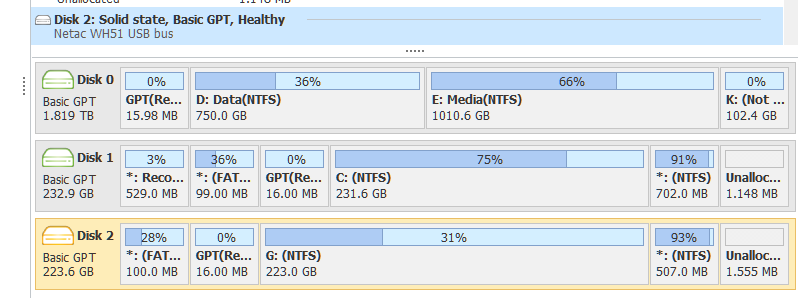
This is what I've done so far:
Disk ### Status Size Free Dyn Gpt
Disk 0 Online 1863 GB 0 B *
Disk 1 Online 232 GB 1024 KB *
Disk 2 Online 223 GB 1024 KB *
DISKPART> select disk 2
Disk 2 is now the selected disk.
DISKPART> list partition
Partition ### Type Size Offset
Partition 1 System 100 MB 1024 KB
Partition 2 Reserved 16 MB 101 MB
Partition 3 Primary 222 GB 117 MB
Partition 4 Recovery 507 MB 223 GB
DISKPART> lis vol
Volume ### Ltr Label Fs Type Size Status Info
Volume 0 F DVD-ROM 0 B No Media
Volume 1 D Data NTFS Partition 750 GB Healthy
Volume 2 E Media NTFS Partition 1010 GB Healthy
Volume 3 K RAW Partition 102 GB Healthy
Volume 4 C NTFS Partition 231 GB Healthy Boot
Volume 5 Recovery NTFS Partition 529 MB Healthy Hidden
Volume 6 FAT32 Partition 99 MB Healthy System
Volume 7 NTFS Partition 702 MB Healthy Hidden
Volume 8 G NTFS Partition 222 GB Healthy
- Volume 9 FAT32 Partition 100 MB Healthy Hidden Volume 10 NTFS Partition 507 MB Healthy Hidden
DISKPART> sel vol 9
Volume 9 is the selected volume.
DISKPART> assign letter=t
DiskPart successfully assigned the drive letter or mount point.
C:\Windows\System32>dir t:
Volume in drive T has no label.
Volume Serial Number is C8BA-9ADB
Directory of T:\
05/05/2021 15:38 <DIR> EFI
           0 File(s)              0 bytes

           1 Dir(s)      72,437,760 bytes free
```C:\Windows\System32>bcdboot c:\windows /s T: /f UEFI

Boot files successfully created.

but the drive still fails with winload.efi missing or corrupted.
' cx='32' cy='32' r='32' /%3E%3Ctext x='50%25' y='55%25' dominant-baseline='middle' text-anchor='middle' fill='%23FFF' %3EJE%3C/text%3E%3C/svg%3E)

' cx='32' cy='32' r='32' /%3E%3Ctext x='50%25' y='55%25' dominant-baseline='middle' text-anchor='middle' fill='%23FFF' %3EVZ%3C/text%3E%3C/svg%3E)