Hello,
We are seeking assistance with an issue on our Windows Server 2019 regarding a disk space reporting discrepancy on a volume dedicated to VSS Shadow Copies. We are unable to account for a large amount of used space, which is preventing new shadow copies from being created and causing our monitoring systems to generate false "low disk space" alerts.
Here is a detailed breakdown of our configuration and the problem:
Objective: We are configuring VSS Shadow Copies for our D: drive.
Storage Location: The shadow copies are configured to be stored on our Y: drive.
Y: Drive Capacity: The total size of the Y: drive is 488 GB.
VSS Maximum Storage: We have set the maximum storage space for shadow copies on the Y: drive to 391 GB (which is 80% of the total volume capacity).
The Issue:
We are observing a significant conflict between the space reported as used by the Shadow Copies service and the space reported as used by Windows File Explorer.
- According to the Shadow Copies settings tab, the "Used" space for shadow copies on the Y: drive is currently 127 GB.
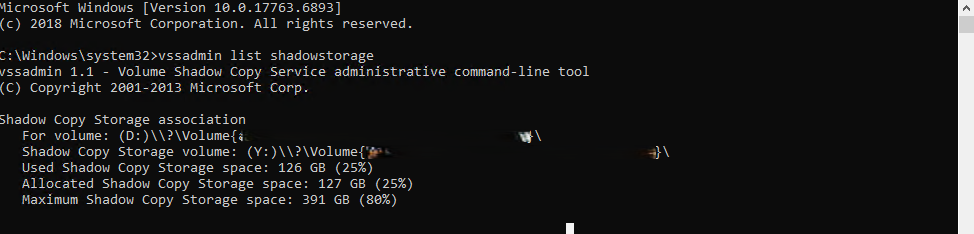
- However, when viewing the Y: drive in "My Computer" or File Explorer, it shows the drive is almost completely full, with only 1.47 GB of free space remaining.

If the total capacity is 488 GB and VSS is only using 127 GB, there should be approximately 361 GB of free space. Instead, File Explorer indicates that over 486 GB is consumed. This discrepancy is causing our infrastructure monitoring systems to constantly trigger alerts for the Y: drive being critically low on space, creating unnecessary alarm and alert fatigue for our team.
Troubleshooting Steps Already Taken
Rebooted the Server: A full server restart did not correct the space reporting.
Expanded the Drive: We previously expanded the Y: drive to its current size of 488 GB, but the problem has persisted.
Verified VSS Settings: We have confirmed through both the Shadow Copy settings GUI and the vssadmin list shadowstorage command that the settings are configured correctly. Both interfaces consistently report the same usage (127 GB) and limit (391 GB), which confirms the settings are applied but doesn't explain the discrepancy with File Explorer.
Could you please provide guidance on why Windows File Explorer would report the drive as full, while the VSS service itself reports a much lower usage? We need to reclaim this "ghost" space to resolve the false monitoring alerts and ensure our VSS snapshots can continue to be created successfully.
Hello,
We are seeking assistance with a critical issue on our Windows Server regarding a disk space reporting discrepancy on a volume dedicated to VSS Shadow Copies. We are unable to account for a large amount of used space, which is preventing new shadow copies from being created and causing our monitoring systems to generate false "low disk space" alerts.
Here is a detailed breakdown of our configuration and the problem:
Objective: We are configuring VSS Shadow Copies for our D: drive.
Storage Location: The shadow copies are configured to be stored on our Y: drive.
Y: Drive Capacity: The total size of the Y: drive is 488 GB.
VSS Maximum Storage: We have set the maximum storage space for shadow copies on the Y: drive to 391 GB (which is 80% of the total volume capacity).
The Issue:
We are observing a significant conflict between the space reported as used by the Shadow Copies service and the space reported as used by Windows File Explorer.
According to the Shadow Copies settings tab, the "Used" space for shadow copies on the Y: drive is currently 127 GB.
However, when viewing the Y: drive in "My Computer" or File Explorer, it shows the drive is almost completely full, with only 1.47 GB of free space remaining.
This creates a contradiction and a significant operational problem. If the total capacity is 488 GB and VSS is only using 127 GB, there should be approximately 361 GB of free space. Instead, File Explorer indicates that over 486 GB is consumed. This discrepancy is causing our infrastructure monitoring systems to constantly trigger alerts for the Y: drive being critically low on space, creating unnecessary alarm and alert fatigue for our team.
Troubleshooting Steps Already Taken
Before reaching out, we have performed the following actions, none of which have resolved the issue:
Rebooted the Server: A full server restart did not correct the space reporting.
Expanded the Drive: We previously expanded the Y: drive to its current size of 488 GB, but the problem has persisted.
Verified VSS Settings: We have confirmed through both the Shadow Copy settings GUI and the vssadmin list shadowstorage command that the settings are configured correctly. Both interfaces consistently report the same usage (127 GB) and limit (391 GB), which confirms the settings are applied but doesn't explain the discrepancy with File Explorer.
Why Windows File Explorer would report the drive as full, while the VSS service itself reports a much lower usage? We need to reclaim this space to resolve the false monitoring alerts and ensure our VSS snapshots can continue to be created successfully.
' cx='32' cy='32' r='32' /%3E%3Ctext x='50%25' y='55%25' dominant-baseline='middle' text-anchor='middle' fill='%23FFF' %3EMB%3C/text%3E%3C/svg%3E)

' cx='32' cy='32' r='32' /%3E%3Ctext x='50%25' y='55%25' dominant-baseline='middle' text-anchor='middle' fill='%23FFF' %3EV%3C/text%3E%3C/svg%3E)