Microsoft Security | Microsoft Entra | Microsoft Entra ID
A cloud-based identity and access management service for securing user authentication and resource access

This browser is no longer supported.
Upgrade to Microsoft Edge to take advantage of the latest features, security updates, and technical support.
' cx='32' cy='32' r='32' /%3E%3Ctext x='50%25' y='55%25' dominant-baseline='middle' text-anchor='middle' fill='%23FFF' %3EJP%3C/text%3E%3C/svg%3E)
I need guidance on recovering access to my Azure AD tenant after accidentally removing my own administrative privileges.
Situation: I was the only Global Administrator in my personal Azure AD tenant. While managing user access, I inadvertently removed myself from all administrator roles. Now I cannot access the Azure AD admin center or manage any directory settings.
A cloud-based identity and access management service for securing user authentication and resource access
Answer accepted by question author
' cx='32' cy='32' r='32' /%3E%3Ctext x='50%25' y='55%25' dominant-baseline='middle' text-anchor='middle' fill='%23FFF' %3ESM%3C/text%3E%3C/svg%3E)
Hello Jorge Perales Diaz,
As discussed offline, the issue resolved by elevating the access for a Global Administrator using the Azure portal.
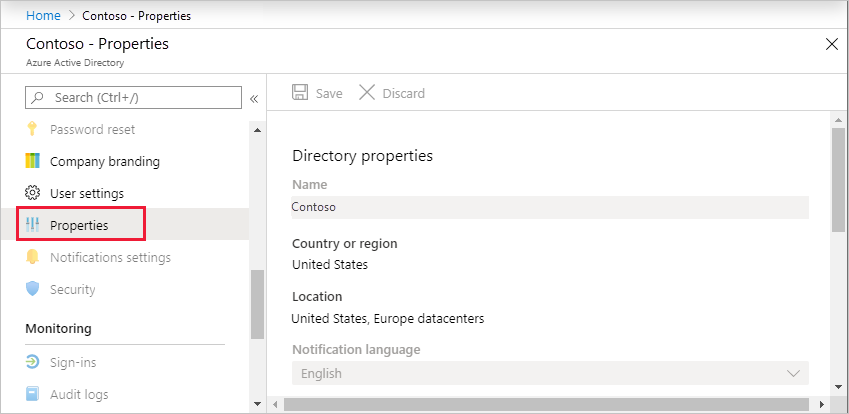
Initially, sign in to the Azure portal as a Global Administrator and browse to Microsoft Entra ID > Manage > Properties.
Under Access management for Azure resources, set the toggle to Yes.
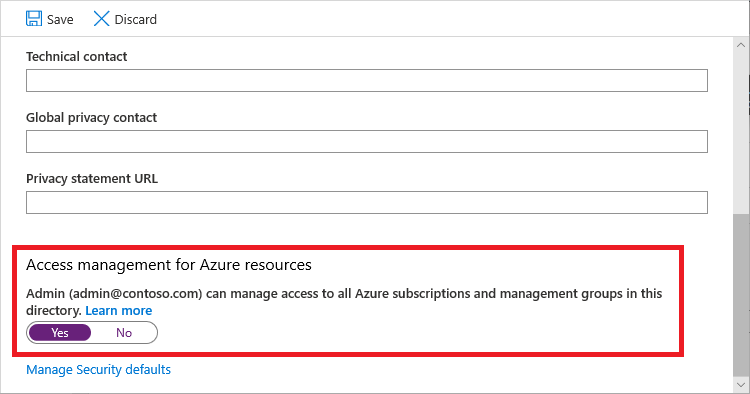
This adds you as User Access Administrator role in Azure RBAC at root scope (/). With that role, you can now assign Owner role to you under subscription and create resources successfully.
Hope this helps! Feel free to reach out for further queries.
If this answers your query, do click Accept Answer and Yes for was this answer helpful, which may help members with similar questions.