' cx='32' cy='32' r='32' /%3E%3Ctext x='50%25' y='55%25' dominant-baseline='middle' text-anchor='middle' fill='%23FFF' %3EBS%3C/text%3E%3C/svg%3E)


' cx='32' cy='32' r='32' /%3E%3Ctext x='50%25' y='55%25' dominant-baseline='middle' text-anchor='middle' fill='%23FFF' %3EB%3C/text%3E%3C/svg%3E)
' cx='32' cy='32' r='32' /%3E%3Ctext x='50%25' y='55%25' dominant-baseline='middle' text-anchor='middle' fill='%23FFF' %3EAN%3C/text%3E%3C/svg%3E)
Hi @Beth Scelza,
Thank you for reaching out to Microsoft Q&A Forum.
As of now, automatic syncing from Outlook to Google Calendar is not supported in New Outlook.
Google Calendar cannot automatically sync with an New Outlook or Classic Outlook calendar. Microsoft official document states that exporting a Classic Outlook calendar produces only a snapshot, and future updates will not sync to Google Calendar.
The only Microsoft‑supported method is:
- In Classic Outlook, open the Calendar, and select the calendar you want to export.
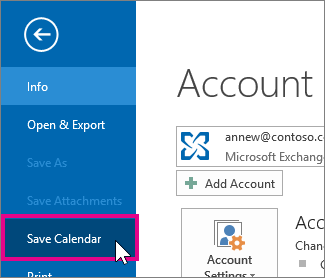
- Click File > Save Calendar.
- Use the default name or type a name for the iCalendar file in the File name box.
- Click More Options.
- Click the Date Range arrow, and choose the amount of calendar data you want to include in the iCalendar file or click Specify dates to enter a custom date range.
Tip: If you choose a large date range or select Whole calendar, you might create a large iCalendar file, which can take a while to generate.
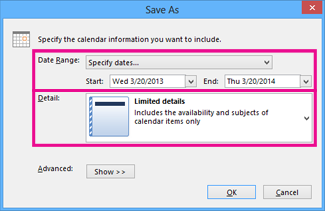
- Click the Detail arrow and, choose the amount of detail you want to show.
- Click OK, and then click Save. If your calendar is empty, you’ll see a message giving you the option to cancel saving the iCalendar file.
- From here you can import your file Google Calendar: Log onto your Google Calendar account.
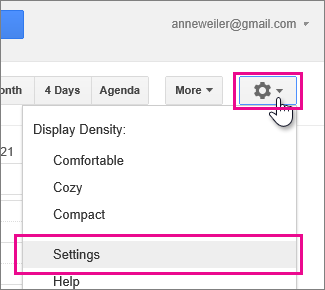
- At the top of the page, click the Settings wheel > Settings.
- Along the left side of the screen, select Import & export.
- Click Select file from your computer.
- Pick the file that you created when you exported your calendar from Outlook, and then click Open.
- If you have multiple Google calendars, use the Add to calendar drop-down box to pick the calendar you want to receive your imported items, and then click Import.
Click the back arrow at the top, left corner of the screen to return to your calendar.
But changes made later in Outlook will not sync automatically.
The Microsoft Support page explicitly confirms that exporting an Outlook calendar is a one‑time export.
For more information, please use this article as references: Export an Outlook calendar to Google Calendar - Microsoft Support
However, you just suggest an innovative suggestion for the development team. I believe this is an important feature for many users, and your feedback can help prioritize it. Please share your feedback directly with the Outlook team through the Feedback Hub in Outlook (go to Help > Feedback) or you can submit your feedback directly to Outlook (new) · Community, where Microsoft product development team can know your requirements and ideas for product improvements. The team actively monitors user input, and many improvements have been made based on community suggestions.
Note: As Microsoft Community moderators, please note that we are not involved in product design decisions and do not have direct access to the development roadmap, we want to assure you that your feedback has been acknowledged and is valued.
In the meantime, if you see my replies bring helpful information, please kindly accept it as an answer and vote it up by your original account, which raised this question. Once marked, it will automatically pin to top. As other users will also search information in this community, your valuable vote up will definitely also help other users who have similar queries easily to find the correct channel and useful information more quickly.
I hope this provides enough clarity and helps you stay inform with your current situation.
Thank you for your patience and your understanding. If you have any questions or need further assistance, please feel free to share them in the comments on this post so I can continue to support you.
