After completing the earlier steps, please run the following file:
C:\Windows\System32\SecurityHealth\10.0.29510.1001-0\Microsoft.SecHealthUI_8wekyb3d8bbwe.appx
Click "Reinstall".
This browser is no longer supported.
Upgrade to Microsoft Edge to take advantage of the latest features, security updates, and technical support.
' cx='32' cy='32' r='32' /%3E%3Ctext x='50%25' y='55%25' dominant-baseline='middle' text-anchor='middle' fill='%23FFF' %3ED%3C/text%3E%3C/svg%3E)
I had a few system crashes tweaking my RAM on a new computer, and ended up with this error code appearing at each system restart now...
C:\Windows\System32\SecurityHealth\10.0.29510.1001-0\SecurityHealthSSO.dll is either not designed to run on windows or it contains an error.
It ends with Error Status 0xc000012f
I did a search online, and tried methods to correct, but it seems that I need a copy of the file to replace the corrupted version. Can anyone provide a copy with instructions to replace?
Thank you!
' cx='32' cy='32' r='32' /%3E%3Ctext x='50%25' y='55%25' dominant-baseline='middle' text-anchor='middle' fill='%23FFF' %3EK%3C/text%3E%3C/svg%3E)
I updated the system to version KB5074828 and KB5077181 on the 11th. I did nothing else after that. Today, when I started the computer normally, this problem occurred. I'm not sure if it's related to the system update, but I've tried almost all the solutions online and none of them worked. I hope I can get an effective solution here...
' cx='32' cy='32' r='32' /%3E%3Ctext x='50%25' y='55%25' dominant-baseline='middle' text-anchor='middle' fill='%23FFF' %3ERS%3C/text%3E%3C/svg%3E)
After completing the earlier steps, please run the following file:
C:\Windows\System32\SecurityHealth\10.0.29510.1001-0\Microsoft.SecHealthUI_8wekyb3d8bbwe.appx
Click "Reinstall".
From PowerShell admin, please run these commands to check the status of the Microsoft Defender services:
Start-Service -Name windefend, securityhealthservice, wscsvc -Verbose

gsv windefend, securityhealthservice, wscsvc | select Name, StartType, Status | ft -auto
Post the output.
PS C:\Users\odhan> Start-Service -Name windefend, securityhealthservice, wscsvc -Verbose
VERBOSE: Performing the operation "Start-Service" on target "Windows Security Service (securityhealthservice)".
Start-Service : Failed to start service 'Windows Security Service (securityhealthservice)'.
At line:1 char:1
    + CategoryInfo          : OpenError: (System.ServiceProcess.ServiceController:ServiceController) [Start-Service],

   ServiceCommandException

    + FullyQualifiedErrorId : StartServiceFailed,Microsoft.PowerShell.Commands.StartServiceCommand
VERBOSE: Performing the operation "Start-Service" on target "Microsoft Defender Antivirus Service (windefend)".
VERBOSE: Performing the operation "Start-Service" on target "Security Center (wscsvc)".
PS C:\Users\odhan> gsv windefend, securityhealthservice, wscsvc | select Name, StartType, Status | ft -auto
Name StartType Status
securityhealthservice Manual Stopped
windefend Automatic Running
wscsvc Automatic Running
accidentally posted it twice, removed one
One of those services is failing to start.
I'd suggest running the following command from a TrustedInstaller Command Prompt.
You can open a TrustedInstaller Command Prompt using AdvancedRun, portable freeware from Nirsoft.net.
In the TrustedInstaller Command Prompt, run these commands:
C:\Windows\System32\SecurityHealth\SecurityHealthSetup.exe" "C:\WINDOWS\system32\SecurityHealth\10.0.29510.1001-0"

cd /d C:\WINDOWS\system32\SecurityHealth\10.0.29510.1001-0

regsvr32 /u SecurityHealthProxyStub.dll

regsvr32 /u SecurityHealthAgent.dll

regsvr32 SecurityHealthProxyStub.dll

regsvr32 SecurityHealthAgent.dll
Note:
The above commands won't be effective when run from admin Command Prompt. TrustedInstaller Command Prompt is required.
Standard Disclaimer: There is a link to a non-Microsoft website. The page appears to provide accurate, safe information. Watch out for ads on the site that may advertise products frequently classified as PUPs (Potentially Unwanted Products).
I was able to do this.
The first two gave back errors, but the last two worked.
The errors stated "The module "XXXX" was loaded but the entry-point dllUnregisteredServer was not found. Make sure that XXXX is a valid DLL or OCX file and then try again.
Can you please confirm you ran them from TrustedInstaller Command Prompt instead of the admin Command Prompt?
Yes, I ran them from a Command Prompt opened under AdvancedRun with the settings of TrustedInstaller
I hope you ran the following command as well. If not, please run it from TrustedInstaller Command Prompt.
"C:\Windows\System32\SecurityHealth\SecurityHealthSetup.exe" "C:\WINDOWS\system32\SecurityHealth\10.0.29510.1001-0"
Restart Windows.
That has to be run from TrustedInstaller Command Prompt.
I did miss that one somehow, apologies.
I have done it now, but I do not get any output from running that line of code, and receive the same errors for the 2 following lines.
I went ahead and extracted the two dll files from the earlier exe, and replaced them in my folders, in case they were also corrupted. (using the method you showed me earlier). I tried rerunning some of the items you suggested since them, but no changes to results.
Ok. Those two errors are normal. I just tested them on my systems here.
Let's manually install the update.
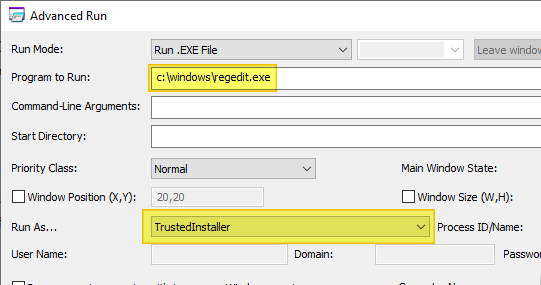
Regedit.exe as TrustedInstaller. (see screenshot)Standard Disclaimer: There is a link to a non-Microsoft website. The page appears to provide accurate, safe information. Watch out for ads on the site that may advertise products frequently classified as PUPs (Potentially Unwanted Products).
IT IS WORKING!!! (without doing your last post)
PS C:\Users\odhan> Start-Service -Name windefend, securityhealthservice, wscsvc -Verbose
VERBOSE: Performing the operation "Start-Service" on target "Windows Security Service (securityhealthservice)".
VERBOSE: Performing the operation "Start-Service" on target "Microsoft Defender Antivirus Service (windefend)".
VERBOSE: Performing the operation "Start-Service" on target "Security Center (wscsvc)".
PS C:\Users\odhan> gsv windefend, securityhealthservice, wscsvc | select Name, StartType, Status | ft -auto
Name StartType Status
securityhealthservice Manual Running
windefend Automatic Running
wscsvc Automatic Running
I don't know why I can't open your screenshot... I've also encountered this problem and posted a related question. Could you help me?
@Khalil:
Please check this link for the screenshot.
However, I suggest starting a new thread for your issue because there are many involved in this error. The REG file may not necessarily apply to your PC.
Standard Disclaimer: There is a link to a non-Microsoft website. The page appears to provide accurate, safe information. Watch out for ads on the site that may advertise products frequently classified as PUPs (Potentially Unwanted Products).
My post is here: https://learn.microsoft.com/zh-cn/answers/questions/5775515/securityhealth10-0-29510-1001-0securityhealthsso-d Could you please take a look and help me as well? Thank you very much.
Done, @Khalil.
' cx='32' cy='32' r='32' /%3E%3Ctext x='50%25' y='55%25' dominant-baseline='middle' text-anchor='middle' fill='%23FFF' %3EJ%3C/text%3E%3C/svg%3E)
Hi, Ramesh. When I try to run this in TrustedInstaller Command Prompt, this is what the first thing it will say: "The filename, directory name, or volume label syntax is incorrect."
"C:\Windows\System32\SecurityHealth\SecurityHealthSetup.exe" "C:\WINDOWS\system32\SecurityHealth\10.0.29510.1001-0"
Hi Daniel,
Please open securityhealthsetup_b0f4702a05e43a3f7389ee3ff73a37084bd8267c.exe using 7-Zip, and explore the .rsrc\RCDATA\ folder in the archive.
Copy SecurityHealthSSO.dll to the desktop.
Open Command Prompt admin and run these commands:
cd /d C:\Windows\System32\SecurityHealth\10.0.29510.1001-0

takeown /f SecurityHealthSSO.dll /a

icacls SecurityHealthSSO.dll /grant *S-1-5-32-544:(F)
Now, copy SecurityHealthSSO.dll from your desktop to the following C:\Windows\System32\SecurityHealth\10.0.29510.1001-0 folder. Overwrite target file when prompted.
How do I copy the file from desktop to the folder - with administrator privileges?
I had to open cmd as administrator to get your code to work, but then I am being denied from copying and pasting the file - as we have allowed admin to have access but not normal me...
Can you post the output of those commands?
Ok, I was able to alter the permissions on the file while in explorer.exe opened in cmd under administrator.
I could then replace the file with the one you helped me get.
I then reverted the permissions back to how they were before, for security...
and am about to restart my computer! Will report back!
I had to open cmd as administrator to get your code to work
Yes, that why I mentioned Command Prompt admin.
Ok, so the error message is no longer appearing. However I tried to open Windows Security, and it still does not open.
Is there any way to force a full replacement of Windows Security?
Unfortunately, there is no option to fully remove and reinstall the Windows Security Platform.
Please share your Farbar scan logs for analysis.
FRST64.exe to FRST64English.exe.Note: If Microsoft Edge or Chrome mislabels the Farbar Scanner executable as PUA/malware, choose to keep it by tapping … in the bottom bar, choosing Keep, and then choosing Keep anyway in the dialog that appears. See this screenshot. It's a safe tool used in most antimalware forums.
Standard Disclaimer: There is a link to a non-Microsoft website. The page appears to provide accurate, safe information. Watch out for ads on the site that may advertise products frequently classified as PUPs (Potentially Unwanted Products). Thoroughly research any product advertised on the site before you decide to download and install it.
first time using that and sharing links online from my onedrive. Let me know when you have it so I can disable.
Got it. The files can now be unshared.
' cx='32' cy='32' r='32' /%3E%3Ctext x='50%25' y='55%25' dominant-baseline='middle' text-anchor='middle' fill='%23FFF' %3ES%3C/text%3E%3C/svg%3E)
Hello i have the same problem and im trying to follow the solution but im using winrar and i cant seem to find the file ur talking about the one i need to copy.
Hi, This is Ramesh.
Please download the Windows Security Platform update installer from the Microsoft link below:
https://catalog.s.download.windowsupdate.com/d/msdownload/update/software/defu/2026/01/securityhealthsetup_b0f4702a05e43a3f7389ee3ff73a37084bd8267c.exe
Save it to the desktop.
Right-click on the file and choose Run as administrator.
Restart Windows.
Let me know if that solves the issue. If it doesn't, we need to manually extract the DLL.
Thank you, but that did not work. When I ran it as administrator on the desktop, it asked for permission to run, and I gave it, but then nothing seemed to happen. I gave it some time and restarted the computer and the error reappeared.
I also did a reinstallation of Windows 11 while keeping my files/programs, but that failed to fix the issue.
I have also done repair and reset of Windows security in the system menu (start/system/system components/Windows Security), to no avail.
When I try to run Windows Security from the app list, the window opens and stalls out with the blue shield visible.
' cx='32' cy='32' r='32' /%3E%3Ctext x='50%25' y='55%25' dominant-baseline='middle' text-anchor='middle' fill='%23FFF' %3EPP%3C/text%3E%3C/svg%3E)
hallo habe genau das gleiche Problem wie sie. Also es scheint, als ob einige damit Probleme haben. Habe auch alles was hier als Lösung angeboten wurde ausprobiert aber alles ohne Erfolg.
Hi Ramesh,
I extracted the DLL manually. Unfortunately, I can't overwrite the file. Access is denied.

Hi Pa Pi,
Please boot into Safe mode and replace the file. In earlier versions of the Windows Security platform, you could replace the file in normal mode. But things seem to have changed in the latest platform version.
AI answer
To fix the error related to securityhealthsso.dll, you can follow these steps:
sfc /scannow
   dism /online /cleanup-image /restorehealth
   sfc /scannow
securityhealthsso.dll file, you can try to find it from another working Windows installation with the same version. Copy the file to the same location on your system. Make sure to back up the existing file before replacing it.Warning: Avoid downloading DLL files from untrusted sources, as they may contain malware or cause further issues.
References: