Outlook | Windows | New Outlook for Windows | For business
Using New Outlook on Windows for professional communication and productivity

This browser is no longer supported.
Upgrade to Microsoft Edge to take advantage of the latest features, security updates, and technical support.
' cx='32' cy='32' r='32' /%3E%3Ctext x='50%25' y='55%25' dominant-baseline='middle' text-anchor='middle' fill='%23FFF' %3ES%3C/text%3E%3C/svg%3E)
When I try to open an MSG with large file attachments for example, I get a message "Sorry, the file "email.msg" couldn't be opened. The file exceeds the maximum file size supported."
So, what IS the maximum file size supported?
I would prefer the answer in a whole number of bytes.
Using New Outlook on Windows for professional communication and productivity
Answer accepted by question author

https://learn.microsoft.com/en-us/answers/questions/5841684/how-to-open-previously-saved-emails
New Outlook can open .eml / .msg / .oft, but .msg and .oft have a 14 MB size limit. If your saved “Outlook item” is larger than 14 MB, it may fail to open in new Outlook
This seems to be true, but I can't see anywhere that actually documents this limit outside of word of mouth...
@sysadmin said
I can't see anywhere that actually documents this limit outside of word of mouth...
There are multiple post from Microsoft Q&A mods. e.g. The one in my answer. And from non-Microsoft sources. Do a search for Overcoming the 14 MB .msg file size limitation of New Outlook
Best I an come up with is:
Notes:
Only top-level .eml files in the selected folder are imported. Files in subfolders are ignored.
.eml files size limit is 14 MB.
And other sources that imply that New Outlook for Windows converts MSGs to EMLs and uses OWA Bulk Import before processing.
But I agree. The whole thing seems pretty murky. No Spec Sheet that I can find, like you would expect.
' cx='32' cy='32' r='32' /%3E%3Ctext x='50%25' y='55%25' dominant-baseline='middle' text-anchor='middle' fill='%23FFF' %3ESG%3C/text%3E%3C/svg%3E)
Hi sysadmin,
Thank you reaching out to Microsoft QnA.
This problem occurs for one of the following reasons, depending on the kind of email account that you are using.
Internet email account (POP3, IMAP, HTTP)
You receive this error message because Outlook 2013 and later versions have a default attachment size limit of 20 megabytes (20480 KB) for Internet email accounts. This limit prevents your computer from continually trying to upload very large attachments that exceed the limits of most Internet service providers. This limit applies whether you are adding one large attachment that is greater than 20 megabytes (MB) or several attachments whose sum total size is greater than 20 MB.
Microsoft Exchange Server email account
If you are using an Exchange Server mailbox, you receive this error message (by default) if you attach one or more items to a message, and if the sum total of the attachments is greater than 10 MB (10240 KB). This attachment limit is not related to the limit in Outlook for Internet email accounts. This limit for an Exchange mailbox stems from the Maximum send size setting that is configured in the Transport Settings Properties dialog box by the Exchange administrator (Refer the following screenshot).
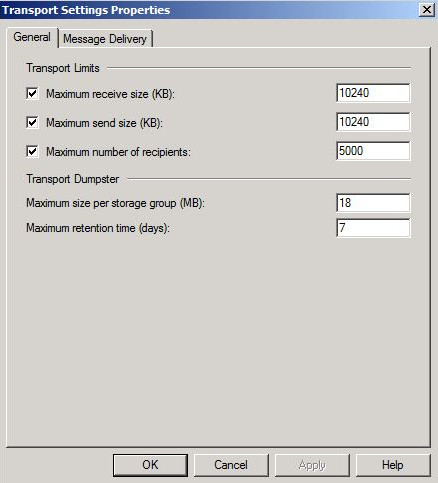
The steps to modify the default attachment limit depend on the type of email account that you are using with Outlook.
If this answers your query, do click Accept Answer and Yes for was this answer helpful. And, if you have any further query do let us know.
This is irrelevant, I'm talking about opening an MSG file from my local PC in New Outlook, nothing to do with servers