Share via

Where do i receive the 6 digit code to login to my phone

sino feng 0 Reputation points
2026-05-30T01:56:02.4333333+00:00

I have been trying to login to the bing app on my phone but i dont know where to find the code on my pc?

Bing | Bing Apps | Download and install

Mobile and desktop apps that bring Bing’s search, discovery, and personalization features to users across devices.Download and install - The process of obtaining and setting up Bing applications on a device.

0 comments No comments

2 answers

Sort by: Most helpful
  1. Gunasekar N 68,585 Reputation points Independent Advisor
    2026-05-30T03:35:46.6266667+00:00

    Hello, thank you for reaching out to Microsoft Q&A.

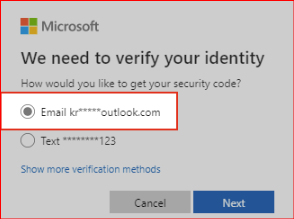
    When signing in with your Microsoft account, do you see a screen like this? The hint shown on that screen indicates where your verification code is being sent.
    User's image

    It could be sent to your recovery email address, phone number, or the Microsoft Authenticator app that you have added before.

    If any of these recovery methods are inactive or unfamiliar to you, you’ll need to replace the security information on your account.

    Please let me know whether you recognize the alternate recovery methods listed there or not, and whether you're having any other issues.


    Was this answer helpful?

    1 person found this answer helpful.
    0 comments No comments

  2. AI answer

    2026-05-30T01:56:15.6833333+00:00

    The 6-digit verification code is sent to the security info on the Microsoft account being used to sign in, not shown on the PC screen by default.

    Check these places for the code:

    1. Email
      • The code is sent to the primary alias or another email added as a way to verify sign-in.
      • Look in the inbox and junk/spam folder for a message from an @accountprotection.microsoft.com address.
    2. Text message (SMS)
      • If a mobile number is set up as security info, the code is sent by SMS to that phone.
      • Ensure the phone number shown (last two digits) matches the mobile number and that the device can receive texts and is not blocking unknown senders.
    3. Authenticator app
      • If Microsoft Authenticator is configured, the prompt or code appears in the app on the phone instead of via SMS/email.

    If no code arrives:

    • Avoid repeatedly requesting new codes, as excessive or repetitive requests can cause Microsoft to temporarily block sending verification codes.
    • Check that a VOIP number is not being used; VOIP numbers cannot receive Microsoft verification codes.
    • If there is unusual activity or heavy compromised traffic from the region, Microsoft may temporarily stop or delay sending codes; this resolves automatically after some time.
    • If still unable to sign in, use the sign-in helper tool: Sign-in helper.

    To review or change where codes are sent (from a browser on the PC):

    1. Go to the Microsoft account security info page (for example via account.microsoft.com → Security).
    2. Confirm that the correct email and/or mobile phone number are listed as security info.
    3. Add or update a mobile phone number or alternate email if needed.

    If codes still do not arrive and access to existing security info is not possible, follow the account recovery process linked from the sign-in page.


    References:

    AI-generated content may be incorrect. Read our transparency notes for more information.

    Was this answer helpful?

    1 person found this answer helpful.

Your answer

Answers can be marked as 'Accepted' by the question author and 'Recommended' by moderators, which helps users know the answer solved the author's problem.
