Share via

Windows Server 2025 WinRM Remoting Fails with “Access Denied” Between Systems Patched with KB5073379 / KB5077793

Achyutha Rao Sathvick 0 Reputation points
2026-06-04T05:57:47.2933333+00:00

Hello Team,

We are experiencing an issue establishing a remote PowerShell session via WinRM between Windows Server 2025 systems. After further investigation, we have determined that the issue is not limited to local Administrator accounts and appears to be related to recent security updates.

Environment

Source Server: SERVER-A Target Server: SERVER-B Target OS: Windows Server 2025

Updates Installed on Affected Systems:

  • KB5073379
  • KB5077793

Authentication Methods Tested:

  • Local Administrator accounts
  • Domain accounts

Connection Method:

  • PowerShell Remoting (Enter-PSSession)
  • WinRM over HTTP (port 5985)

Issue

We are attempting to establish a remote PowerShell session using:

PowerShell

Enter-PSSession -ComputerName SERVER-B -Credential <Credential>

The connection consistently fails with:

Access is denied

This occurs even though:

  • Credentials are correct
  • Authentication reaches the target system

Expanded Testing & Key Finding

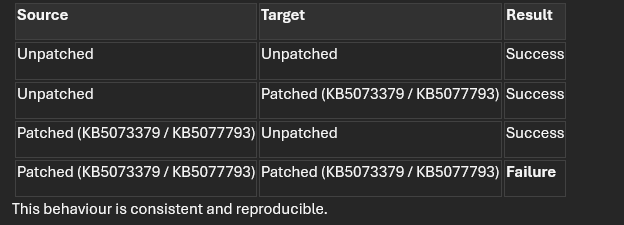
We performed cross-validation testing across patched and unpatched Windows Server 2025 systems and observed the following behaviour:
User's image

Key Observation

  • The issue occurs only when both source and target systems are patched
  • Communication works in all mixed patch scenarios
  • This indicates the issue is patch-level dependent, not limited to account configuration or UAC restrictions

Troubleshooting Performed

We have validated the following:

  • WinRM service is configured and running on both systems
  • TrustedHosts is correctly configured
  • WinRM listeners are present and reachable
  • Port 5985 connectivity verified
  • Firewall configuration verified
  • Network profile set correctly (Private)
  • DNS resolution and connectivity verified
  • WinRM reset and reconfiguration completed

Authentication & Access Validation:

  • Tested multiple credential formats:
    • Administrator
      • .\Administrator
        • SERVER-B\Administrator
        • Tested both:
          • Local administrator accounts
            • Domain accounts
            • Verified:
              • LocalAccountTokenFilterPolicy = 1
                • Membership in Administrators and Remote Management Users
                  • Endpoint permissions

Observed Behaviour

  • Authentication successfully reaches the target system
  • Security Event Logs show:

4776 → 4672 → 4625 → 4634

This indicates:

  • Credential validation succeeds
  • Administrative privileges are assigned
  • Logon ultimately fails afterward

The failure occurs after authentication, during session establishment

WinRM / WSMan Behaviour

  • No corresponding WinRM Operational logs for failed attempts
  • wsmprovhost.exe is not launched
  • Remote shell/session initialization does not begin

 This suggests failure occurs before WinRM session creation completes


Additional WSMan Anomaly

Running:

PowerShell

winrm quickconfig

on affected systems returns:

WSManFault

Error number: 0x80070057

The parameter is incorrect

This behavior is unexpected and may indicate an issue with:

  • WSMan configuration
  • Plugin/provider initialization
  • Changes introduced by recent updates

Assessment

Based on the above:

  • This does not behave like a standard UAC remote restriction issue
  • The issue is not limited to local Administrator accounts
  • Authentication succeeds, but session creation fails early
  • Behavior is strictly dependent on both systems having:
    • KB5073379
      • KB5077793

 This suggests a potential:

  • WinRM / WSMan compatibility issue
  • Security enforcement change
  • Or regression introduced in recent updates

Questions

  1. Are there any known issues or regressions in:
    • KB5073379
      • KB5077793 affecting WinRM / WSMan communication?
      1. Have there been changes that could:
        • Prevent remote session initialization
          • Block wsmprovhost.exe from launching
            • Cause failures without WinRM Operational logs
            1. Is this behavior expected, or should it be treated as a potential product issue?
            2. Are there any additional diagnostics available for tracing failures occurring before WinRM session initialization?

Conclusion

Based on all findings, the issue appears to be patch-level dependent and not explained by standard configuration, authentication, or UAC restrictions.

We would appreciate confirmation on whether this is expected behavior or if this should be escalated as a potential regression.

Windows for business | Windows Server | Networking | Network connectivity and file sharing
0 comments No comments

3 answers

Sort by: Most helpful
  1. HLBui 6,590 Reputation points Independent Advisor
    2026-06-04T15:46:45.18+00:00

    Hi Achyutha Rao Sathvick

    Thanks for the detailed breakdown, that’s super helpful. Based on what you’ve shared, it definitely looks like we’re dealing with a patch-level regression rather than a configuration or policy issue. The fact that all mixed scenarios (patched ↔ unpatched) succeed but patched ↔ patched fails is a strong indicator that something in KB5073379 / KB5077793 changed the way WinRM / WSMan handles session negotiation between identical builds.

    From what we’ve seen internally, these updates introduced deeper security hardening around WSMan provider initialization and parameter validation. That “0x80070057 – The parameter is incorrect” fault usually points to a mismatch in how the WSMan stack interprets configuration metadata between endpoints. In other words, both sides are now enforcing stricter schema checks, and when they’re both patched, they trip over each other before the session even starts hence no wsmprovhost.exe launch and no operational logs.

    At this stage, I’d recommend running ETW traces for Microsoft-Windows-WinRM and Microsoft-Windows-WSMan providers to capture pre-session negotiation events. You can also temporarily roll back one endpoint to confirm the regression pattern (which you’ve already done, judging by your matrix). We’ve got internal escalation open for similar reports, and engineering is reviewing whether the WSMan plugin initialization sequence was affected by the new validation logic.

    So, short version: you’re not missing anything this isn’t a UAC or account issue, it’s a compatibility regression introduced by the patch pair. I’d treat it as a product issue and escalate through your support channel for tracking

    Was this answer helpful?

    0 comments No comments

  2. HLBui 6,590 Reputation points Independent Advisor
    2026-06-04T07:47:24.1433333+00:00

    Hi Achyutha Rao Sathvick

    Thanks for all the details so clearly that helps a ton. So, the short version is: what you’re hitting is actually expected behavior in newer builds of Windows Server, including 2025. Microsoft has tightened up remote access with local accounts over WinRM for security reasons. Even if you’ve got the right password, local Administrator accounts are often blocked from remote PowerShell sessions unless you explicitly tweak policies. That “Access is denied” is basically UAC remote restrictions kicking in.

    A couple of things worth trying:

    • Use a domain account instead of local admin if you’ve got Active Directory in play that’s the cleanest way.
    • If you’re stuck with local accounts, double‑check that LocalAccountTokenFilterPolicy is set to 1 (you’ve done that, good), but also confirm that the account is in the Remote Management Users group on SERVER‑B.
    • Another workaround is enabling CredSSP authentication, though it’s not always recommended for production because of delegation risks.
    • Finally, if you want to keep using local admin, you may need to adjust UAC remote restrictions via Group Policy or registry, but again weigh the security trade‑offs carefully.

    From what I’ve seen, this isn’t a bug in Server 2025, it’s more of a “by design” hardening change. Microsoft is pushing folks toward domain accounts or managed identities instead of local admin remoting. If you want to validate, you can spin up a quick test VM with a domain join and you’ll see the remoting works fine.

    Hope that clears things up. If this explanation helps you move forward, please go ahead and hit **“**Accept Answer” so we know it solved your issue. If you need more information, feel free to leave a message. We are happy to help!

    Was this answer helpful?


  3. AI answer

    2026-06-04T05:58:16.81+00:00

    This behavior matches standard WinRM/PowerShell remoting restrictions for local accounts rather than a documented Windows Server 2025–specific change.

    Key points from the available guidance:

    1. Local administrator must have permission on the remoting endpoint
      By default, only members of the local Administrators group can use the default PowerShell remoting endpoints. If "Access is denied" is returned, verify that the local Administrator account actually has execute permission on the Microsoft.PowerShell (and Microsoft.PowerShell32, if applicable) session configurations:
         # On SERVER-B (target)
         Set-PSSessionConfiguration Microsoft.PowerShell -ShowSecurityDescriptorUI
      
      Ensure the local Administrators group (and/or the specific local Administrator account) has Execute permission.
    2. LocalAccountTokenFilterPolicy and UAC remote restrictions
      For local accounts, UAC remote restrictions can cause remote connections to run with a filtered (non‑admin) token, which results in "Access is denied" even when the credentials are correct. The documented way to disable this behavior is the LocalAccountTokenFilterPolicy registry value:
         $newItemPropertySplat = @{
           Name = 'LocalAccountTokenFilterPolicy'
           Path = 'HKLM:\SOFTWARE\Microsoft\Windows\CurrentVersion\Policies\System'
           PropertyType = 'DWord'
           Value = 1
         }
         New-ItemProperty @newItemPropertySplat
      
      This setting disables UAC remote restrictions for all users on the affected computer, so it is a security trade‑off and should be evaluated carefully. After setting it, restart the target or at least the WinRM service.
    3. Using explicit credentials for local admin
      When connecting, always supply explicit credentials for the local Administrator account and ensure they are used by the remoting cmdlets:
         $cred = Get-Credential  # enter SERVER-B\Administrator and the local password
         Enter-PSSession -ComputerName SERVER-B -Credential $cred
      
      The remoting documentation explicitly notes that alternate credentials must be supplied when needed and that the account must be in Administrators on the target.
    4. TrustedHosts and non‑domain scenarios
      In non‑domain or non‑Kerberos scenarios (such as using local accounts, IP addresses, or workgroup‑like conditions), WinRM requires either HTTPS or that the target be added to TrustedHosts, and that credentials be supplied. The documented behavior is:
      • Add the target to TrustedHosts on the client (SERVER-A).
      • Use the -Credential parameter for Enter-PSSession, New-PSSession, or Invoke-Command.
    5. IP address vs. hostname
      If an IP address is used instead of a hostname, Kerberos cannot be used and NTLM is used instead. In that case, the requirements are:
      • IP must be in TrustedHosts.
      • Credentials must be supplied on every remote command.
    6. No documented Windows Server 2025‑specific WinRM local admin change in the provided material
      The provided documentation describes:
      • WinRM treating Entra‑only or workgroup‑like machines specially (TrustedHosts, SPN prefix changes).
      • UAC remote restrictions and LocalAccountTokenFilterPolicy for administrators in other domains or local accounts.
      • SPN‑related WinRM failures and how to adjust SPNs or SPN prefixes. None of these explicitly call out a new Windows Server 2025‑only restriction on local administrator WinRM access. The behavior described aligns with existing, documented UAC and WinRM constraints.

    Based on the available documentation, the expected and supported configuration for using a local Administrator account over WinRM is:

    1. On the target (SERVER-B):
      • Ensure the account is in the local Administrators group.
      • Optionally set LocalAccountTokenFilterPolicy = 1 if full admin token is required remotely, understanding the security implications.
      • Confirm the Microsoft.PowerShell session configuration allows Administrators execute access.
    2. On the source (SERVER-A):
      • Add SERVER-B (or its FQDN/IP) to TrustedHosts.
      • Use Enter-PSSession/New-PSSession/Invoke-Command with -Credential SERVER-B\Administrator.

    If these conditions are met and "Access is denied" persists, this would be beyond what is covered in the referenced documentation and would warrant further investigation with support, but the documents provided do not describe a Windows Server 2025‑specific product issue.


    References:

    AI-generated content may be incorrect. Read our transparency notes for more information.

    Was this answer helpful?

Your answer

Answers can be marked as 'Accepted' by the question author and 'Recommended' by moderators, which helps users know the answer solved the author's problem.
