
i am still cannot fix the problem.
This browser is no longer supported.
Upgrade to Microsoft Edge to take advantage of the latest features, security updates, and technical support.
' cx='32' cy='32' r='32' /%3E%3Ctext x='50%25' y='55%25' dominant-baseline='middle' text-anchor='middle' fill='%23FFF' %3EO%3C/text%3E%3C/svg%3E)
Hi,
I would like to open Windows 10 settings app (ms-settings:) from command line to navigate to following location:
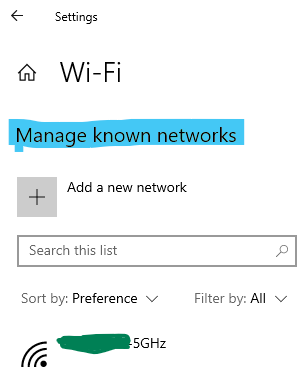
Settings >Network and Internet > WiFi > Manage Known Networks
Currently I am using start ms-settings:network-wifi and then clicking the "Manage Known Networks" option.
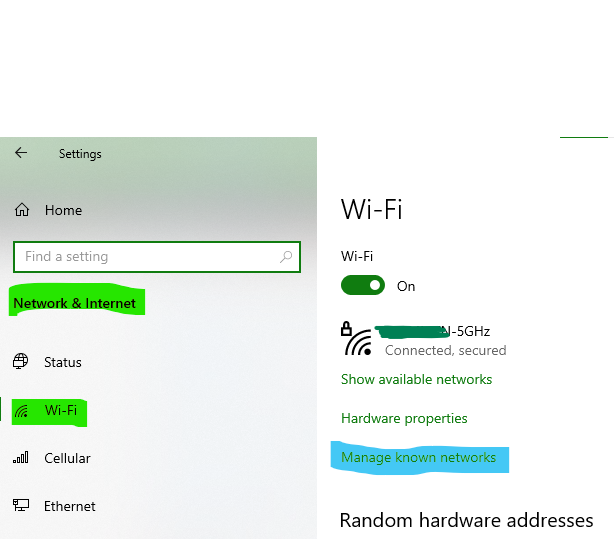
Question: Can I reach to the Manage Known Networks directly?
' cx='32' cy='32' r='32' /%3E%3Ctext x='50%25' y='55%25' dominant-baseline='middle' text-anchor='middle' fill='%23FFF' %3EYZ%3C/text%3E%3C/svg%3E)
i am still cannot fix the problem.
' cx='32' cy='32' r='32' /%3E%3Ctext x='50%25' y='55%25' dominant-baseline='middle' text-anchor='middle' fill='%23FFF' %3EA%3C/text%3E%3C/svg%3E)
Hi ,
start ms-settings:network-wifi command can only launch Manage Wi-Fi Settings interface.
start ms-settings:network-wifisettings can launch Mange Known Networks.
Best Regards,
Candy
--------------------------------------------------------------
If the Answer is helpful, please click "Accept Answer" and upvote it.
Note: Please follow the steps in our documentation to enable e-mail notifications if you want to receive the related email notification for this thread.
Hi, it launched the Mange Known Networks indeed.
Yes, I found start ms-settings:network-wifisettings can launch Mange Known Networks.
You could accept the useful reply as answer if you want to end this thread up.
If there is anything else we can do for you, please feel free to post in the forum.

The main list is in MSDN :
Thanks for providing full list, it's documented as:


Maybe this helps:
start ms-settings:network-wifisettings
(If the reply was helpful please don't forget to upvote and/or accept as answer, thank you)
Regards
Andreas Baumgarten
Thanks Andreas for telling me the correct command.
If you found the answer helpful, it would be great if you marked it "Accept as answer". This will help others find answers in Q&A.
Regards
Andreas Baumgarten