Microsoft 365 and Office | Visio | For business | Windows
A professional diagramming tool that helps users visualize complex information through easy-to-understand diagrams.

This browser is no longer supported.
Upgrade to Microsoft Edge to take advantage of the latest features, security updates, and technical support.
' cx='32' cy='32' r='32' /%3E%3Ctext x='50%25' y='55%25' dominant-baseline='middle' text-anchor='middle' fill='%23FFF' %3EAS%3C/text%3E%3C/svg%3E)
I want to turn an arrow from 1-way to 2-way. It could be done by selecting it from right click - Styles - Line - Arrows . Also there are only options with pointers that differ from the default ones -they are either bigger or jagged. Is there an easier way to do it?
A professional diagramming tool that helps users visualize complex information through easy-to-understand diagrams.
Answer accepted by question author

Hi @Aleksey Sivaks ,
I believe the Line > Styles > Arrow is the easiest way of creating a bi-directional arrow in Visio.
----------
(If the reply was helpful please don't forget to upvote or accept as answer, thank you)
Best regards,
Leon

I aggree with Leon.
Generally, to create a bi-directional arrows In Visio, we right click the line > Styles > Line > Arrows.
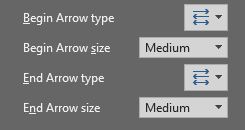
For more settings of arrows, we may click "More Arrows". There would be some options for arrow type and size.
If an Answer is helpful, please click "Accept Answer" and upvote it.
Note: Please follow the steps in our documentation to enable e-mail notifications if you want to receive the related email notification for this thread.