Exchange | Exchange Server | Management
The administration and maintenance of Microsoft Exchange Server to ensure secure, reliable, and efficient email and collaboration services across an organization.
This browser is no longer supported.
Upgrade to Microsoft Edge to take advantage of the latest features, security updates, and technical support.
' cx='32' cy='32' r='32' /%3E%3Ctext x='50%25' y='55%25' dominant-baseline='middle' text-anchor='middle' fill='%23FFF' %3EJC%3C/text%3E%3C/svg%3E)
Hi all,
I can grant userA "send as" permission for distribution groupA by administrator account via EAC, I want userB can grant "send as" permission for other users on groupA too, which role in "admin roles" I have to assign userB to archive this ?
The administration and maintenance of Microsoft Exchange Server to ensure secure, reliable, and efficient email and collaboration services across an organization.
Answer accepted by question author

Add it back to the Recipient Management Role. Someone removed it
You can do this in EAC under Permissions/Admin Role
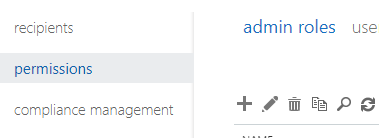
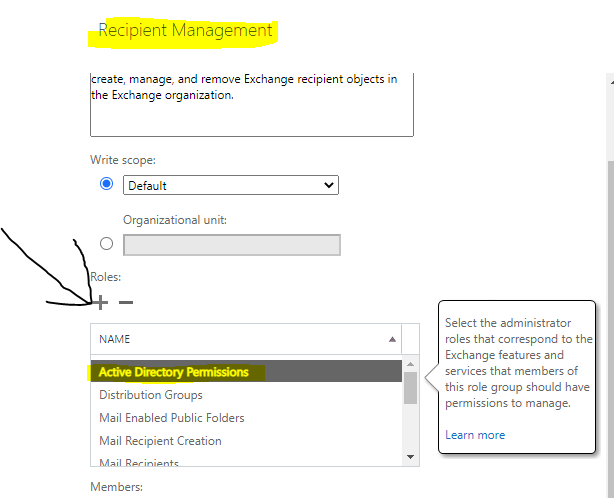
The Recipient Management role will give UserB the ability to grant SEND AS to any mail-enabled object in EAC, unless you scoped a custom role to a specific group of recipients using RBAC.
Regardless, here is how you find which role is required for a specific command
In this case, send as is granted with add-adpermission for on-prem
$Perms = Get-ManagementRole -Cmdlet Add-ADPermission
Name RoleType
Active Directory Permissions ActiveDirectoryPermissions
$Perms | foreach {Get-ManagementRoleAssignment -Role $_.Name -Delegating $false | Format-Table -Auto Role,RoleAssigneeType,RoleAssigneeName}
Role RoleAssigneeType RoleAssigneeName
Active Directory Permissions RoleGroup Organization Management
Active Directory Permissions RoleGroup Recipient Management
To using the built-in role, add the UserB to "Recipient Management" at a minimum
https://learn.microsoft.com/en-us/powershell/exchange/find-exchange-cmdlet-permissions?view=exchange-ps
Alternatively, they can add SEND AS via ADUC if they have perms there as well :)
Thanks for your reply,
In my case , userB is assigned to The Recipient Management role but he cannot grant SEND AS , so I try to find which role is required for "Add-ADPermission" command, this is result :
$Perms = Get-ManagementRole -Cmdlet Add-ADPermission
$Perms | foreach {Get-ManagementRoleAssignment -Role $_.Name -Delegating $false | Format-Table -Auto Role,RoleAssigneeType,RoleAssigneeName}
Role                         RoleAssigneeType RoleAssigneeName
----                         ---------------- ----------------
Active Directory Permissions        RoleGroup Organization Management
Recipient Management role is not listed , only Organization Management , I don't want to add userB into Organization Management role, what should I do ?
I didn't custom any role as default , here information about Recipient Management role at EAC:
Recipient Management
Members of this management role group have rights to create, manage, and remove Exchange recipient objects in the Exchange organization.

Assigned Roles

Distribution Groups
Mail Recipient Creation
Mail Recipients
Mailbox Import Export
Message Tracking
Migration
Move Mailboxes
Recipient Policies
Team Mailboxes