Microsoft 365 and Office | OneDrive | For business | Windows
A Microsoft file hosting and synchronization service.

This browser is no longer supported.
Upgrade to Microsoft Edge to take advantage of the latest features, security updates, and technical support.
' cx='32' cy='32' r='32' /%3E%3Ctext x='50%25' y='55%25' dominant-baseline='middle' text-anchor='middle' fill='%23FFF' %3EDD%3C/text%3E%3C/svg%3E)
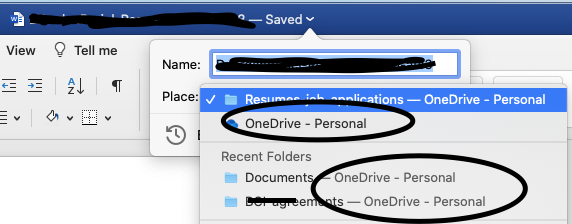 Whenever I turn on autosave for Word the location in OneDrive shows Personal - where is this? I can never find the location. The image shows the Personal location under the application icon, itself. There's no other folder and so no list to see where it is.
A Microsoft file hosting and synchronization service.
' cx='32' cy='32' r='32' /%3E%3Ctext x='50%25' y='55%25' dominant-baseline='middle' text-anchor='middle' fill='%23FFF' %3ECS%3C/text%3E%3C/svg%3E)
And what’s the answer, when you’re using Word on iPad?
The file gets saved to “OneDrive - Personal” which is not visible in iOS Files, nor in OneDrive app :(
Where the @$%& is it!?

Hi @Deborah Deb Jordan ,
By default, the data you sync to your PC from OneDrive is stored on your local drive in the User folder (C:\Users\<Username>\OneDrive).
The location can be changed if you want.
(If the reply was helpful please don't forget to upvote or accept as answer, thank you)
Best regards,
Leon
' cx='32' cy='32' r='32' /%3E%3Ctext x='50%25' y='55%25' dominant-baseline='middle' text-anchor='middle' fill='%23FFF' %3ELB%3C/text%3E%3C/svg%3E)
@Leon Laude I have a similar problem in that I can't find a lot of folders that I apparently created under e.g. onedrive - [company name] >> personal >> [my email] >>documents
It's not in the local drive Users folder. I can't find it anywhere :*(

You could try to turn on Finder integration in "Sync files with OneDrive on Mac OS X" as LeonLaude given.
Regards,
Erin
If an Answer is helpful, please click "Accept Answer" and upvote it.
Note: Please follow the steps in our documentation to enable e-mail notifications if you want to receive the related email notification for this thread.
Sorry I failed to say I am on a Mac.
You can change the location here:
https://support.microsoft.com/en-us/office/sync-files-with-onedrive-on-mac-os-x-d11b9f29-00bb-4172-be39-997da46f913f

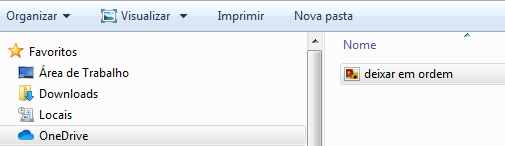
the file is saved in C: \ Users \ "your user" \ OneDrive
' cx='32' cy='32' r='32' /%3E%3Ctext x='50%25' y='55%25' dominant-baseline='middle' text-anchor='middle' fill='%23FFF' %3EMP%3C/text%3E%3C/svg%3E)