Azure IoT Hub
An Azure service that enables bidirectional communication between internet of things (IoT) devices and applications.
This browser is no longer supported.
Upgrade to Microsoft Edge to take advantage of the latest features, security updates, and technical support.

In Azure IoT-Hub (portal), IoT devices and Query explorers are not accessible to users who do not have at least the contributor role. There does not seem to be a built-in role to access these explorers so I would like to create a custom role : basically a Reader with additional permission to see the explorers.
However I can't find wichi authorizations / permissions are needed to see the Iot Device explorer and the Query explorer. Anyone knows where I can find that ?
An Azure service that enables bidirectional communication between internet of things (IoT) devices and applications.
' cx='32' cy='32' r='32' /%3E%3Ctext x='50%25' y='55%25' dominant-baseline='middle' text-anchor='middle' fill='%23FFF' %3EA%3C/text%3E%3C/svg%3E)
Hi
You have not mentioned what permissions to add to this custom role, pls list the permissions to add thanks.
' cx='32' cy='32' r='32' /%3E%3Ctext x='50%25' y='55%25' dominant-baseline='middle' text-anchor='middle' fill='%23FFF' %3EAM%3C/text%3E%3C/svg%3E)
You can set the masterreader access which allows a user to view everything but not make changes.
Access control (IAM) is the page that you typically use to assign roles to grant access to Azure resources. It's also known as identity and access management and appears in several locations in the Azure portal.
To grant access to an Azure resource, you add a role assignment. Follow these steps to assign a role.
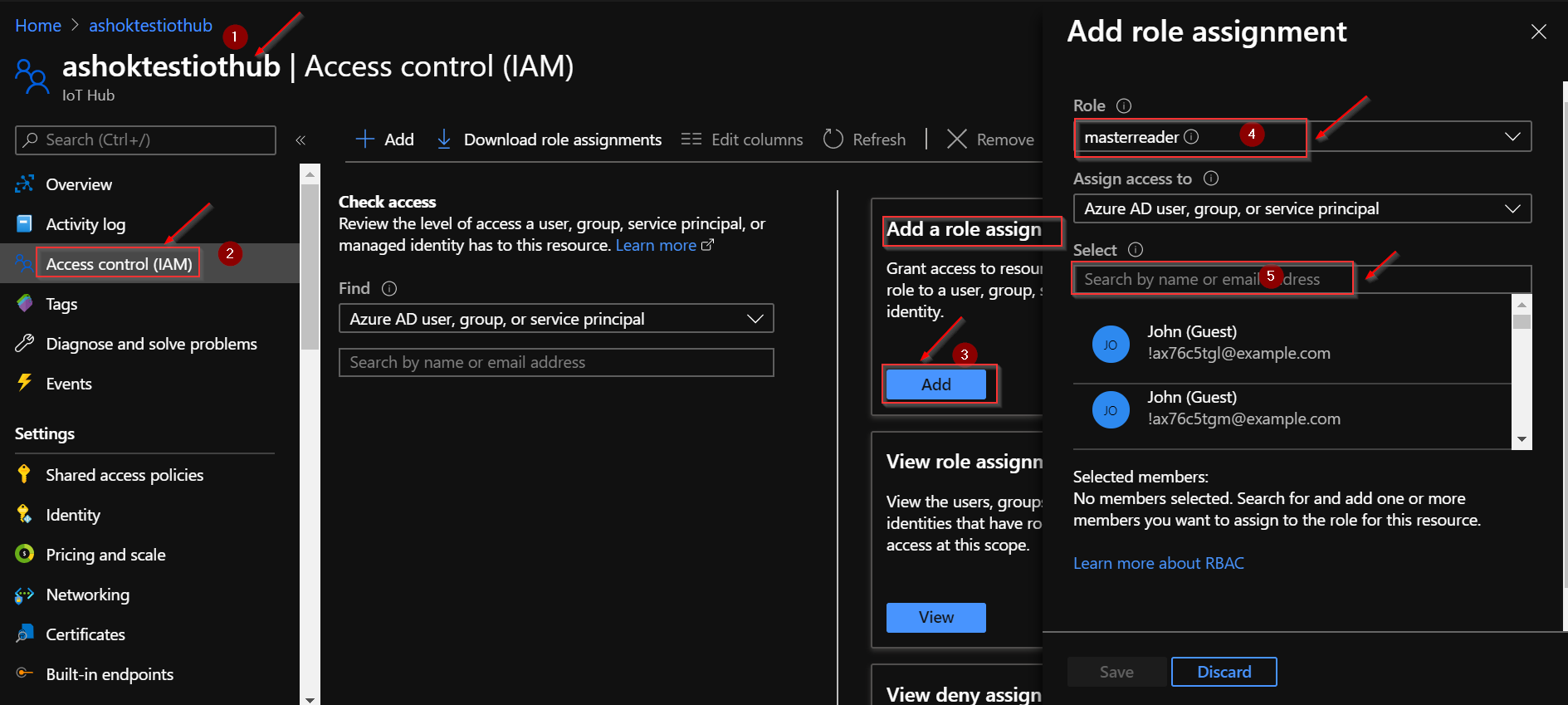
Please refer Add or remove Azure role assignments using the Azure portal for more details.
If the Azure built-in roles don't meet the specific needs of your organization, you can create your own custom roles. Just like built-in roles, you can assign custom roles to users, groups, and service principals at management group, subscription, and resource group scopes.
Please see Create or update Azure custom roles using the Azure portal for more details.
Hope that helps. Do let us know if you have further queries.
Please accept helpful responses as 'Answer', which will be helpful to others as well.
@Alexandre Just checking back, could you please let us know if you need further help in this matter.
Please accept helpful responses as 'Answer', which will be helpful to others as well.
@AshokPeddakotla-MSFT Thanks for your answer but I can't find any masterreader role, are you sure this is a Built In Role and not a custom role ?
I can't see it in the roles tab : 
@Alexandre Sorry for the delayed response. masterreader is listed as a custom role. Please see below screenshot for more details.

Ensure that you have permissions to create custom roles, such as Owner or User Access Administrator
Please let me know if you have any further queries.
Sorry I did not get notified by your answer. Can you tell me what permission did you assign to this custom role in order for me to create a similar role ? @AshokPeddakotla-MSFT
@Alexandre Due to limitation, posted response as new answer. Kindly check and update if you have any further queries.
@Alexandre
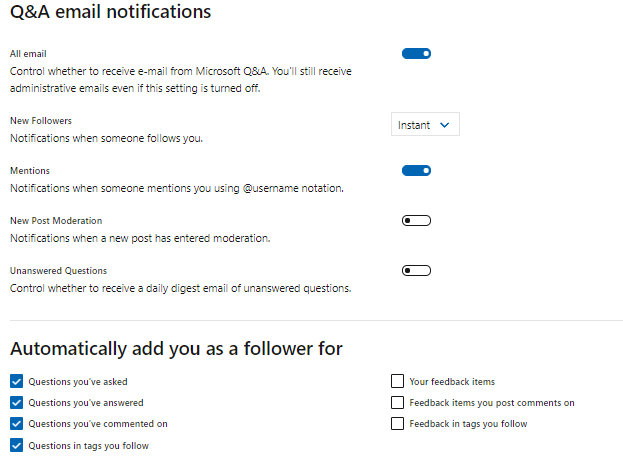
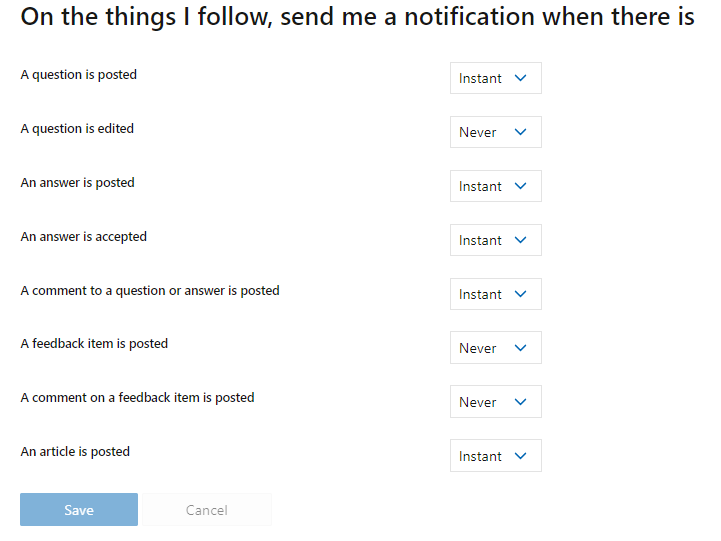
To receive notifications when answer is posted on the question you have asked or you follow, click on your Avatar, and then Settings. Make sure you have an email for notifications. Then, on Q&A email notifications section, select Questions in tags you follow and click on Save.
Regarding the specific question, as mentioned earlier, this role Allows a user to view everything but not make changes.
To add or remove role assignments, you must have:
Microsoft.Authorization/roleAssignments/write and Microsoft.Authorization/roleAssignments/delete permissions, such as User Access Administrator or Owner
Kindly check Add or remove Azure role assignments using the Azure portal for more details.
Please accept helpful responses as 'Answer' and 'Up vote' which will be helpful to others as well.
@Alexandre Just checking back, could you please let us know if you need further help in this matter.
Please accept helpful responses as 'Answer', which will be helpful to others as well.
' cx='32' cy='32' r='32' /%3E%3Ctext x='50%25' y='55%25' dominant-baseline='middle' text-anchor='middle' fill='%23FFF' %3EAN%3C/text%3E%3C/svg%3E)
As @Anonymous said, you did not give what permissions to add in this new custom role. @AshokPeddakotla-MSFT the question is not to know what permissions are necessary to add or remove a role assignment, but if I create a new custom role masterreader what permissions should I set in it to have the right to see the iot hub devices, their properties, their twins ...
' cx='32' cy='32' r='32' /%3E%3Ctext x='50%25' y='55%25' dominant-baseline='middle' text-anchor='middle' fill='%23FFF' %3ESS%3C/text%3E%3C/svg%3E)
this is a useless thread. No permissions are provided for this "masterreader" custom role