
Hi,
According to my knowledge, there is no GPO that can disable the terminal server
Best wishes
Vicky
This browser is no longer supported.
Upgrade to Microsoft Edge to take advantage of the latest features, security updates, and technical support.
' cx='32' cy='32' r='32' /%3E%3Ctext x='50%25' y='55%25' dominant-baseline='middle' text-anchor='middle' fill='%23FFF' %3EFC%3C/text%3E%3C/svg%3E)
Hi all,
Inside company we have completed a vulnerability assessment.
I have this vulnerability:
"TLS Version 1.0 Protocol Detection"
All physical servers and virtual machine inside company are Windows Server 2016 DataCenter and they has got the last Windows Updates.
How can I solve it about RDP?
Is it possible disable TLS 1.0 for RDP using GPO?
I would improve security on company servers.
Thanks so much
Best regards
Federico
' cx='32' cy='32' r='32' /%3E%3Ctext x='50%25' y='55%25' dominant-baseline='middle' text-anchor='middle' fill='%23FFF' %3EVW%3C/text%3E%3C/svg%3E)
Hi,
According to my knowledge, there is no GPO that can disable the terminal server
Best wishes
Vicky
Can anyone suggest me properly GPO to set to disable TLS 1.0 on different servers?
Not servers are Terminal Server (just one at the moment).
Thanks
Federico
Hi,
thanks for you reply.
@Thameur-BOURBITA Ok, so I will disable TLS 1.0 for all system and not just for RDP.
@Vicky Wang Sorry but I did not understood which is the right option about "Remote Desktop Session Host Configuration"
I would generally disable TLS 1.0 to improve security in my LAN where there are differente Windows Server 2016 VM (Domain Controllers, File Server, Print server...)
Can I create a group policy to disable it on different machines?
Thanks so much
Federico
Disabling TLS is a system-wide registry setting:
https://technet.microsoft.com/en-us/library/dn786418.aspx#BKMK_SchannelTR_TLS10
Key: HKLM SYSTEM\CurrentControlSet\Control\SecurityProviders\SCHANNEL\Protocols\TLS 1.0\Server
Value: Enabled
Value type: REG_DWORD
Value Data: 0
Also, the PCI requirement for disabling early TLS does not go into effect until June 30, 2016.
Internet Explorer is one product I know of that has a separate configuration option for the TLS/SSL encryption settings. There may be others.
I have a Windows 2012 R2 server with TLS 1.0 disabled and I can remote desktop to it.
If you are wondering, below is a screenshot of tsconfig.msc on a Windows 2008 R2 server that has KB3080079 installed. There's nothing to configure because the only thing the update did was add support for the other two TLS encryption levels so that when TLS 1.0 is disabled it continues to work.
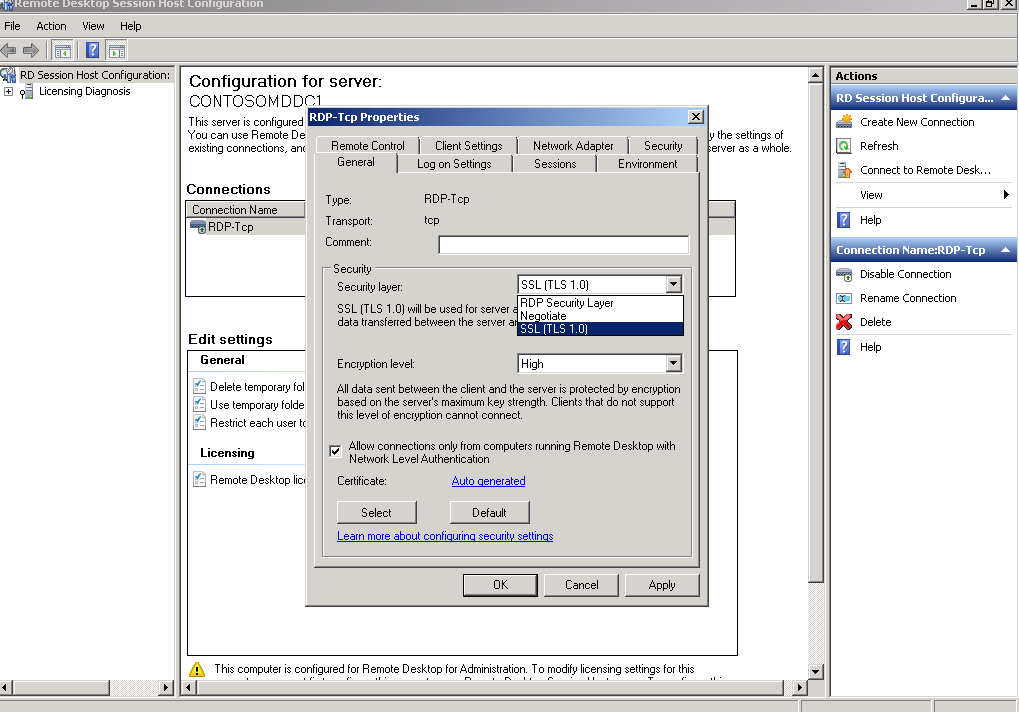
Hope this information can help you
Best wishes
Vicky
' cx='32' cy='32' r='32' /%3E%3Ctext x='50%25' y='55%25' dominant-baseline='middle' text-anchor='middle' fill='%23FFF' %3ETB%3C/text%3E%3C/svg%3E)
Hi,
You can use Group policy preference to disable or enable TLS 1.0 by setting this registry key mentioned on this link :
Please don't forget to mark this reply as answer if it help you to fix your issue