Microsoft Teams | Microsoft Teams for business | Other
Additional features, settings, or issues not covered by specific Microsoft Teams categories

This browser is no longer supported.
Upgrade to Microsoft Edge to take advantage of the latest features, security updates, and technical support.
' cx='32' cy='32' r='32' /%3E%3Ctext x='50%25' y='55%25' dominant-baseline='middle' text-anchor='middle' fill='%23FFF' %3ENA%3C/text%3E%3C/svg%3E)
I created a recurring meeting and accidentally added it as a Teams meeting, but we wanted to use Zoom for it. People are confused about whether to use Teams/Zoom. Is there a way to just turn off Teams or do I have to cancel and create a new meeting?
Additional features, settings, or issues not covered by specific Microsoft Teams categories
' cx='32' cy='32' r='32' /%3E%3Ctext x='50%25' y='55%25' dominant-baseline='middle' text-anchor='middle' fill='%23FFF' %3EAA%3C/text%3E%3C/svg%3E)
Yes you can easily via the Teams calendar, but not via Outlook.
' cx='32' cy='32' r='32' /%3E%3Ctext x='50%25' y='55%25' dominant-baseline='middle' text-anchor='middle' fill='%23FFF' %3EL%3C/text%3E%3C/svg%3E)
Customize your outlook options bar and add "Don't Host Online" to it (the botton will be active).

It's annoying that Teams activates and converts the event unprompted, whenever you add other parties in scheduling assistant tab, and you must then use the Don't Host Online button under the Meeting tab.
' cx='32' cy='32' r='32' /%3E%3Ctext x='50%25' y='55%25' dominant-baseline='middle' text-anchor='middle' fill='%23FFF' %3ECE%3C/text%3E%3C/svg%3E)
I want to bump this comment. Teams will make something an online meeting by default. Then, there is no way to change it except to cancel the meeting? This is awful. Sometimes you really cannot cancel a meeting that was difficult to arrange and expect people to take that the right way. This really much be addressed.
' cx='32' cy='32' r='32' /%3E%3Ctext x='50%25' y='55%25' dominant-baseline='middle' text-anchor='middle' fill='%23FFF' %3ESM%3C/text%3E%3C/svg%3E)
So many people asking this but Microsoft not listening as usual.

I'd like to add my voice to Chris Estey's. It is often impractical and disruptive to cancel a meeting. Bad form.

It's best to cancel it, and you'd probably want to "end" the corresponding meeting chat in Teams (or boot all participants out of it).
' cx='32' cy='32' r='32' /%3E%3Ctext x='50%25' y='55%25' dominant-baseline='middle' text-anchor='middle' fill='%23FFF' %3EJM%3C/text%3E%3C/svg%3E)
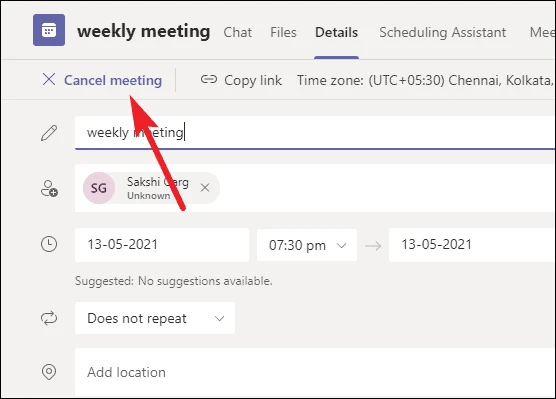
As michev said above, you need to cancel this Teams meeting in your Teams calendar.
If the answer is helpful, please click "Accept Answer" and kindly upvote it. If you have extra questions about this answer, please click "Comment".
Note: Please follow the steps in our documentation to enable e-mail notifications if you want to receive the related email notification for this thread.
It has been a while, how is everything going?
If you have any update about this issue, please feel free to post back.
I am checking the status of this case. Please let us know if you would like further assistance.
Meanwhile, if the reply is helpful to you, please try to mark it as an answer to close the thread, it will help others who encounter the same issue and read this thread.
Thank you for your understanding and patience!