Windows for business | Windows Server | Storage high availability | Clustering and high availability

This browser is no longer supported.
Upgrade to Microsoft Edge to take advantage of the latest features, security updates, and technical support.
' cx='32' cy='32' r='32' /%3E%3Ctext x='50%25' y='55%25' dominant-baseline='middle' text-anchor='middle' fill='%23FFF' %3EA%3C/text%3E%3C/svg%3E)
Hello, community! 👋
I am working on setting up a Windows Server Failover Cluster (WSFC) with Hyper-V to make virtual machines highly available.
However, I am limited to using local storage on each cluster node and do not want to use traditional shared storage solutions. I Want to Configure Hyper-V VM as a Cluster Role Without Shared Storage.)
When I try to make a virtual machine highly available, I encounter an error related to the storage not being shared or accessible by all cluster nodes.
Below are the details of what I've tried and the results.
What I Have Tried
C:\ProgramData\Microsoft\Windows\Hyper-V).→ Virtual Machine
[
→ Configure High Availability.
- Result : Configuration failed with the following detailed log:
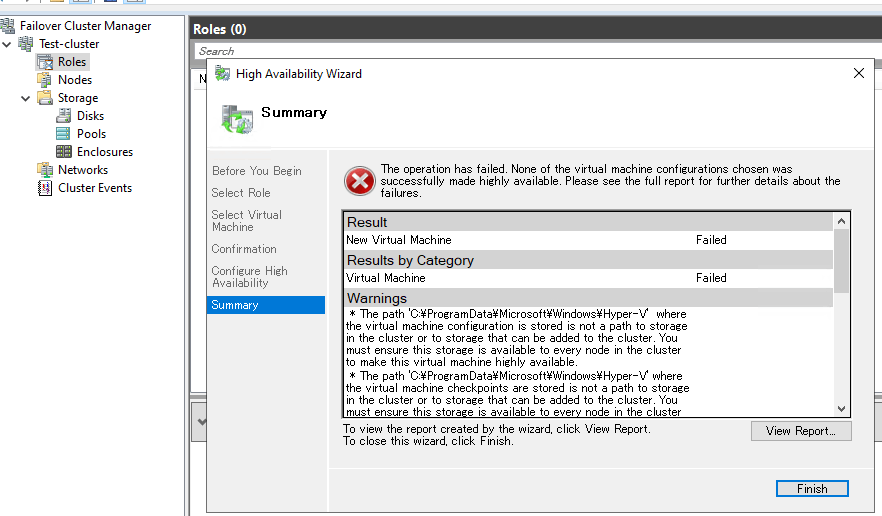
New Virtual Machine
Looking for required storage...
The path 'C:\ProgramData\Microsoft\Windows\Hyper-V' where the virtual machine configuration is stored is not a path to storage in the cluster or to storage that can be added to the cluster. You must ensure this storage is available to every node in the cluster to make this virtual machine highly available.
Configuring virtual machine 'New Virtual Machine'...
Creating virtual machine role 'New Virtual Machine'...
Creating resources for virtual machine 'New Virtual Machine'...
Creating virtual machine resource 'Virtual Machine New Virtual Machine'...
Creating virtual machine configuration resource 'Virtual Machine Configuration New Virtual Machine'...
Configuring virtual machine resource 'New Virtual Machine'...
Configuring virtual machine configuration resource 'Virtual Machine Configuration New Virtual Machine'...
Configuring dependencies between virtual machine and its configuration resource...
Configuring storage for virtual machine 'New Virtual Machine'...
Configuring dependencies between the virtual machine resources and their storage...
Notifying virtual machine configuration resource 'Virtual Machine Configuration New Virtual Machine' that its configuration has changed...
Bringing virtual machine configuration resource 'Virtual Machine Configuration New Virtual Machine' online...
There was a failure bringing the virtual machine configuration resource 'Virtual Machine Configuration New Virtual Machine' online.
Deleting virtual machine resource 'Virtual Machine New Virtual Machine'.
Deleting virtual machine configuration resource 'Virtual Machine Configuration New Virtual Machine'.
Removing storage that is no longer needed from virtual machine 'New Virtual Machine'...
Deleting virtual machine role 'New Virtual Machine'...
There was a failure configuring the virtual machine role for 'New Virtual Machine'.
An error occurred while attempting to bring the resource 'Virtual Machine Configuration New Virtual Machine' online.
The cluster resource could not be brought online by the resource monitor
An error was encountered while configuring the clustered virtual machine. The clustered role that was being configured has been removed.
Query
Is there any way to configure high availability for Hyper-V VMs using local storage only, without relying on traditional shared storage solutions?
Thanks in advance for your insights and suggestions! 🙏
Locked Question. This question was migrated from the Microsoft Support Community. You can vote on whether it's helpful, but you can't add comments or replies or follow the question.
Thank you for your suggestion regarding Storage Spaces Direct (S2D) as an option for shared storage and the “Hyperconverged Hyper-V and Storage Spaces Direct” setup.
I’ve reviewed the [Storage Spaces Direct hardware requirements | Microsoft Learn) and my current storage configuration:
On my system, storage is RAID-based, and here are the details:
Disk ###  Status         Size     Free     Dyn  Gpt

--------  -------------  -------  -------  ---  ---

Disk 0    Online          893 GB  1024 KB        *
Volume ###  Ltr  Label        Fs     Type        Size     Status     Info

----------  ---  -----------  -----  ----------  -------  ---------  --------

Volume 0     C                NTFS   Partition    893 GB  Healthy    Boot

Volume 1                      FAT32  Partition    100 MB  Healthy    System

Volume 2                      NTFS   Partition    599 MB  Healthy    Hidden
According to the Microsoft documentation, Storage Spaces Direct supports configurations with SAS or NVMe drives in a direct pass-through mode.
https://learn.microsoft.com/en-us/windows-server/storage/storage-spaces/storage-spaces-direct-hardware-requirements#drives
**So based on the above setup, is my configuration supported by Storage Spaces Direct?**I’m sorry for my limited knowledge and understanding in this area as I’m very new to this technology.
My Goal :
I need to set up a failover cluster and add stateless virtual machines (running Debian-based operating systems) to the cluster. These VMs will host stateless HTTP applications, so the application layer is the primary focus.
Key Questions
Thank you again for guiding me as I navigate this setup.
Your guidance and support are much appreciated!
Hi,
The storage needs to be available to other nodes if you want to configure high availability to the VMs. Since you can only use the local disks on your cluster nodes you may give a try to Storage Spaces Direct.
Deploy Storage Spaces Direct on Windows Server | Microsoft Learn