Hi all,
I've been using an i7 SP3 as my primary PC for one of it's original purposes -
gaming and dev.
Sure, there are desktops, but isn't it a laptop replacement too?
Power of a laptop, portability of a tablet.
This post is my experience with major issues on running heavy-duty workloads on the SP3.
It's a great device with fantastic support, but falls just short of perfection in this regard (for now).
Thermal throttling
The easiest way that hopefully solves this:
Wait for Microsoft to release a way to toggle fan speed between default and full-speed.
The Surface app is a great place to cram this option, as with others.
Why try this method?
If it works, it means more things can be done in tablet mode (visual lag & heat is worse than noise).
A normal fan is bulkier, and uses a USB port, so it's only a real solution while docked.
Thermal throttling is based on an ambient sensor inside the case.
Reducing clock speeds, and maintaining CPU temps around 70'C = throttles eventually:
Heat is still trapped inside the casing, because the fan is too busy trying to be stealthy.
By the time fan speeds really ramp up to counter the heat, **** has hit the fan (90'C and counting).
Surface does the 800MHz back-flip, and spends its day see-sawing between perfect and awful.
Otherwise, hope for a ninja firmware patch that Microsoft did for the earlier Surface Pros?
Same problem would happen, but at least temperatures would ping-pong faster.
The alternative way that definitely solves this:
Get a fan solution to deal with the heat.
(hopefully Microsoft makes one, because aesthetics and build quality).
Why fiddle with this?
Because it definitely works. A fan works so well, it's unfunny - fully sustainable turbo boost.
Sadly, it unleashes a different can of worms, but more on that later.
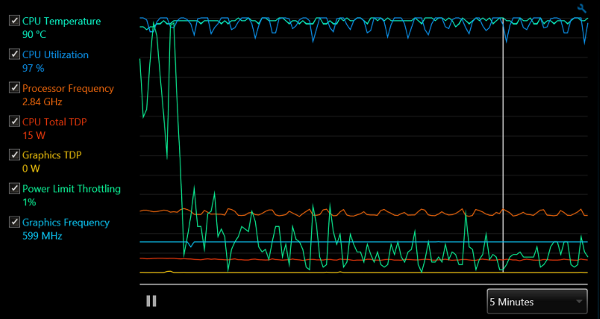
above: Intel XTU CPU test on my SP3 (and yes, it used to have thermal mood swings too)
Average sustained CPU frequencies (based on 25W):
Light GPU workloads: 2.6 - 2.8GHz
Moderate GPU workloads: 2.2 - 2.3GHz
Heavy GPU workloads: 1.7GHz
My fan is a horrible hack bound by a rubber band just a bit different from Cothek's.
HisDIY fan solution is more compact ($30++, it depends).
The cheaper solution is afan attached to the side of your Surface (around $8).
Insufficient power on AC (adapter / dock)
If you bypassed the thermal throttle and hit the power limit (for long hours) instead,
your Surface will likely black out, work may be lost, and a low battery picture pops out!
Technical detail:
When using more power than AC power provides, your Surface dips into battery power.
Eventually, this wears the battery until it reaches 0%, and everything fades to black.
Apparently, it's by design (same as Macbooks) and not unheard of for laptops.
One way that might solve this:
Wait for Microsoft to sell an updated adapter which delivers more power.
SP2 has a 48W adapter. Although, the chance of this happening is rather slim.
Another way that definitely solves this:
CPU+GPU wattage can be limited, using Intel XTU, by applying the same value to
turbo boost power max and
turbo boost short power max.
I've figured out the wattage for my i7 SP3 (may not apply to all, doesn't hurt to try anyway):
max = while set to maximum screen brightness (100%)
min = while set to minimum screen brightness (0%)
dock
9.500W (max)
11.625W (min)
adapter
13.000W (max)
15.125W (min)
Intel XTU's GPU test is not a fully accurate gauge for typical gaming (i.e. CPU+GPU).
So I tested the wattage by running Fish Bowl with 2000 fish to simulate game play,
as well as testing actual games afterwards (Dragon Age: Inquisition for e.g. runs great).
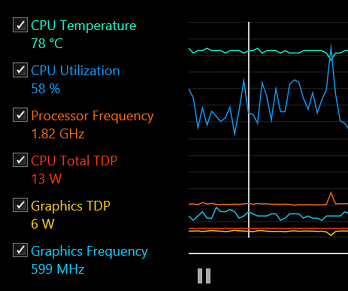
above: numbers from running DA:I on it with wattage set (13W)
Side note:
Brightness can be changed to trigger an update to the charging on/off status.
Unfortunately, the 48W dock supplies less power than the 36W adapter.
I've logged an issue about that, so hopefully it gets fixed soon.
It'd be nice if the dock could supply more power than the adapter though.
External graphics dock
It would definitely make SP3 a serious gaming device.
Not essential for its well-being, but 100% interesting for better quality.
Plus it solves both problems above very neatly!
Power and heat contention is thrown from iGPU to the graphics dock.
So why not make the dock, sell it, and make i5 / i7 perfect for entertainment?
Edit: as noted below, there isn't sufficient bandwidth between the SP3 and dock.
Either way, it's a great device. But the question is, can it be a perfect device?
' cx='32' cy='32' r='32' /%3E%3Ctext x='50%25' y='55%25' dominant-baseline='middle' text-anchor='middle' fill='%23FFF' %3EA%3C/text%3E%3C/svg%3E)
