Developer technologies | C#
An object-oriented and type-safe programming language that has its roots in the C family of languages and includes support for component-oriented programming.
This browser is no longer supported.
Upgrade to Microsoft Edge to take advantage of the latest features, security updates, and technical support.

Let us say, in the application, I will refer to Access database a lot (File path: C:\Users\QR\Documents\UserDatabase.accdb).
I would like to set a global variable for the file path, the reason is: the file may be moved over the time, and setting a global variable makes it easy to update the application.
Should I add an item (Class)?
Thanks.
Edit: Now I add a class GlobalVariables.cs, I have code public static string InstructionFilePath {get; set;} But it does not seem I can write GlobalVariables.InstructionFilePath = "C\User\QR\Documents\Instruction.pdf" inside the class. I still need to write GlobalVariables.InstructionFilePath = "C\User\QR\Documents\Instruction.pdf" inside a form. What if other forms also refer to the same file path? It seems I need to write GlobalVariables.InstructionFilePath = "C\User\QR\Documents\Instruction.pdf" for each form. That is not the purpose of glass variable. If the file has moved, it seems I will need to update each form?
How should I set a truly glabal variable? So that I will need to update the file path in one place (if the file has moved).
An object-oriented and type-safe programming language that has its roots in the C family of languages and includes support for component-oriented programming.

Hello @VAer-4038
A consideration is to store the path/setting in app.config and use a class to get/set the path and another class for providing access to the setting in any form or class in the application. The class RuntimeSettings is thread safe singleton.
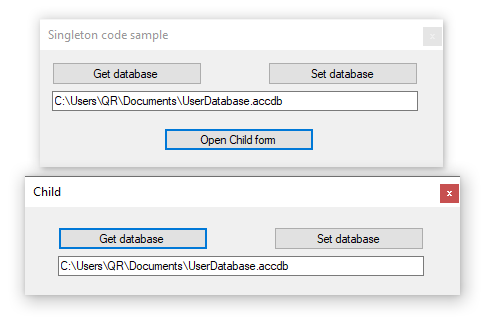
Add a reference for System.Configuration for working with settings in app.config.
https://github.com/karenpayneoregon/code-samples-csharp/tree/master/SingletonExample1
<?xml version="1.0" encoding="utf-8" ?>
<configuration>
    <startup>
        <supportedRuntime version="v4.0" sku=".NETFramework,Version=v4.8" />
    </startup>
  <appSettings>
    <add key="DatabasePath" value="C:\Users\QR\Documents\UserDatabase.accdb" />
  </appSettings>
</configuration>
using System.Configuration;
using System.IO;
using System.Reflection;

namespace SingletonExample1.Classes
{
    public class ApplicationSettings
    {
        public static string GetDatabasePath() => GetSettingAsString("DatabasePath");
        public static void SetDatabasePath(string value) => SetValue("DatabasePath", value);

        public static string GetSettingAsString(string configKey) => ConfigurationManager.AppSettings[configKey];
        public static void SetValue(string key, string value)
        {
            var applicationDirectoryName = Path.GetDirectoryName(Assembly.GetExecutingAssembly().Location);
            var configFile = Path.Combine(
                applicationDirectoryName, $"{Assembly.GetExecutingAssembly().GetName().Name}.exe.config");
            var configFileMap = new ExeConfigurationFileMap { ExeConfigFilename = configFile };
            var config = ConfigurationManager.OpenMappedExeConfiguration(configFileMap,
                ConfigurationUserLevel.None);

            config.AppSettings.Settings[key].Value = value;
            config.Save();

            Reload();

        }
        public static void Reload()
        {
            ConfigurationManager.RefreshSection("appSettings");
        }
    }
}
Note the event/delegate is optional which can be used to inform all listeners who subscribe to this event that the database setting has changed.
using System;

namespace SingletonExample1.Classes
{

    public sealed class RuntimeSettings
    {
        private static readonly Lazy<RuntimeSettings> Lazy =
            new Lazy<RuntimeSettings>(() => new RuntimeSettings());


        public static RuntimeSettings Instance => Lazy.Value;

        public string DatabasePath
        {
            get => ApplicationSettings.GetDatabasePath();
            set
            {
                ApplicationSettings.SetDatabasePath(value);
                OnDatabasePathChangedEvent?.Invoke();
            }
        }

        public delegate void OnDataPathChanged();
        public static event OnDataPathChanged OnDatabasePathChangedEvent;

    }
}
        RuntimeSettings.OnDatabasePathChangedEvent +=
            RuntimeSettingsOnOnDatabasePathChangedEvent;
    }

    private void RuntimeSettingsOnOnDatabasePathChangedEvent()
    {
        DatabasePathTextBox.Text = RuntimeSettings.Instance.DatabasePath;
    }

    private void GetDatabaseButton_Click(object sender, EventArgs e)
    {
        DatabasePathTextBox.Text = RuntimeSettings.Instance.DatabasePath;
    }

    private void SetDatabasePathButton_Click(object sender, EventArgs e)
    {
        RuntimeSettings.Instance.DatabasePath = DatabasePathTextBox.Text;
    }

    private void OpenChildForm_Click(object sender, EventArgs e)
    {
        var childForm = new ChildForm();
        try
        {
            childForm.ShowDialog();
        }
        finally
        {
            childForm.Dispose();
        }
    }
}
using System;
using System.Windows.Forms;
using SingletonExample1.Classes;

namespace SingletonExample1
{
    public partial class ChildForm : Form
    {
        public ChildForm()
        {
            InitializeComponent();
        }

        private void GetDatabaseButton_Click(object sender, EventArgs e)
        {
            DatabasePathTextBox.Text = RuntimeSettings.Instance.DatabasePath;
        }

        private void SetDatabasePathButton_Click(object sender, EventArgs e)
        {
            RuntimeSettings.Instance.DatabasePath = DatabasePathTextBox.Text;
        }
    }
}
Singleton is a creational design pattern, which ensures that only one object of its kind exists and provides a single point of access to it for any other code.

Consider using AppSettings to keep the filePath, so even when it's deployed, you can change the value without recompiling the code.

You could make a public Utlities.cs static class as an example and use a public string constant in the class or a public static method as an option that can be seen publicly by other classes in the project.
https://www.infoworld.com/article/3546242/how-to-use-const-readonly-and-static-in-csharp.html
' cx='32' cy='32' r='32' /%3E%3Ctext x='50%25' y='55%25' dominant-baseline='middle' text-anchor='middle' fill='%23FFF' %3EDZ%3C/text%3E%3C/svg%3E)
Hi VAer-4038,
As Jaliya Udagedara said, you can use appSettings and save this in the App.config.
App.config:
<?xml version="1.0" encoding="utf-8" ?>
<configuration>
  <appSettings>
    <add key="FilePath" value="C\User\QR\Documents\Instruction.pdf" />
  </appSettings>
</configuration>
Then you can read those settings like this:
using System.Configuration;
using System.Web.Configuration;

Configuration config = WebConfigurationManager.OpenWebConfiguration(null);

if (config.AppSettings.Settings.Count > 0)
{
    KeyValueConfigurationElement customSetting = config.AppSettings.Settings["FilePath"];

    if (customSetting != null)
    {
        string directory = customSetting.Value;
    }
}
More details you can refer to this docuemnt.
Best Regards,
Daniel Zhang
If the response is helpful, please click "Accept Answer" and upvote it.
Note: Please follow the steps in our documentation to enable e-mail notifications if you want to receive the related email notification for this thread.