Share via

Surface Pro 4, Screen Flickering, Shaking

Anonymous
2017-01-19T07:47:47+00:00

Hi All,

Update: Flickergate is now having a forum to bring all affected users at a single platform to plan for resolvement of issue. Please join at

 https://forum.flickergate.com

UPDATE: Check FlickerGate.com for videos of the problem and to submit your own. 
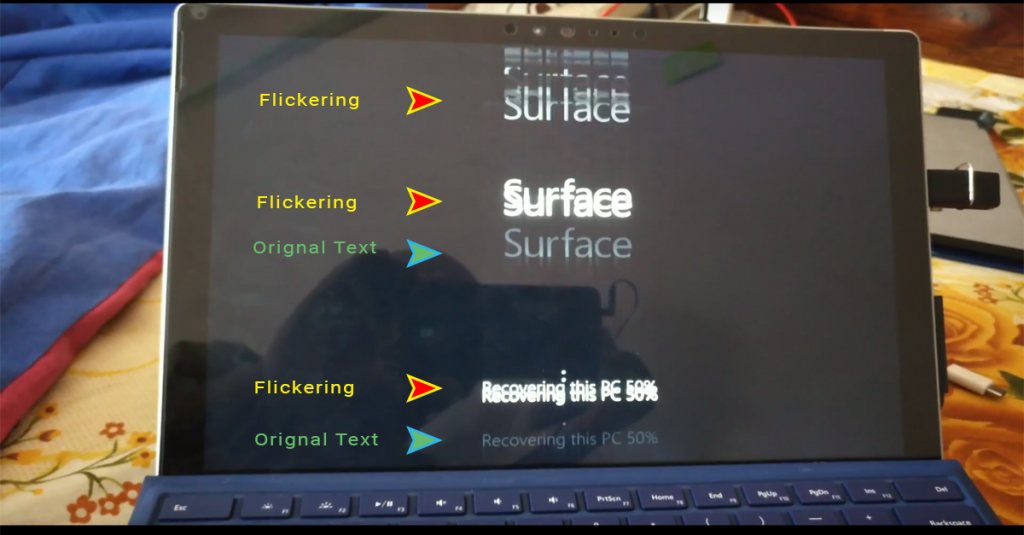
I purchased SP4 device a few months ago and it was working fine for a month. Then I noticed that when the CPU is at its max, the screen flickers a bit. Investigating further revealed that it flickers even if it is setting idle. It does not flicker if at least one of the following thing is done:

  1. A video being played in browser 
  2. If I keep the touch screen busy by either taping it or keeping a finger on it
  3. If I use the touchpad
  4. If keyboard is used for typing

This resulted in making the device completely unusable while reading articles or ebooks. I am a developer, most of the time I have to read the code and to do that, I have to constantly keep a finger on the touch pad or the screen. I contacted surface support in October and November and was told that the developers are working on the patch. Looking at the updates the developers are pushing since then, I don't think anyone is even aware of the problem there. 

My previous support ticket numbers are:

 ***deleted personally identifiable information***

***deleted personally identifiable information***

Just wondering if anyone else had the same problem (and the fix) and if not, what's the procedure for the refund? I will rather go for a mac then sacrificing $2000+ for a dancing screen.  

Kind Regards,

Abbas

***Personal information deleted by the moderator. Please see the Microsoft Community Frequently Asked Questions for more information on how you can protect your privacy.***

Surface | Surface Pro | Display and screen

Locked Question. This question was migrated from the Microsoft Support Community. You can vote on whether it's helpful, but you can't add comments or replies or follow the question.

0 comments No comments
Answer accepted by question author
  1. Anonymous
    2018-05-11T17:59:00+00:00

    Hey Everyone,

    Creating the best products and experiences for our customers is our top priority.

    We have heard your feedback and after careful examination, have determined that a small percentage of Surface Pro 4 devices are exhibiting a screen flicker that cannot be addressed with a firmware or driver update.

    To support customers affected by this issue, we will replace eligible Surface Pro 4 devices for up to three years from the date of purchase, free of charge. If you believe your device is experiencing this issue, please visit our Surface Pro 4 screen flicker article for more details.

    Bryan [MSFT]

    100+ people found this answer helpful.
    0 comments No comments

2,779 additional answers

Sort by: Most helpful
  1. Anonymous
    2017-04-02T07:25:33+00:00

    Hello,

    If you still experiencing this issue, we suggest that you run this on your device. This is a software repair tool, here's the link.

    Dear Rizza, 

    We post our problem here after trying all solutions you proposed, so I think you should serriously consider that is the hardware issue and find a really helpful solution for us, not repeating your CRM script!

    0 comments No comments
  2. Anonymous
    2017-04-01T03:36:24+00:00

    Hi Rizza,

    I ran the Microsoft repair tool and the problem still exists.

    0 comments No comments
  3. Anonymous
    2017-03-31T19:17:35+00:00

    Hello,

    If you still experiencing this issue, we suggest that you run this on your device. This is a software repair tool, here's the link.

    0 comments No comments
  4. Anonymous
    2017-03-31T02:30:09+00:00

    Hi!

    I have the same issue! I bought my surface pro 4 in December 2015 and I'm in Bolivia.

    Thank God the clock solution is working for me and I hope this issue is software related. How can I trust Microsoft again if this isn't the case?. how can anyone buy a surface again?.  It's a 1600 $ machine! They must find a solution.

    add seconds in taskbar not work with me

    0 comments No comments