Share via

Microsoft Surface Bluetooth/wireless keyboard

Anonymous
2022-07-14T13:33:53+00:00

Hi

I own a Microsoft Surface Bluetooth/Wireless keyboard for the past 18months. Paired with my HP laptop.

Today it has just stopped working for no reason. I've changed the batteries but it still appears to be dead (no LED light for Caps lock etc).

I've searched this community for solutions but found nothing that can help me (no option for USB connection etc.)

Any solutions?

Many thanks

Surface | Accessories | Surface mice and keyboards

Locked Question. This question was migrated from the Microsoft Support Community. You can vote on whether it's helpful, but you can't add comments or replies or follow the question.

0 comments No comments

3 answers

Sort by: Most helpful
  1. Anonymous
    2022-07-14T16:18:27+00:00

    Hi PadraigJN,

    Thank you for reaching Microsoft Community. I'm sorry to hear about what happened to your keyboard.

    Just to make sure: is this the keyboard that you have: Buy Surface Keyboard - Microsoft Store?

    If yes, please try these steps below in pairing the keyboard to your laptop and see if this works:

    1: Press and hold the Pairing button of the keyboard for 5 seconds.

    Pairing button is located at the left side of the stand (see image below)
    

    2: On your laptop, select the Start button, then select Settings > Devices > Bluetooth & other devices.

    3: Make sure Bluetooth is on, then select Add Bluetooth or other device > Bluetooth.

    See if the laptop now sees the keyboard. If yes, select the keyboard to pair and connect. 
    

    Hope this helps.

    Kind regards,

    Marrion

    1 person found this answer helpful.
    0 comments No comments
  2. Anonymous
    2022-07-15T21:34:39+00:00

    Hi PadraigJN,

    Thank you for the response and I'm sorry to hear that the issue still persist. I'm sorry but I suggest contacting live support for options available for the keyboard and for further assistance. You may contact them through the numbers listed in Global Customer Service phone numbers (microsoft.com) under For Business users. This works with Home users also, just select Surface then Home as a type of user in the IVR prompt. You may also reach them through this page: Contact Us - Microsoft Support following the steps below:

    1: Go to Contact Us - Microsoft Support and sign-in your personal Microsoft Account

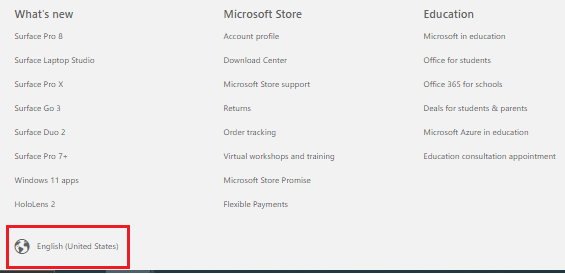
    2: To make sure you are using the correct locale of the page, click the Globe icon on the lower-left corner of the page then select the country you are in.
    Image

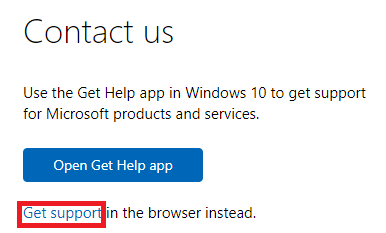
    3: Click Get support

    Image

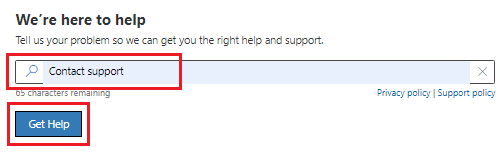
    4: On the Describe your issue box, type in Contact support then click on Get Help
    Image

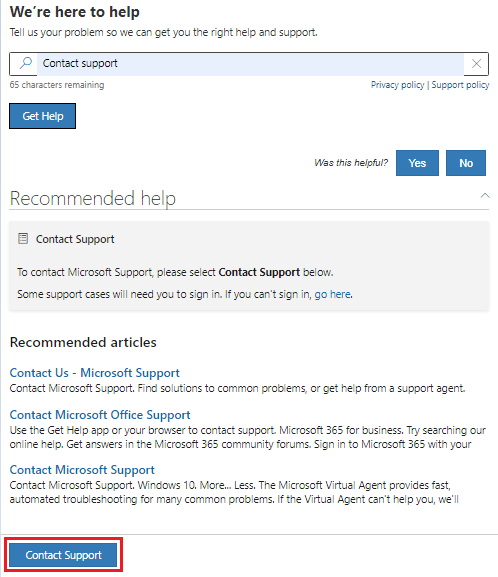
    5: Click on Contact Support at the bottom
    Image

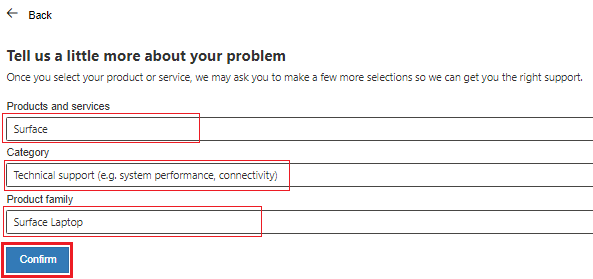
    4: On the next page, select Surface then Technical support then choose your Surface model and click on Confirm
    Image

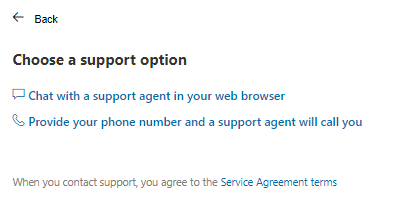
    5: These options should appear depending on which is available on you country. It would also show the available time of support if in case you accessed the page out of the time of operations.
    Image

           You may select **Provide your phone number and a support agent will call you** option and you will be ask to select and confirm your phone number then click **Confirm**. You will then receive a phone call from support in a while. 
    
          Selecting **Chat with support agent in your web browser** will ask you to confirm the email address associated with your Microsoft Account then click **Confirm**. 
    

    Kind regards,

    Marrion

    0 comments No comments
  3. Anonymous
    2022-07-15T10:55:14+00:00

    Hi Marrion

    Yes that is the correct keyboard.

    Unfortunately that hasn't worked. The keyboard is still dead.

    Any other suggestions?

    Kind Regards

    Padraig

    0 comments No comments