Share via

Surface Pro 4 battery drains 10% per day (24 hours) when switched off (hard off)

Anonymous
2021-01-26T09:13:24+00:00

I've had this problem with my Surface Pro 4 right from when I first purchased it.  The battery drains around 10% per 24 hour cycle even when the device is completely switched off (so not in standby or connected standby).

I've already done all the following:

  • I've done all the latest driver and firmware updates
  • Windows 10 latest release installed and all updated
  • I've disabled connected standby
  • I've run the diagnostic tool and found no errors
  • I've run and looked at the following powercfg reports (I have copies of these reports run 4 times over the period of a month) :
    • battery report
    • energy report
    • sleepstudy report

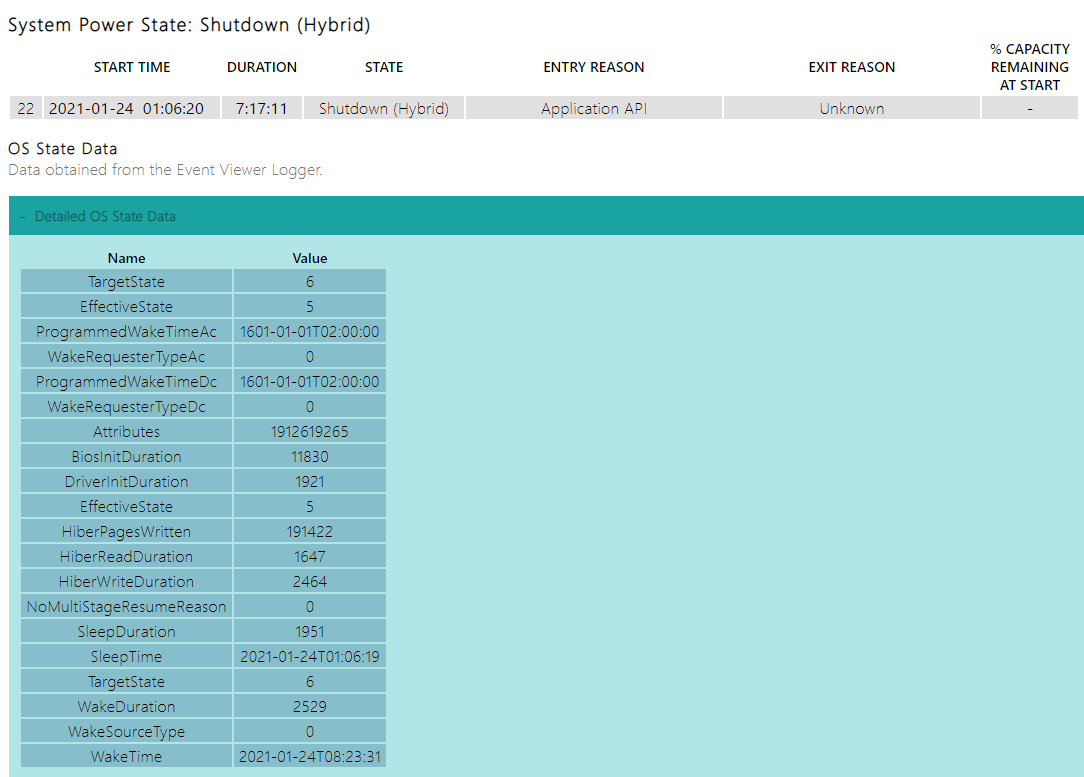
The line entry in the sleepstudy report where the drain happens reads "Shutdown (Hybrid), but it doesn't show the actual drain over the period.  One can calculate it though (97% min 10% line 21, so 87% when switched off, then line 23 drains 11% and ends with 71%, so it was 82% at start.  So Shutdown (Hybrid) drained 5% during 7h17m11s.

SleepStudy Report:
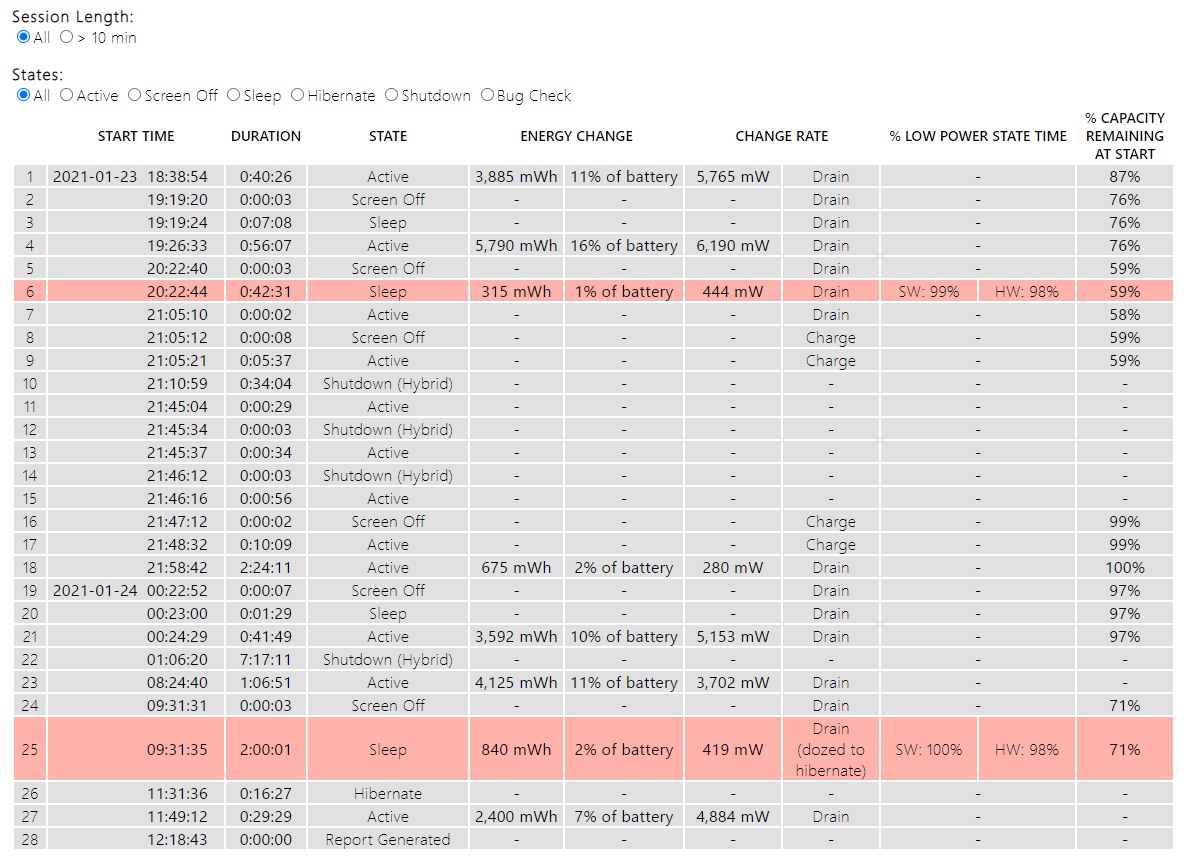
 

  • I did a clean Windows 10 install using Start>Settings>Update & Security>Recovery.  Chose option to wipe everything clean and do fresh install.  This didn't change anything.  The above screenshot was done after this fresh reinstall.  I installed no other programs onto the machine in order to test that no other program can potentially interfere.  It made no difference.
  • I've now gone so far as to delete the Windows 10 partition and installed a Linux distribution on the surface pro to see if there still was a power drain even with Windows 10 totally removed (i.e. to eliminate the possibility that it has anything to do with Windows 10).  And indeed the power drain when switched off is still exactly the same.

I am not Microsoft Certified and do not know definitively what is wrong with my device, but from everything I've tested I can only conclude that my device was shipped with a faulty battery right from the start. 

Is there any other possible explanation?   Can there for instance be something in the firmware that can trigger battery drain even when hard off (state S5)?  And that with all the latest firmware installed?

I am now finally at a loss at what could cause it.

Surface | Surface Pro | Power and battery

Locked Question. This question was migrated from the Microsoft Support Community. You can vote on whether it's helpful, but you can't add comments or replies or follow the question.

0 comments No comments

8 answers

Sort by: Most helpful
  1. Anonymous
    2021-01-29T08:04:24+00:00

    Hi Barb,

    I've now ran three new sets of reports.  One set after:

    • Hibernating for 7 hours with AC connected
    • Hibernating for 7 hours with the battery
    • Hibernating for 32 hours with the battery

    All the reports are saved in the OneDrive folder.

    When I looked at the reports generated after the 7 hours hibernation on battery power I got so excited!  It looked as if there were no drain caused by the hibernation.  I couldn't believe it! So I thought, let me run it for a longer period and confirm the result.  Sadly, when I ran it for 32 hours, the power drain was 20%.

    The Realtek audio driver still shows up as an error in the energy report, showing that it is preventing sleep.  I don't know if that is at all playing a roll in a forced hibernate shutdown's power drain.

    Was this answer helpful?

    3 people found this answer helpful.
    0 comments No comments
  2. Anonymous
    2021-01-26T17:58:21+00:00

    I hear you Barb, I'm also not very hopeful.  I've bought the SP4 in May 2016, and received it in June 2016.  When I first noticed the battery drain at the time a Googled and I recall some people were saying at the time it was likely due to early on firmware issues between the SP4 and Windows, and that it should be sorted with future updates.  I my case it never went away, and I just kept on reading article upon article every 6 months or so when it got the better of me again and I had the will again to do more hours of troubleshooting.  So this is my final attempt, calling in the pros :-)

    I'll wipe all the nvme's partitions again and do a clean Windows 10 Pro install  (I still have Fedora on it, which I installed two days ago to try and see if the problem is Windows 10 related.  But since it drains even on a complete shutdown on Fedora I know the problem is not Windows 10 based).

    I'll then do all the hybernations you've outlined above, with all the powercfg report after each one.  I'll then upload them again to OneDrive and will let you know once I'm done.  Should be in the next 2 days.

    Was this answer helpful?

    2 people found this answer helpful.
    0 comments No comments
  3. Barb Bowman 80,795 Reputation points MVP Volunteer Moderator
    2021-01-26T16:43:27+00:00

    Your issue sounded familiar and when I looked at your reports, it definitely rang a bell. https://www.surfaceforums.net/threads/surface-pro-4-top-issues.18435/page-2 seems pretty similar. In your case I saw video USB, and the realtek SST sound device seeming to interfere with connected standby. BUT, you also state your are seeing drain with the device switched completely off. You've stated you've turned off connected standby, so I'd like to start from a know good config and have you restore default power plans

    powercfg -restoredefaultschemes

    Then restart. I'd like you as a test to make sure hibernate is enabled. -

    powercfg.exe /hibernate on

    Then make sure you are plugged in and charged to 100%. With the SP4 plugged in, hibernate for 6-7 hours using the cmd -

    shutdown /h

    what is the drain (and generate reports). then test the drain when UNplugged for
    6-7 hours when hibernated using the shutdown /h cmd again. (I'm not very hopeful
    that there is a fix for this issue, sadly. There are certainly enough other
    reports of battery drain here and elsewhere. You DID say you've had this issue
    since you purchased your SP4, and I don't know when that was.

    Was this answer helpful?

    2 people found this answer helpful.
    0 comments No comments
  4. Anonymous
    2021-01-29T11:42:41+00:00

    Thank you for looking at it Barb!  I really appreciate it!

    Well, time to just accept this is the way it is.  Have a great day Barb!

    Was this answer helpful?

    1 person found this answer helpful.
    0 comments No comments
  5. Anonymous
    2021-01-26T13:38:21+00:00

    Hi Barb,

    Thank you for the reply.  Herewith a link to the folder with all the files.  I hope you can see something in them that can shed some light on the problem.

    https://1drv.ms/u/s!AvcBWALa1r\_2w0xA29SeFZMUEF90?e=0RFQkb

    Thank you very much for looking into this problem!

    Was this answer helpful?

    1 person found this answer helpful.
    0 comments No comments