Share via

Install driver printers on surface pro 11

Anonymous
2024-11-27T07:46:28+00:00

Dear support team,

We have a Surface Pro 11 and are unable to install our printers.

We've tried everything but couldn't achieve a successful installation.

Does it require specific drivers or any special tips?

Which printers are compatible with it, and is the 1102 model installable?

We would greatly appreciate your guidance.

Kind regards,

Makan

Surface | Surface Pro | Install and update

Locked Question. This question was migrated from the Microsoft Support Community. You can vote on whether it's helpful, but you can't add comments or replies or follow the question.

0 comments No comments

7 answers

Sort by: Most helpful
  1. Anonymous
    2025-01-09T07:08:45+00:00

    I've not been able to install ANY of our org printers on 2 Surface Pro 11s. HP, Ricoh, Sharp, Oce, Brother, NOTHING works. Watchguard VPN doesn't work. Without a solution, these tablets are useless.

    True. The Surface snapdragon elite X laptops cannot be used in business because there are no business printers with winidows 11 - snapdragon drivers.

    We are returning our Surface machines because they are therefore unusable by serious Windows laptop users.

    They should never have been released to the public under these failed circumstances.

    4 people found this answer helpful.
    0 comments No comments
  2. Anonymous
    2024-12-02T19:52:19+00:00

    I've not been able to install ANY of our org printers on 2 Surface Pro 11s. HP, Ricoh, Sharp, Oce, Brother, NOTHING works. Watchguard VPN doesn't work. Without a solution, these tablets are useless.

    3 people found this answer helpful.
    0 comments No comments
  3. Anonymous
    2024-12-02T22:35:22+00:00

    I don't know if you've tried this or not, but it's worth a shot.

    On the ARM-based Windows machines, you do not install manufacturer's drivers. You must let Windows auto-discover the printers and then the machine will install a generic Microsoft printer driver that should give you basic printer functionality. This is the only way to print from ARM-based Windows until the manufacturers release ARM-compatible printer drivers.

    Go to Setup > Bluetooth & devices > Printers & scanners and click on add device in the upper right corner. This will cause the computer to scan the network and local ports for printers. Then, you can Add any discovered printers and the generic Microsoft driver will be set up for you.

    Good luck!

    1 person found this answer helpful.
    0 comments No comments
  4. Anonymous
    2024-11-28T06:07:41+00:00

    Hello makan,

    Welcome to Microsoft Community.

    Yes, your perception is correct.

    The issue may relate to the fact that the Surface Pro 11 is powered by an ARM-based Snapdragon® X processor, so the printer you are using may not have a driver that matches it. However, this may not be compatible with the current Windows 11 system on the printer you are using.

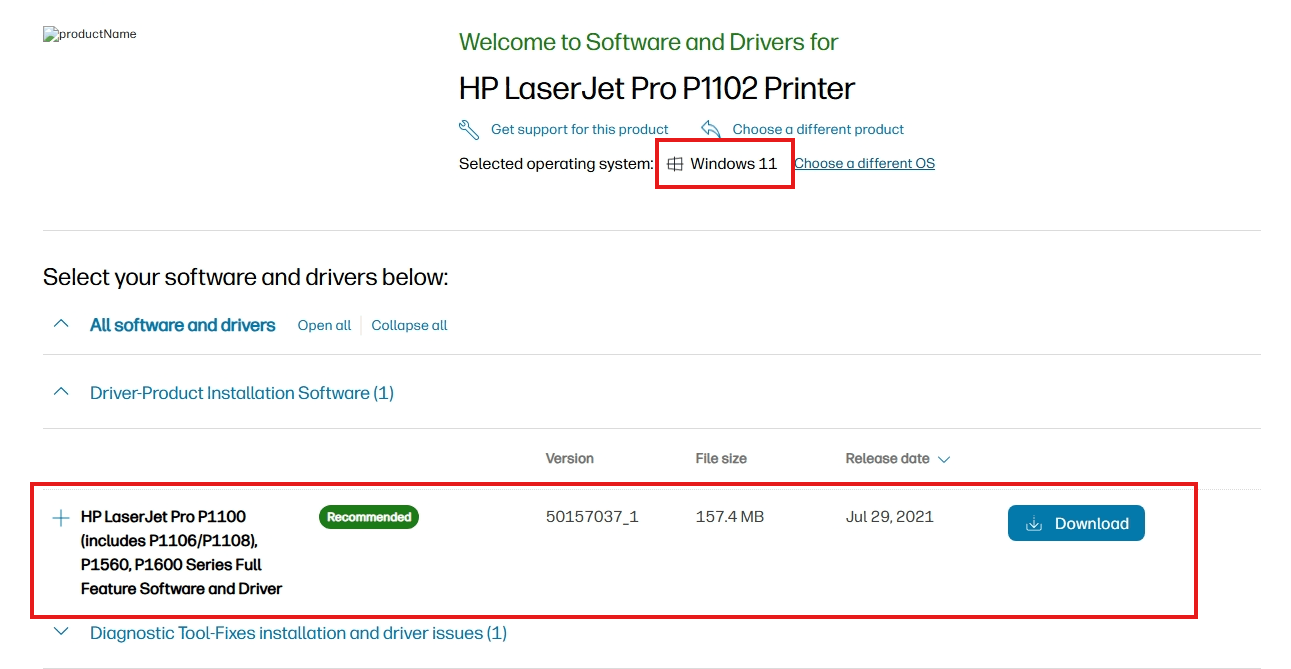
    I am not sure which brand of printer model you refer to by "1102", may I assume that you are using HP LaserJet Pro P1102? Then the following is the corresponding printer driver download address:

    **** HP LaserJet Pro P1102 Printer Software and Driver Downloads | HP® Support

    The default driver download was for Windows 10, and when I switched to Windows 11, I noticed that there was only one driver available, and the release date was July 29, 2021:
    Image

    Disclaimer: These are non-Microsoft websites. The pages appear to be providing accurate and safe information. Watch out for ads on the site that may advertise products frequently classified as PUP (Potentially Unwanted Products). Thoroughly research any product advertised on the site before you decide to download and install it.

    But when I opened all the supported system versions, I noticed that in previous generations of systems, there was a clear distinction between 32-bit and 64-bit. Considering that Windows 11 was only available in 64-bit when it was first released, I would speculate that this driver might only be available for Windows 11 64-bit.

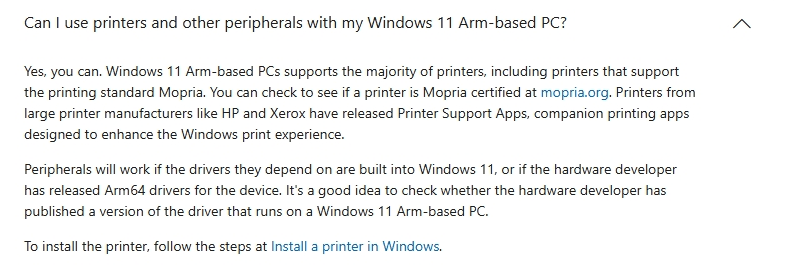
    If this is the driver you've been trying to install, I don't think it works with the ARM version of the system. For some information on the ARM system, I recommend that you carefully read some of the following links:

    Windows Arm-based PCs FAQ - Microsoft Support ****
    Image

    Microsoft would certainly welcome more printers to be compatible with the Surface, but only if printer manufacturers provide ARM-compatible drivers.

    Finally, if you are still looking for an ARM-compatible printer, then you can contact a sales person at HP or Xerox.

    Best Regards,

    Mitchell | Microsoft Community Support Specialist

    1 person found this answer helpful.
    0 comments No comments
  5. Anonymous
    2024-12-02T23:47:58+00:00

    Rodrigo, this is correct. The same is recommended at How to download and install the latest printer drivers - Microsoft Support for Windows on ARM PCs.

    Thanks,

    Greg

    0 comments No comments