Share via

Memory inside of the Surface? Can I upgrade it?

Anonymous
2024-06-11T22:55:26+00:00

Microsoft Surface tablets can be ordered with 64GB of memory but Intel Motherboards support 128GB. Can I replace the memory after I buy it?

https://www.microsoft.com/en-us/surface/business/surface-pro-10

Surface | Surface Pro | Performance and maintenance

Locked Question. This question was migrated from the Microsoft Support Community. You can vote on whether it's helpful, but you can't add comments or replies or follow the question.

0 comments No comments

3 answers

Sort by: Most helpful
  1. Anonymous
    2024-06-12T12:39:19+00:00

    I appreciate your reply. I will not be buying a Surface product. When the memory is upgradeable, I'll be happy to buy one.

    A few years back I started putting 128GB in my computing units and Windows has never blue screened since. 128GB is my magic number for computing.

    4 people found this answer helpful.
    0 comments No comments
  2. Anonymous
    2024-06-12T02:51:08+00:00

    Hi George,

    Welcome to Microsoft Community.

    I'm Hahn and I'm here to help you with your concern.

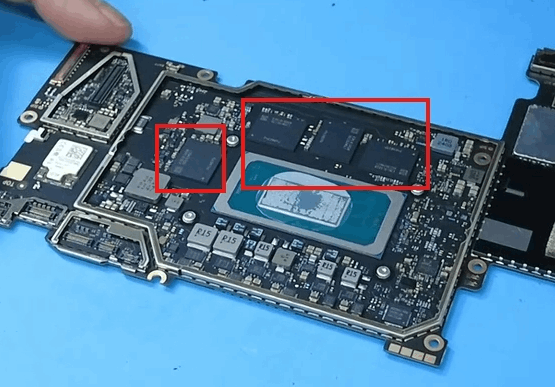
    Unfortunately, the memory inside the Surface Pro 10 for Business is not user-upgradable. The memory is soldered onto the motherboard, which means that it cannot be replaced or upgraded by the user. If you require more memory, you will need to purchase a Surface Pro 10 for Business with a higher memory capacity.

    I hope this helps. If there is anything not clear, please do not hesitate to let me know.

    Your Sincerely

    Hahn. W - MSFT | Microsoft Community Support Specialist

    2 people found this answer helpful.
    0 comments No comments
  3. Anonymous
    2024-06-13T04:35:25+00:00

    Hi George,

    I quite understand your need, but let me explain to you that this may not be possible in the short term.

    The current Surface Pro manufacturing process still does not support memory scalability, because the memory core is welded to the motherboard:
    But some other brands of laptops support memory expansion, you can add memory from the back.

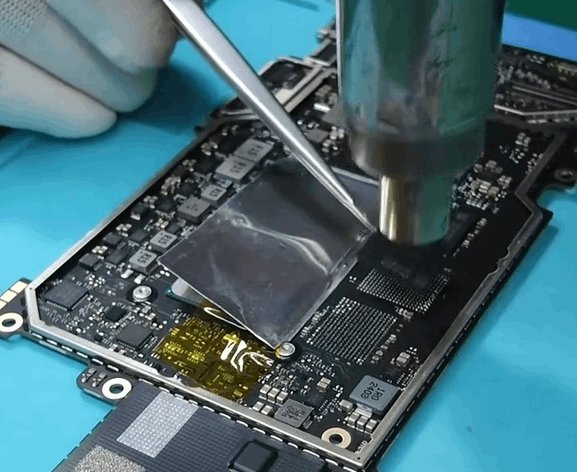
    You may find tutorial videos online that show users how to upgrade the Surface memory themselves (for example, replacing 32GB with 64GB), but they often involve taking apart the back, melting the solder to make the memory particles removable, and then manually installing new memory particles with specialized equipment, which is extremely risky. That's why Microsoft typically releases multiple versions of memory when it releases devices:
    Although the current Surface products can not meet your needs, you can pay attention to our official mall, once there are new products on the line, you can communicate with our sales representatives:

    **** Microsoft Surface - Microsoft Store

    I hope my reply has answered your confusion.

    Best Regards,

    Mitchell | Microsoft Community Support Specialist

    1 person found this answer helpful.
    0 comments No comments